Garmin G1000 Pilot’s Guide for the Piper PA-32 Saratoga
190-02692-00 Rev. A20
SYSTEM OVERVIEW
SYSTEM
OVERVIEW
FLIGHT
INSTRUMENTS
EIS
AUDIO PANEL
& CNS
FLIGHT
MANAGEMENT
HAZARD
AVOIDANCE
AFCS
ADDITIONAL
FEATURES
APPENDICESINDEX
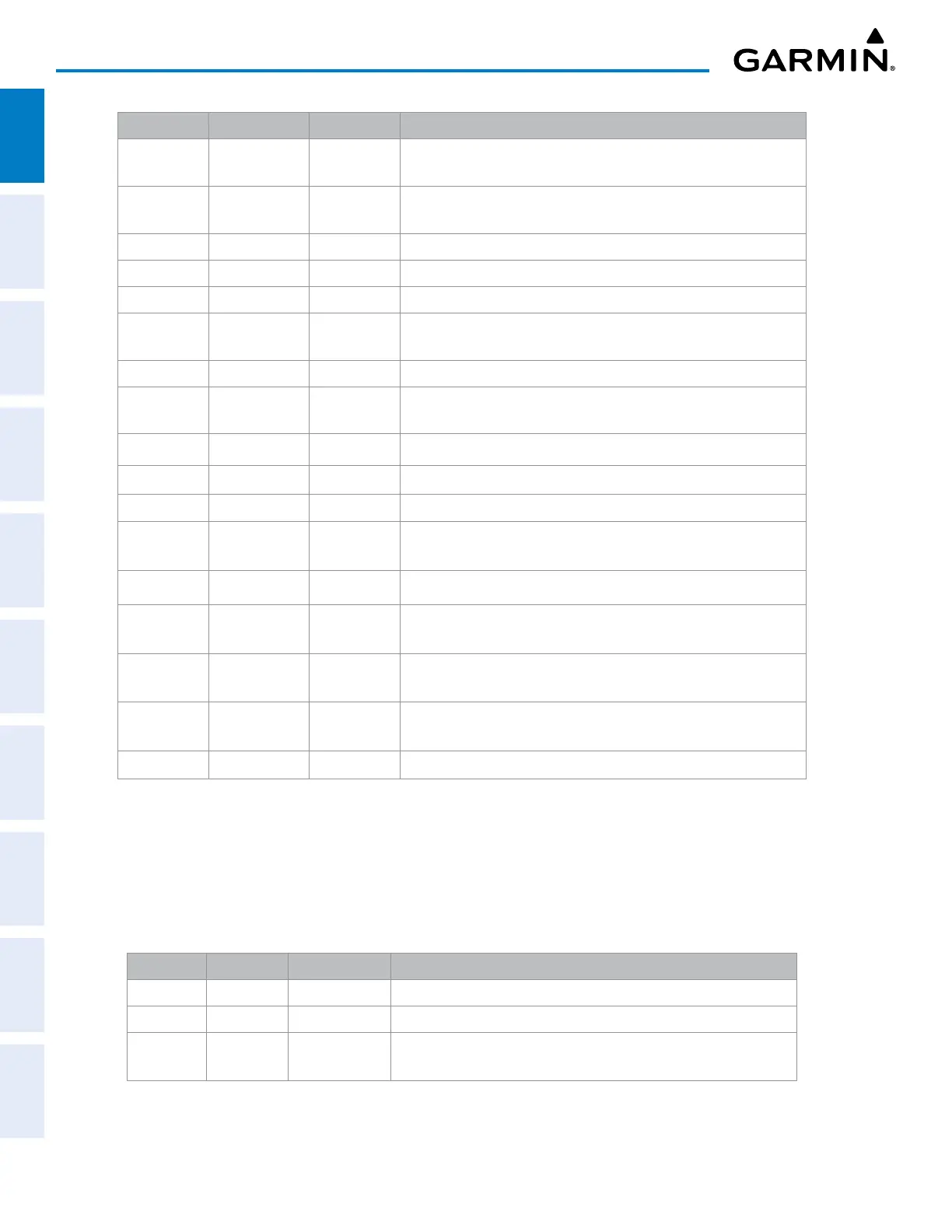
Level 1 Level 2 Level 3 Description
STD BARO
Sets barometric pressure to 29.92 in Hg (1013 hPa if HPA Softkey
is selected)
OBS
Selects OBS Mode on the CDI when navigating by GPS (only
available with active leg)
CDI
Cycles through GPS, VOR1, and VOR2 navigation modes on the CDI
DME
Displays the DME Tuning Window, allowing selection of the DME
XPDR
Displays transponder mode selection softkeys
STBY
Selects standby mode (transponder does not reply to any
interrogations)
ON
Selects Mode A (transponder replies to interrogations)
ALT
Selects Mode C altitude reporting mode (transponder replies to
identification and altitude interrogations)
VFR
Automatically enters the VFR code (1200 in the USA only)
CODE
Displays transponder code selection softkeys 0-7
0 — 7
Use numbers to enter code
IDENT
Activates the Special Position Identification (SPI) pulse for 18
seconds, identifying the transponder return on the ATC screen
BKSP
Removes numbers entered, one at a time
IDENT
Activates the Special Position Identification (SPI) pulse for 18
seconds, identifying the transponder return on the ATC screen
IDENT
Activates the Special Position Identification (SPI) pulse for 18
seconds, identifying the transponder return on the ATC screen
TMR/REF
Displays REFERENCES Window
NRST
Displays NEAREST AIRPORTS Window
Table 1-2 PFD Softkeys
PFD SOFTKEYS IN REVERSIONARY MODE
In the event of a display failure, the system automatically switches to Reversionary Mode. The following
table indicates PFD softkey data that displays differently in Reversionary Mode. All other critical flight data
displays are in the same format as normal operating mode and are discussed in other parts of this section.
Level 1 Level 2 Level 3 Description
ENGINE Displays the LEAN and SYSTEM Softkeys
LEAN Displays the CYL SLCT Softkey to facilitate engine leaning
CYL SLCT
Cycles through selection of each cylinder indicated by changing the
cylinder display to cyan


 To Next Page