190-02692-00 Rev. A
Garmin G100 Pilot’s Guide for the Piper PA-32 Saratoga 57
FLIGHT INSTRUMENTS
SYSTEM
OVERVIEW
FLIGHT
INSTRUMENTS
EIS
AUDIO PANEL
& CNS
FLIGHT
MANAGEMENT
HAZARD
AVOIDANCE
AFCS
ADDITIONAL
FEATURES
APPENDICES INDEX
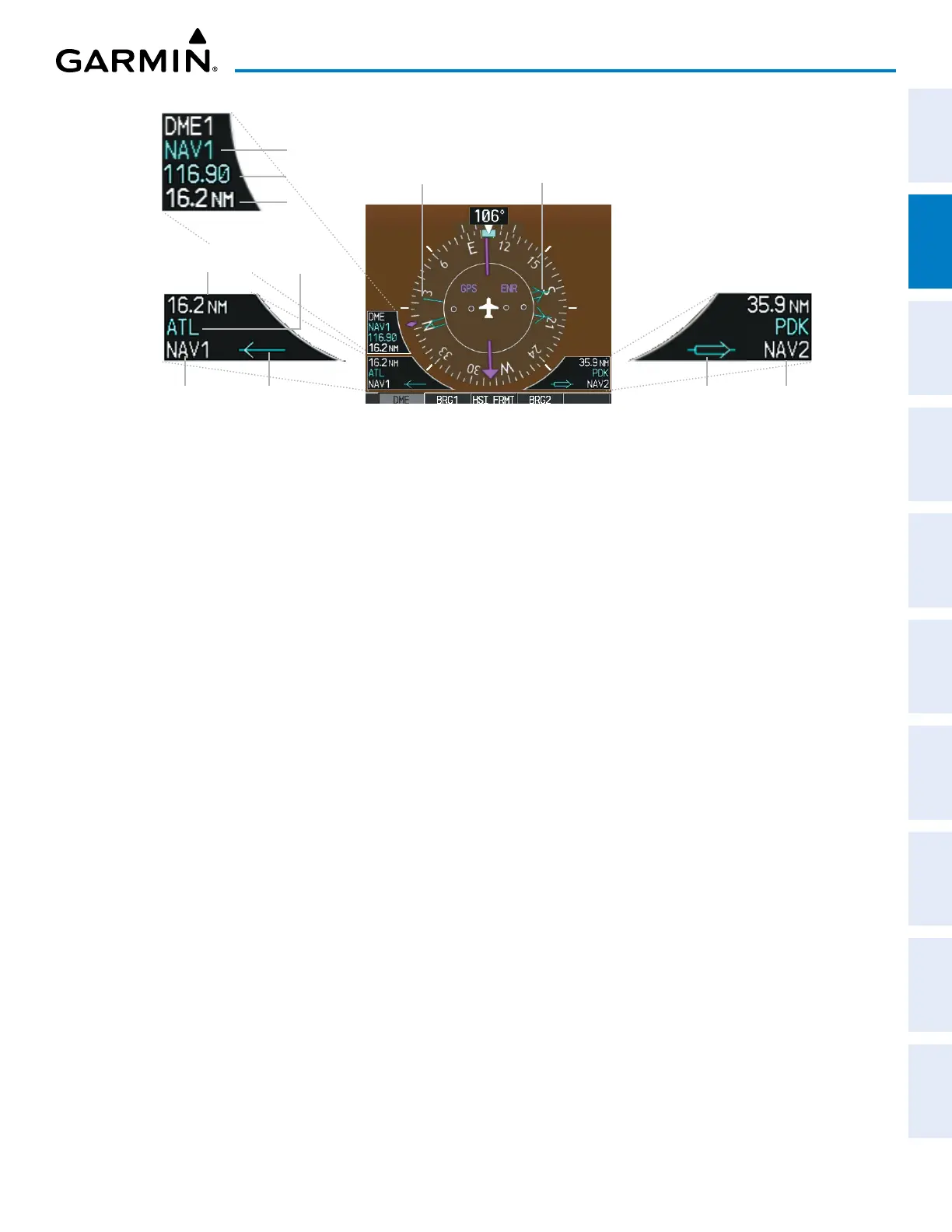
Figure 2-17 HSI with Bearing and Distance Information
Bearing 1
Pointer
Bearing 2
Pointer
Bearing 2 Information Window
Pointer 2 Bearing Source
Bearing 1 Information Window
Bearing Source
Pointer 1
Distance to
Bearing Source
Station
Identifier
Frequency
Tuning Mode
Distance
When a bearing pointer is displayed, the associated information window is also displayed. The bearing
information windows are displayed at the lower sides of the HSI and give the following information:
» Bearing Source (NAV, GPS, ADF)
» Pointer Icon (BRG1 = Single Line, BRG2 =
Double Line)
» Frequency (NAV, ADF)
» Station/Waypoint Identifier (NAV, GPS)
» GPS-derived Great Circle Distance to Bearing
Source
When the NAV radio is tuned to an ILS frequency, the bearing source and bearing pointer are removed
from the HSI. When NAV1 or NAV2 is the selected bearing source, the frequency is replaced by the station
identifier when the station is within range. If GPS is the bearing source, the active waypoint identifier is
displayed instead of a frequency.
The bearing pointer is removed from the HSI and ‘NO DATA’ is displayed in the information window if the
NAV radio is not receiving a VOR station or if GPS is the bearing source and an active waypoint is not selected.
Selecting bearing display and changing sources:
1) Press the PFD Softkey.
2) Press either the BRG1 Softkey or BRG2 Softkey to display the desired bearing pointer and information window
with a NAV source.
3) Press the BRG1 Softkey or BRG2 Softkey again to change the bearing source to GPS.
4) Press the BRG1 Softkey or BRG2 Softkey again to change the bearing source to ADF.
5) To remove the bearing pointer and information window, press the BRG Softkey again.


 To Next Page