190-02692-00 Rev. A
Garmin G100 Pilot’s Guide for the Piper PA-32 Saratoga
60
FLIGHT INSTRUMENTS
SYSTEM
OVERVIEW
FLIGHT
INSTRUMENTS
EIS
AUDIO PANEL
& CNS
FLIGHT
MANAGEMENT
HAZARD
AVOIDANCE
AFCS
ADDITIONAL
FEATURES
APPENDICESINDEX
GPS steering guidance is still provided after the CDI automatically switches to LOC until LOC capture, up
to the Final Approach Fix (FAF) for an ILS approach, or until GPS information becomes invalid. Activating a
Vector-to-Final (VTF) also causes the CDI to switch to LOC navigation source. GPS steering guidance is not
provided after the switch.
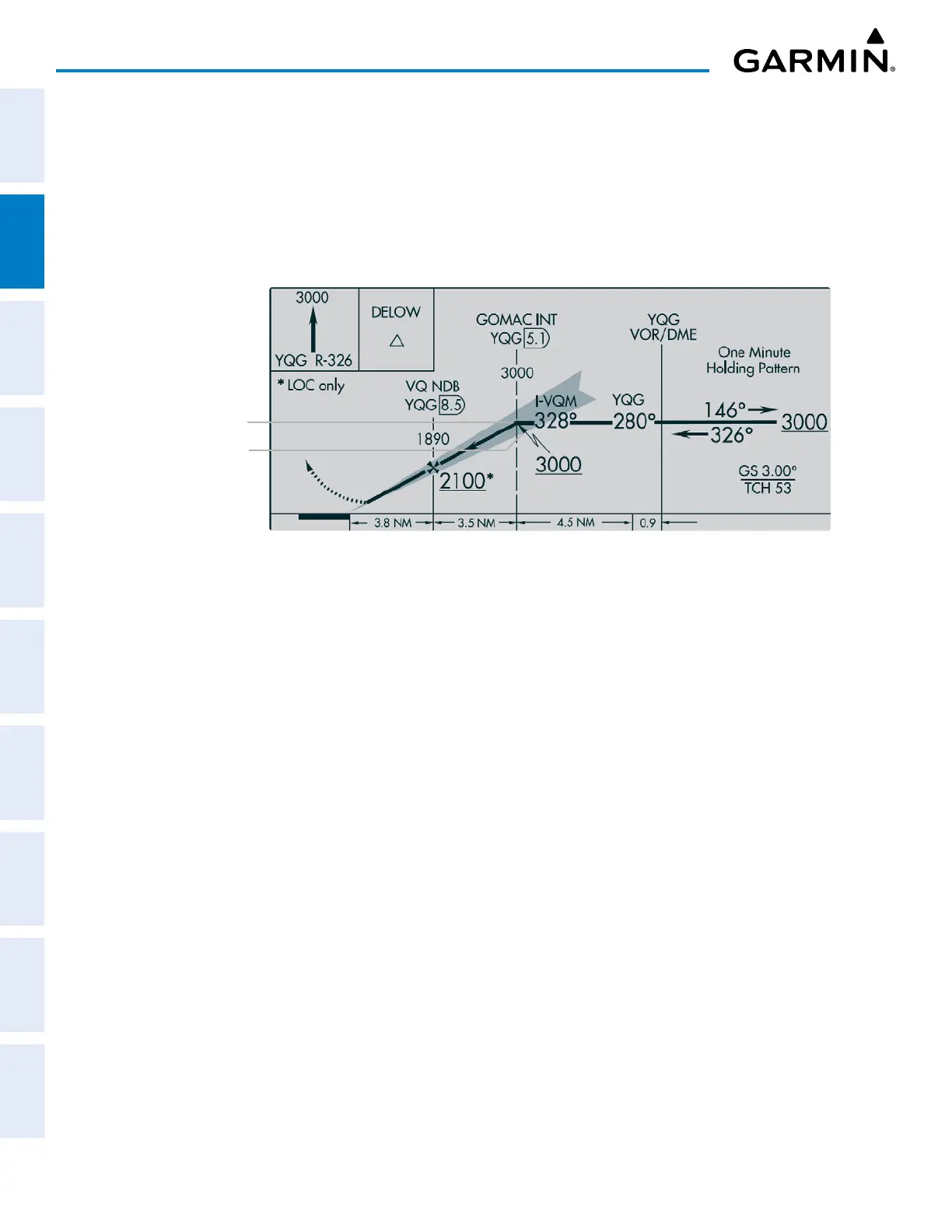
On some ILS approaches where the glideslope intercept point is at or in close proximity to the fix prior to the
FAF (see the following figure), it is possible to be above the glideslope when the navigation source automatically
switches from GPS to LOC. The probability of this occurring varies based on air temperature.
Figure 2-21 ILS Approach with Glideslope Intercept Point at Fix Prior to the FAF
Fix Prior to the FAF
Glideslope Intercept Point
GPS CDI SCALING
When GPS is the selected navigation source, the flight plan legs are sequenced automatically and
annunciations appear on the HSI for the flight phase. Flight phase annunciations are normally shown in
magenta, but when cautionary conditions exist the color changes to amber. If the current leg in the flight plan
is a heading leg, ‘HDG LEG’ is annunciated in magenta beneath the aircraft symbol.
The current GPS CDI scale setting is displayed as System CDI on the AUX – SYSTEM SETUP Page and the
full-scale deflection setting may also be changed (2.00NM, 1.00NM, 0.30NM or AUTO) from this page. If
the selected scaling is smaller than the automatic setting for enroute and terminal phases, the CDI is scaled
accordingly and the selected setting is displayed rather than the flight phase annunciation.
Changing the selected GPS CDI setting:
1) Use the FMS Knob to select the AUX – SYSTEM SETUP Page on the MFD.
2) Push the FMS Knob to activate the cursor.
3) Turn the
large FMS
Knob to highlight SELECTED in the GPS CDI Box.
4) Turn the small FMS Knob to highlight the desired setting and press the ENT Key.
5) To cancel the selection, push the FMS Knob or the CLR Key.


 To Next Page