MAP PILOT owner’s manual 7
Satellite Signals
After the navigation system is turned on, it begins acquiring
satellite signals� The system may need a clear view of the sky to
acquire satellite signals� For more information about GPS, go to
www�garmin�com/aboutGPS�
Viewing GPS Satellite Signals
The Satellite Information menu displays current satellite
information�
Select Settings > System > Satellite Information�
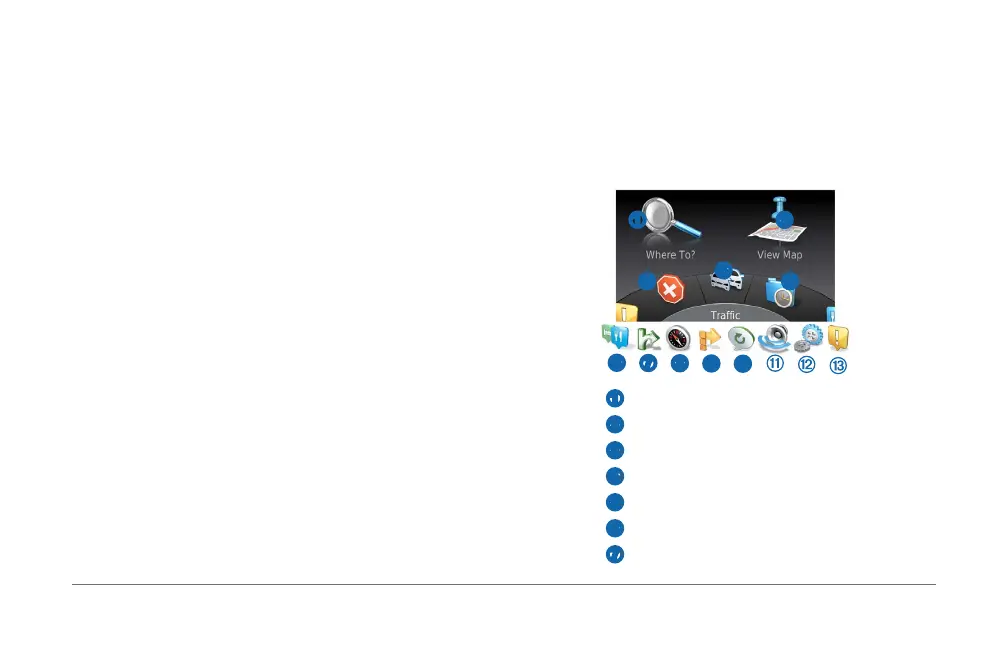
Using the Main Menu
NOTE: When needed, you can access the main menu tools from
the map by selecting the map�
Rotate the main menu tools wheel for access to all of the
options�
➊ ➋
➌
➍
➎
➏
➐
➑
➒
➓
• Select ➊ to nd a destination�
• Select
➋ to view the map�
• Select
➌ to stop a route�
• Select
➍ to view trafc conditions�
• Select
➎ to view recenly found destinations�
• Select
➏ to browse points of interest�
• Select
➐ to view services at upcoming exits�













 To Next Page