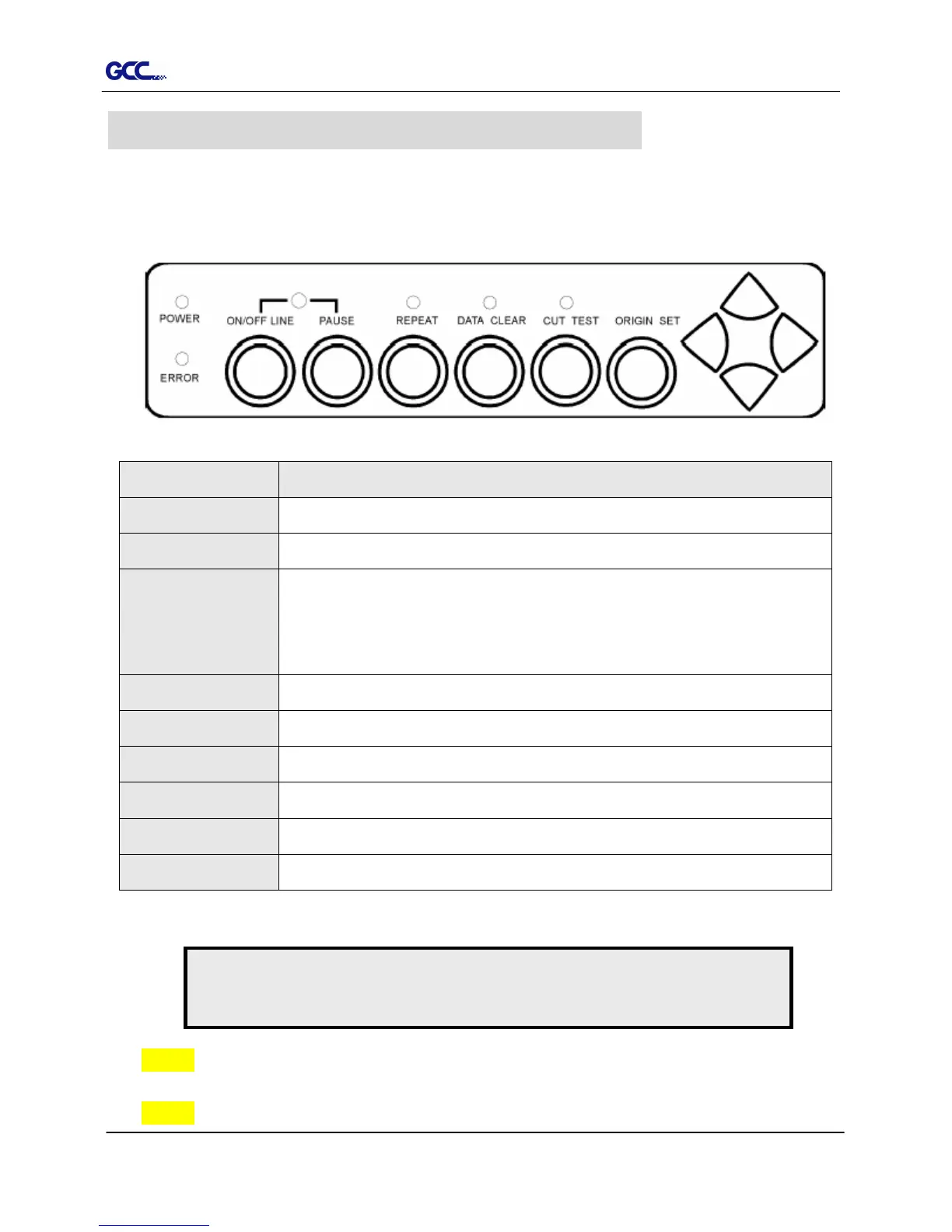
3.1 The Control Panel
3.1.1 The Outline of control panel
Key Function
POWER LED To indicate the power status ( light up: power on; light off: power off )
ERROR LED To indicate the error status ( light up: error; light off: normal )
ON/OFF LINE
To switch modes or stop cutting job( light up: on-line; light off: off-line )
While in off-line mode: the settings in VLCD can be adjusted.
PAUSE To temporarily halt cutting process or to continue
REPEAT To repeat last job.
DATA CLEAR To clear up buffer memory.
CUT TEST To perform cutting tests on different media.
ORIGIN SET To reset origin at a new position.
4 Arrow Keys To move carriage position, select function, or change setting.
3.1.2 Reset Origin
Step 1 Move the carriage to a new position.
Step 2 Press the ORIGIN SET button to reset origin.
3. Operation
Figure 3-1
Note:
Make sure the machine is in off-line mode to enable this function.














 To Next Page