14
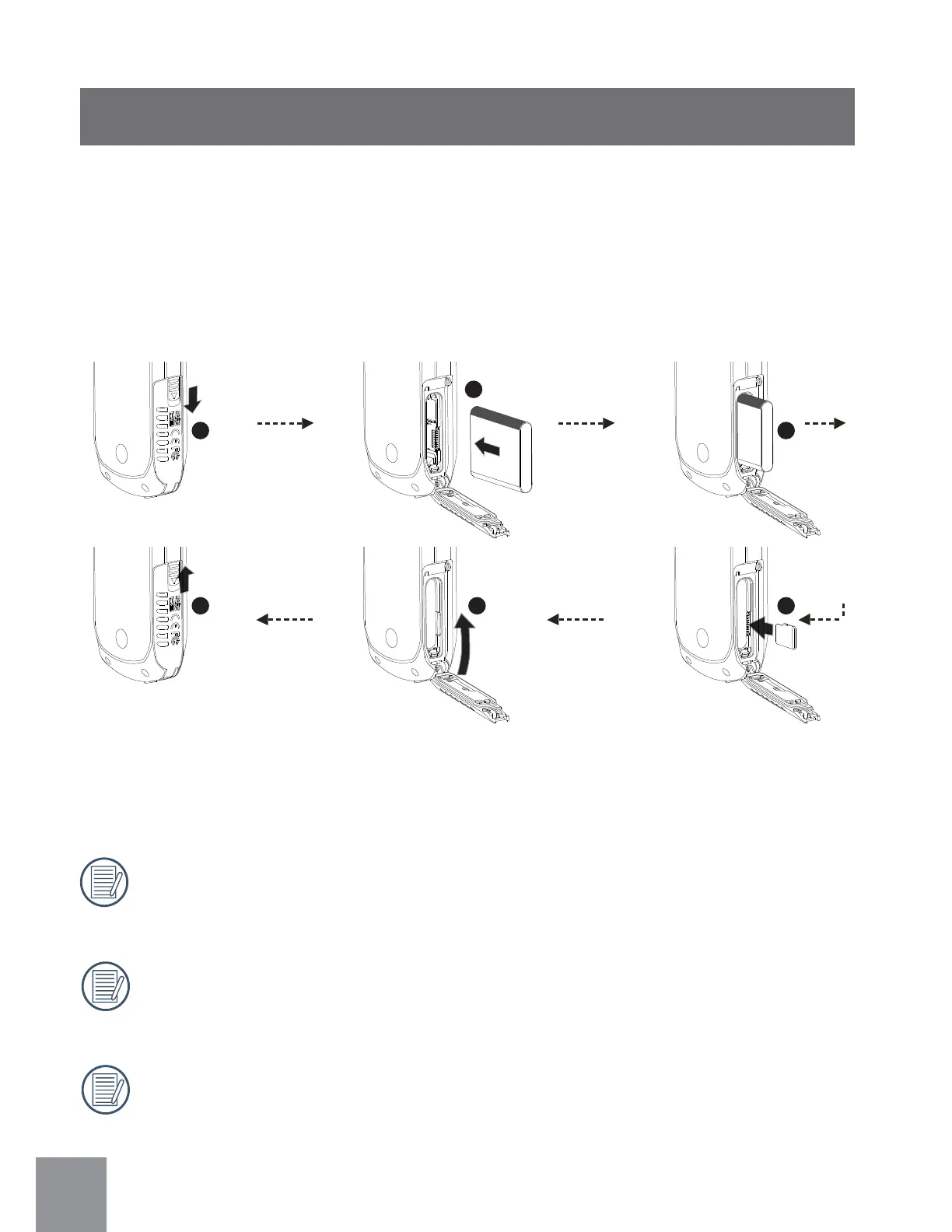
1. Open SD Card Cover according to
ᢳ
;
2. Install battery according to
ᢴ
and
ᢵ
.
3. Install Micro SD card according to
ᢶ
.
4. Close SD Card Cover according to
ᢷĭ
ᢸ
.
Installing Battery and Memory Card
Optional Micro SD/Micro SDHC cards are not included in the accessories
and must be purchased separately.
When selecting Full HD size (1920X1080, 1440X1080) to record video, please
use a High Speed Card (above Class 6).
When taking video, if “Memory card accessing is slow” on the LCD screen,
please select High Speed Card or format this card, then take video.
After opening the buckle on the Micro SD Card Cover according to the arrow
direction shown in the figure
ᢳ
, Micro SD Card Cover will pop open. To remove
Micro SD card, gently press it down to pop it out.
1
2
3
456



 To Next Page