Chapter 1. Installation
10 moisture.IQ User’s Manual
1.8.2 Adapting an Existing TF-Series Probe Cable
If an existing moisture measurement system uses a TF-Series moisture probe, the cable for that probe may be
adapted for use with an MISP2 probe. To retrofit the existing system, refer to Figure 5 below and complete
the following steps:
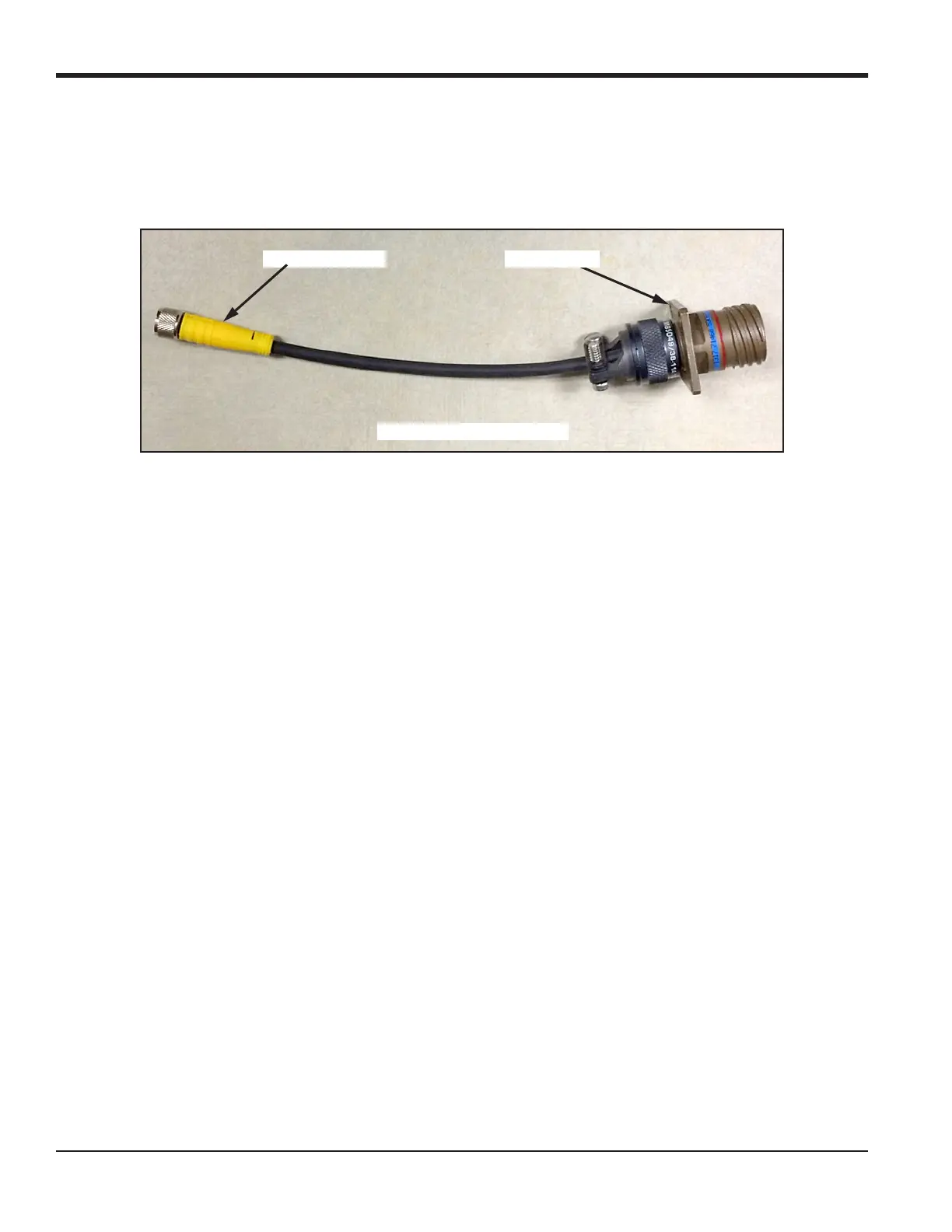
Figure 5: TF-MISP2 Converter Cable
1. Locate the existing TF-Series probe and disconnect the cable from the probe.
2. Replace the TF-Series probe with an MISP2 probe.
3. Using BHGE adapter cable 704-1362-00, shown in Figure 5 above, connect one end of the cable to the
MISP2 probe and connect the other end to the existing TF-Series cable connector.
4. At the moisture analyzer end of the TF-Series cable, locate the same TF-Series cable and disconnect all
flying leads from the pluggable connector.
5. Locate the BLACK and WHITE wires of the TF-Series cable and connect them to the moisture.IQ at the
MISP2 probe gray pluggable connector. See “Moisture Image Series Probes (MISP and MISP2)” on
page 19 for help.
6. Trim all other flying leads from the TF-Series cable flush with the jacket.
7. Plug the newly-wired MISP2 probe pluggable connector into the moisture.IQ.
MISP2 Connector
[Total Cable Length = 6.50”]
TF Connector


 To Next Page