moisture.IQ User’s Manual 41
Chapter 3. Using the Settings Menu
3.3 System Settings
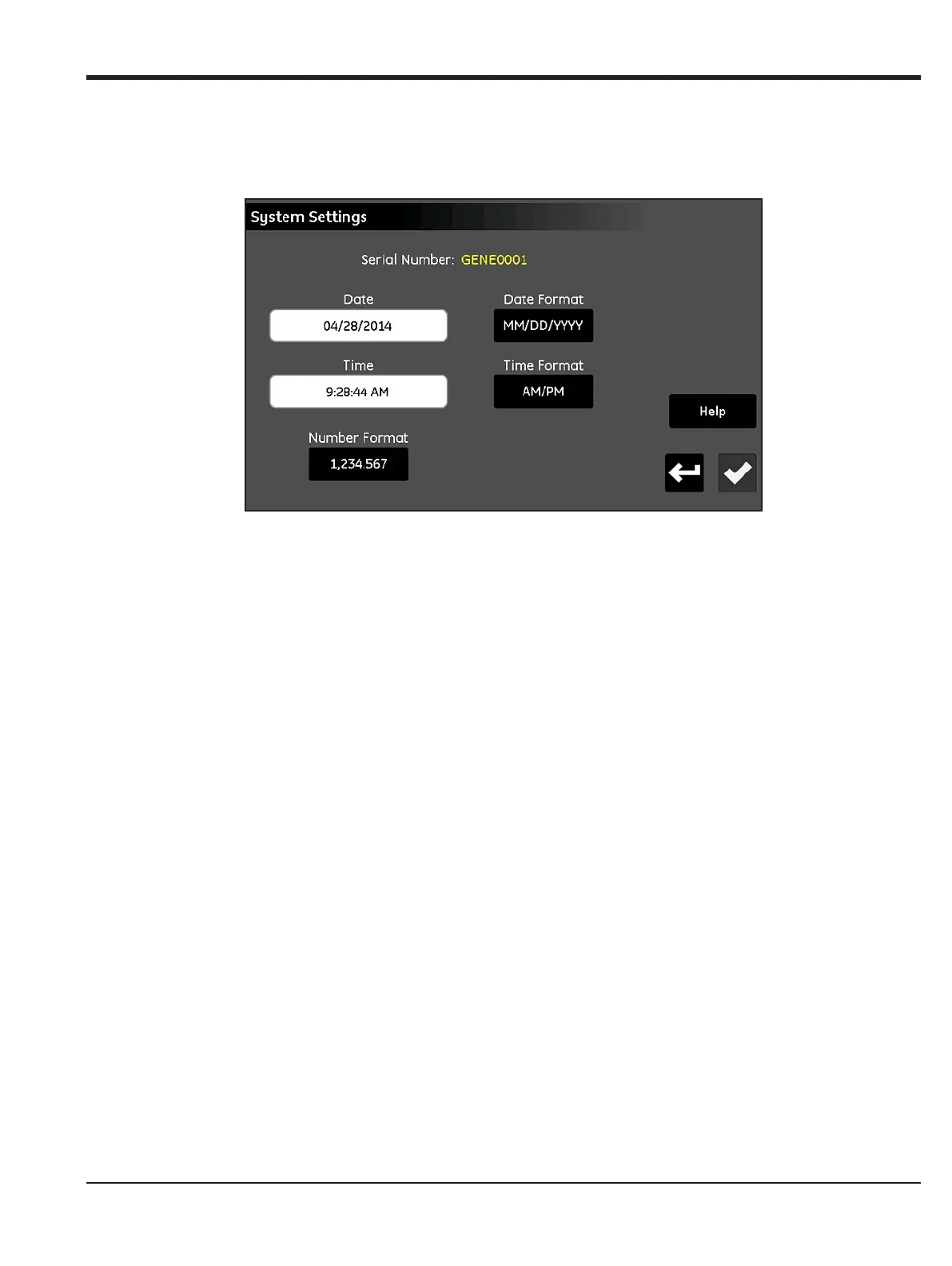
The System Settings menu (see Figure 35 below) allows you to configure the global moisture.IQ settings.
Figure 35: The System Settings Screen
• The system Serial Number is displayed as a read-only value at the top of the screen.
• Tap the Date button and select the current date from the pop-up calendar. Tap the Date Format button
and select the desired format (
MM/DD/YYYY, DD/MM/YYYY or YYYY-MM-DD) from the drop-down list.
• Tap the Time button and set the current time with the pop-up Hours and Minutes counters. Tap the
Time Format button to toggle between the available formats (24 Hr or AM/PM).
• Tap the Number Format button and select either 1,234.567 or 1.234,567 from the drop-down list to
specify the format for displaying numbers.
• After completing your settings, either tap the Check button to save your changes, or tap the Cancel
button to discard the changes and keep the original settings. Then, tap the
Return button to return to
the Settings Menu.
Note: If the Number Format is set to 1.234,567, it is best to avoid using a Comma for the field separator in data
logs.


 To Next Page