moisture.IQ User’s Manual 27
Chapter 1. Installation
1.10Establishing a Gas Flow Through the Oxygen Cell (cont.)
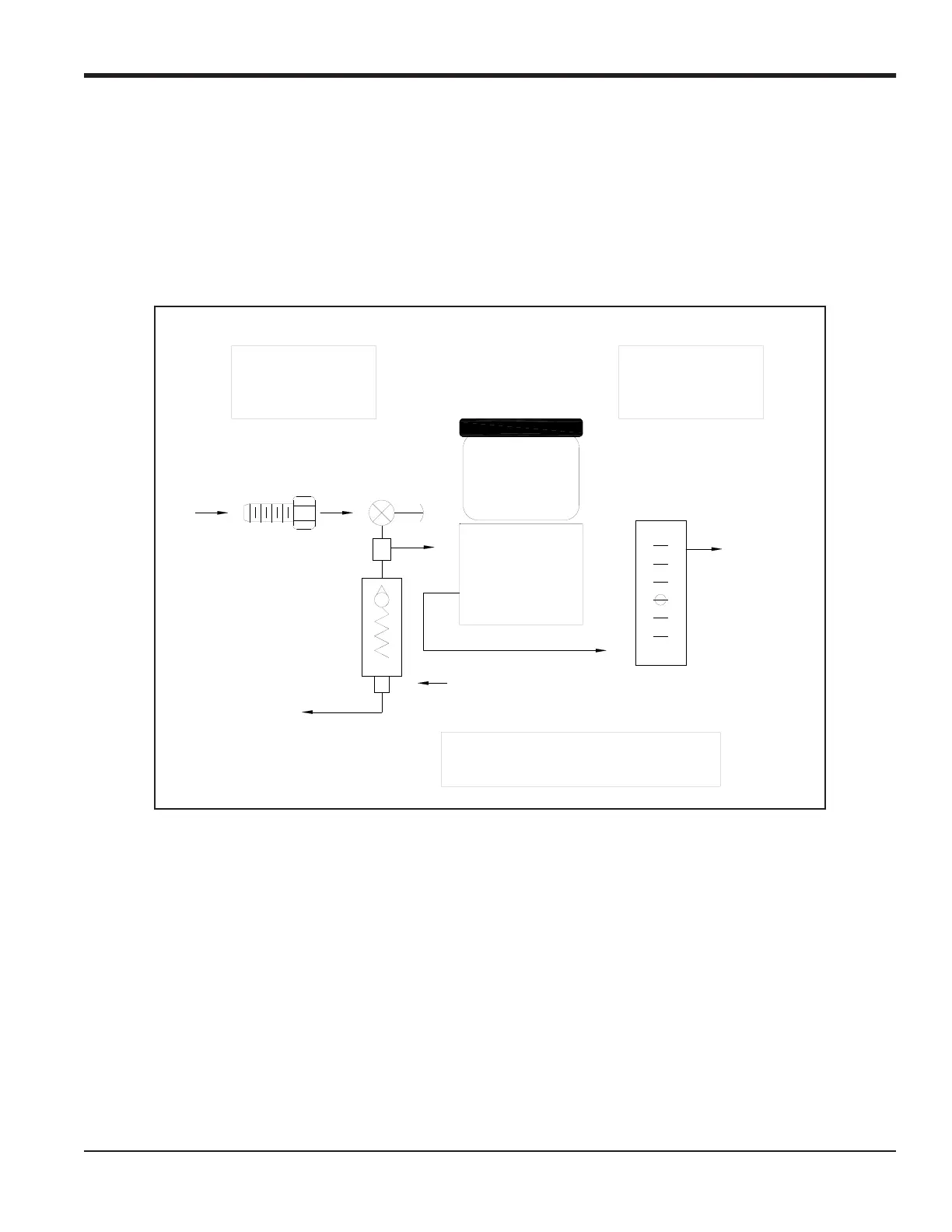
3. Slowly open the flow control valve until the recommended flow of 2 to 2.5 SCFH is established on the
flow meter.
4. When the proper flow is achieved, make sure the relief valve is closed by placing an object (e.g., your
finger, if the gas is non-corrosive) over the relief valve vent. Cover and uncover the relief valve vent and
verify that the flow meter shows no change in the flow rate. Keep the relief valve closed during
operation to minimize leakage in the sample system.
Figure 22: Gas Flow Schematic
Optimum Inlet
Pressure Limits
0.2 – 1.0 psig
Optimum Sample
Flow Range
2.0 – 2.5 SCFH
should vent to atmosphere.
Sample Gas Outlet and Relief Valve
Vent
Oxygen Cell
Electrolyte
Reservoir
Sample
Gas In
In
Out
Tee
Relief
Valve
Assembly
Flow Control
Valve
Flowmeter
Sample
Gas Out


 To Next Page
 Loading...