2 Installation
12
Monitor UV-900 User Manual 18-1120-05 Edition AF
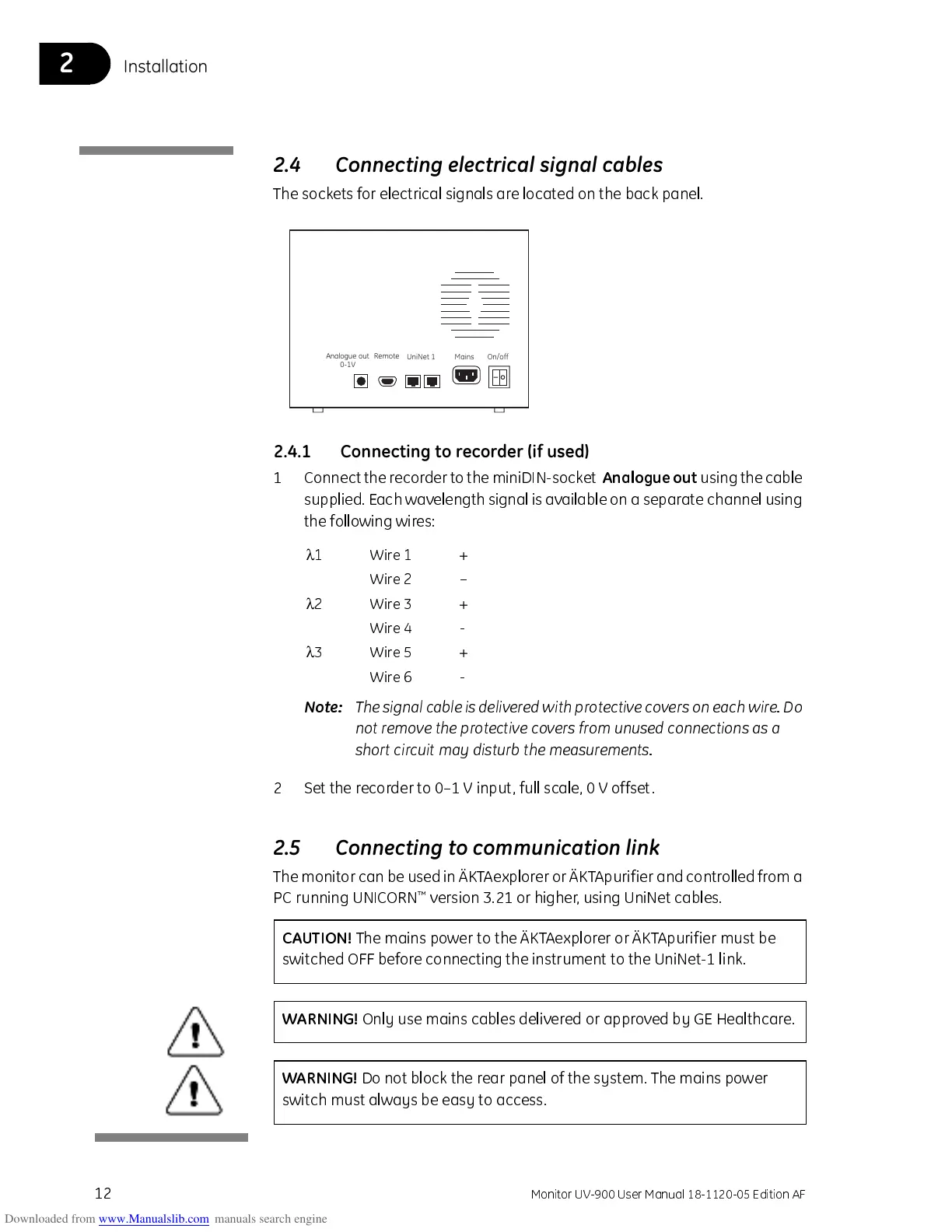
2.4 Connecting electrical signal cables
The sockets for electrical signals are located on the back panel.
2.4.1 Connecting to recorder (if used)
1 Connect the re cor der to the miniD IN-socket
Analogue out
using the cable
supplied. Each wavelength signal is av ailable on a separate channel using
the following wires:
Note:
The signal cable is delivered with protective covers on each wir e. Do
not remove the protective covers from unused connections as a
short circuit may disturb the measurements.
2 Set the recorder to 0–1 V input, full scale, 0 V offset.
2.5 Connecting to communication link
The monitor can be used in ÄKTAexplorer or ÄK T Apuri fier and controlle d from a
PC running UNICORN
™
version 3.21 or higher, using UniNet cables.
Analogue out
0-1V
Remote
UniNet 1 Mains On/off
λ
1 Wire 1 +
Wire 2 –
λ
2 Wire 3 +
Wire 4 -
λ
3 Wire 5 +
Wire 6 -
CAUTI ON!
The mains power to the ÄKTAexplorer or ÄKTApurifier must be
switched OFF before connecting the instrument to the UniNet-1 link.
WARNING!
Only use mains cables delivered or approved by GE Healthcare.
WARNING!
Do not block the rear panel of the system. The mains power
switch must always be easy to access.



 To Next Page