9
The sleep mode will activate after 2 minutes of inactivity� It can however also be accessed by pressing the flx�go for
2 seconds when in any other menu, or by pressing the “back” icon on the main screen�
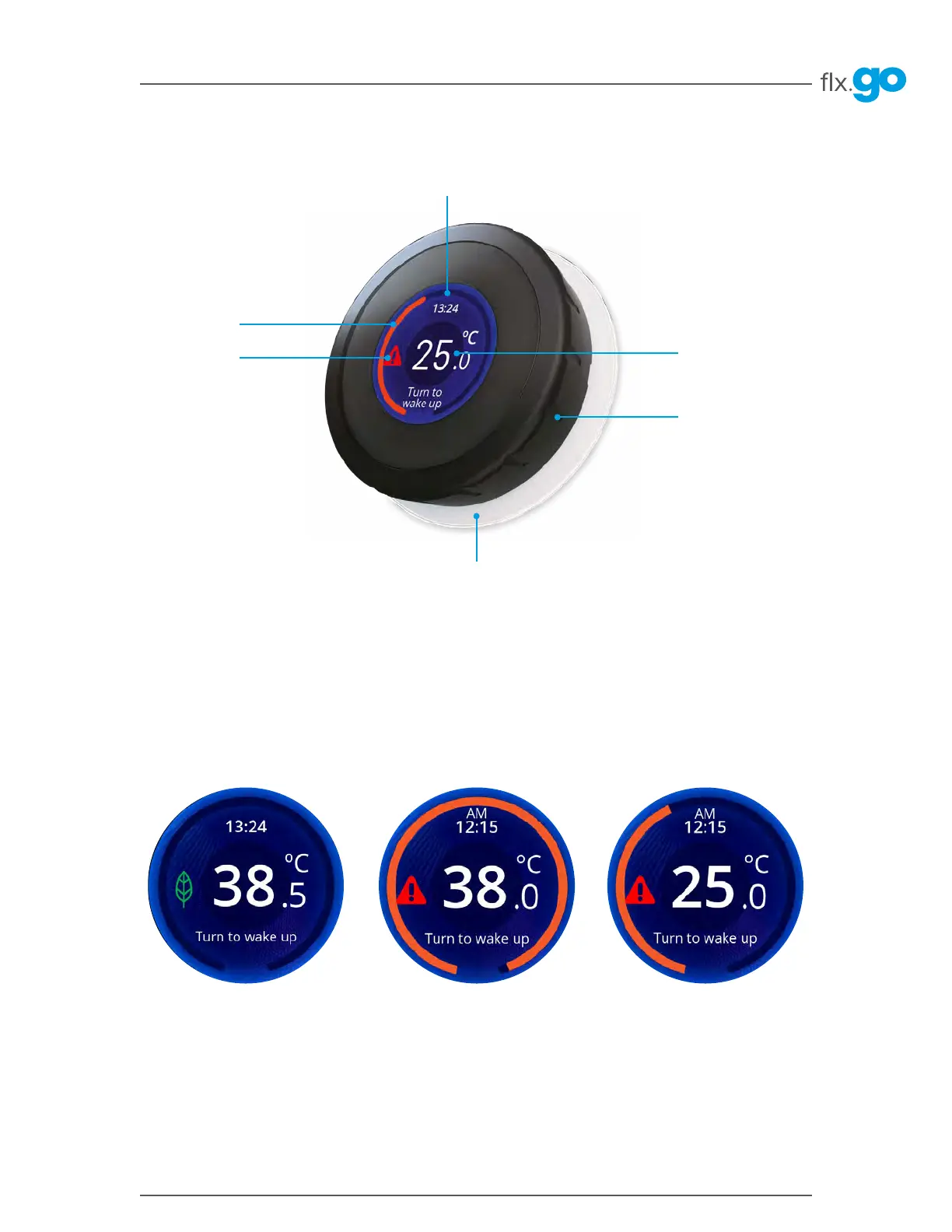
The sleep mode screen shows the current water temperature, error indicator, economy indicator and time of day�
When the water temperature set point is higher than the current water temperature, an orange arc will appear� The
orange arc indicates that the water is being heated to the temperature set point� The length of the arc represents the
temperature difference between the current water temperature and the set point� The total length of the arc will be fully
orange when the temperature reaches set point� There is normally a short delay before the heating starts�
Keypad functions
Backlit rim
Time of day
Error/notification
indicator
Heating/cooling
indicator arc
Dial ring
Temperature
Power
Rotate the dial ring of the flx�go to turn on the keypad� After 2 minutes of inactivity, the keypad will revert to the sleep
mode screen and after 4 minutes of inactivity, the screen will shut off�
Sleep mode screen
Keypad layout



 To Next Page