6
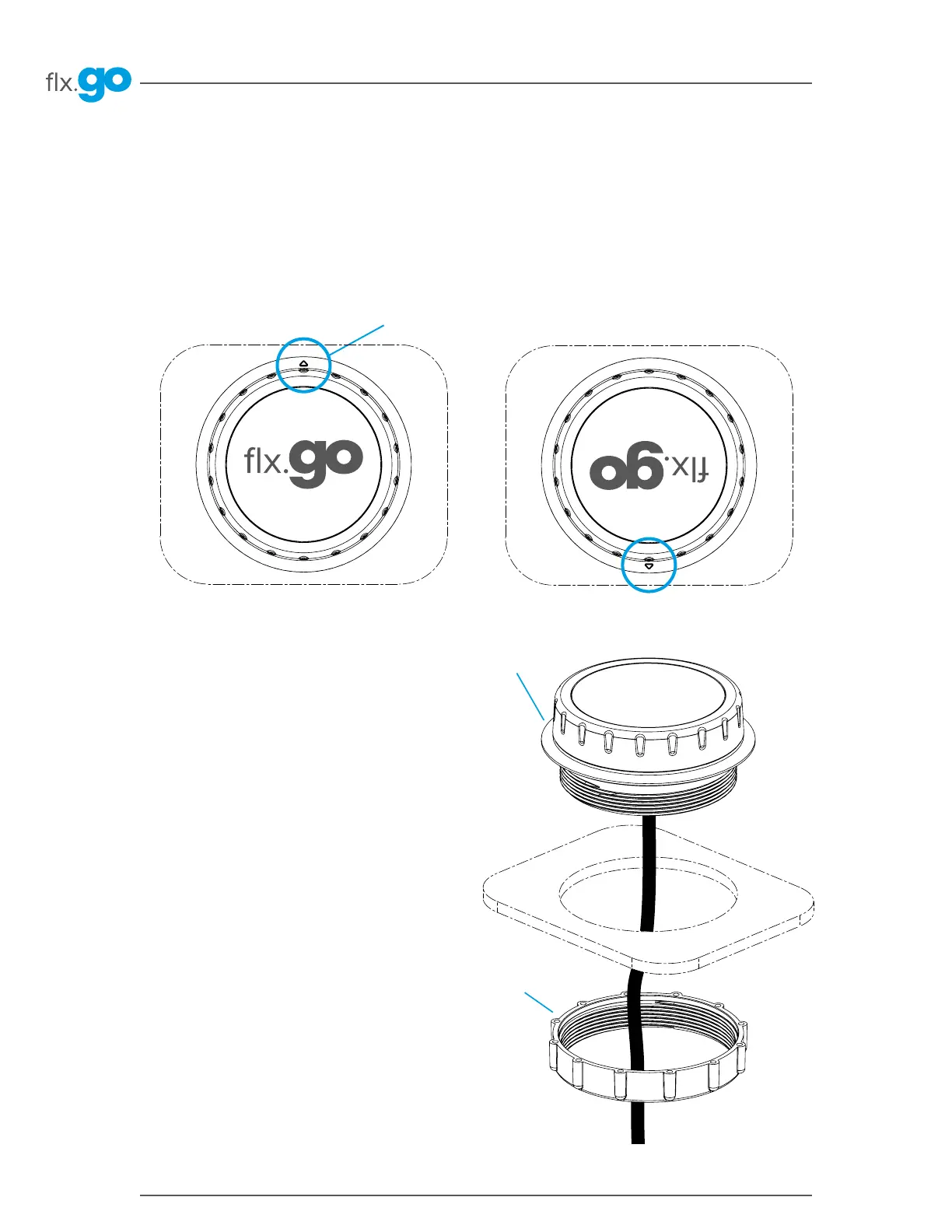
Embossed triangle
Installation
Installation of flx.go
To install the flx�go, determine the mounting location and cut out an opening using a 3�75" hole saw�
Clean the installation surface and peel the adhesive gasket from the back of the keypad�
Locate the embossed triangle on the outer rim of the flx�go�
Point the triangle according to your desired display orientation and insert the keypad�
Optional fastening nut
Adhesive gasket
When inserting the keypad, align it correctly, then
ensure it is properly glued by gently pressing evenly on
the entire surface� Gecko recommends the use of the
fastening nut to tighten the seal between the gasket
and the hot tub shell� (The fastening nut must be hand
tightened�)
Use the fastening nut on a hot tub thickness between
0�28" and 0�5"�
For thinner or thicker surfaces, use of the adhesive
gasket alone is recommended� Gecko does not
recommend the use of silicone other than electronic
grade or neutral cured silicone over the adhesive gasket�



 To Next Page