53
SDI-Parameter new Generation:
Die Parameter für die Autopilotregelung und das Datum und die Uhrzeit können mit dem Serial Monitor über
die Mikro USB-Schnittstelle eingestellt werden.
Parameter adjustment for autopilot and date and time is possible with the PC-Programm Serial monitor.
Hierzu das Programm „Serial Monitor“ starten.
Please start the programm „serial monitor“.
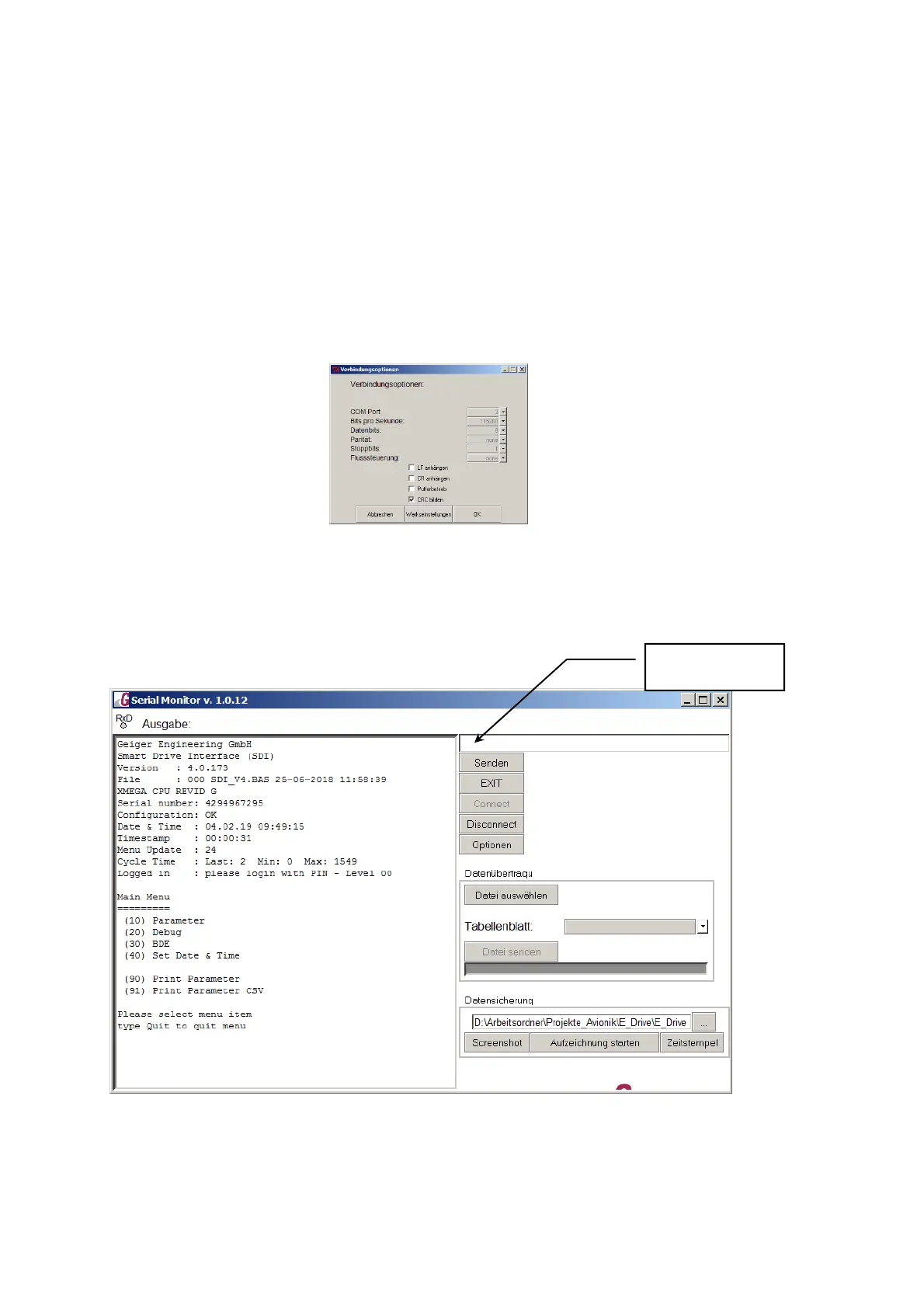
Durch den Button „Optionen“ die Verbindungsoptionen wie hier einstellen. Die Comportnummer entnehmen
Sie bitte dem Gerätemanager.
Call the option window with the button „Optionen“ and set the comportparameters. please take the
comportnumber from your devicemanager.
Jetzt den Button „Connect“ betätigen und anschließend das Wort „menu“ in die Kommandozeile eintragen
und mit dem Button „Senden“ oder mit Taste Return bestätigen. Es erscheint der Menüaufbau im
Ausgabefenster.
Now please push the button „connect“ and type the word „menu“ in the command line and then press return.
The window with the menu structure is displayed:
SDI-Ansicht des Main Menu/SDI Main Menu view:
Kommandozeile


 To Next Page