HT Series II Inert Gas Purge
10-1474 Issue 3-6 March 2014 7
Controls
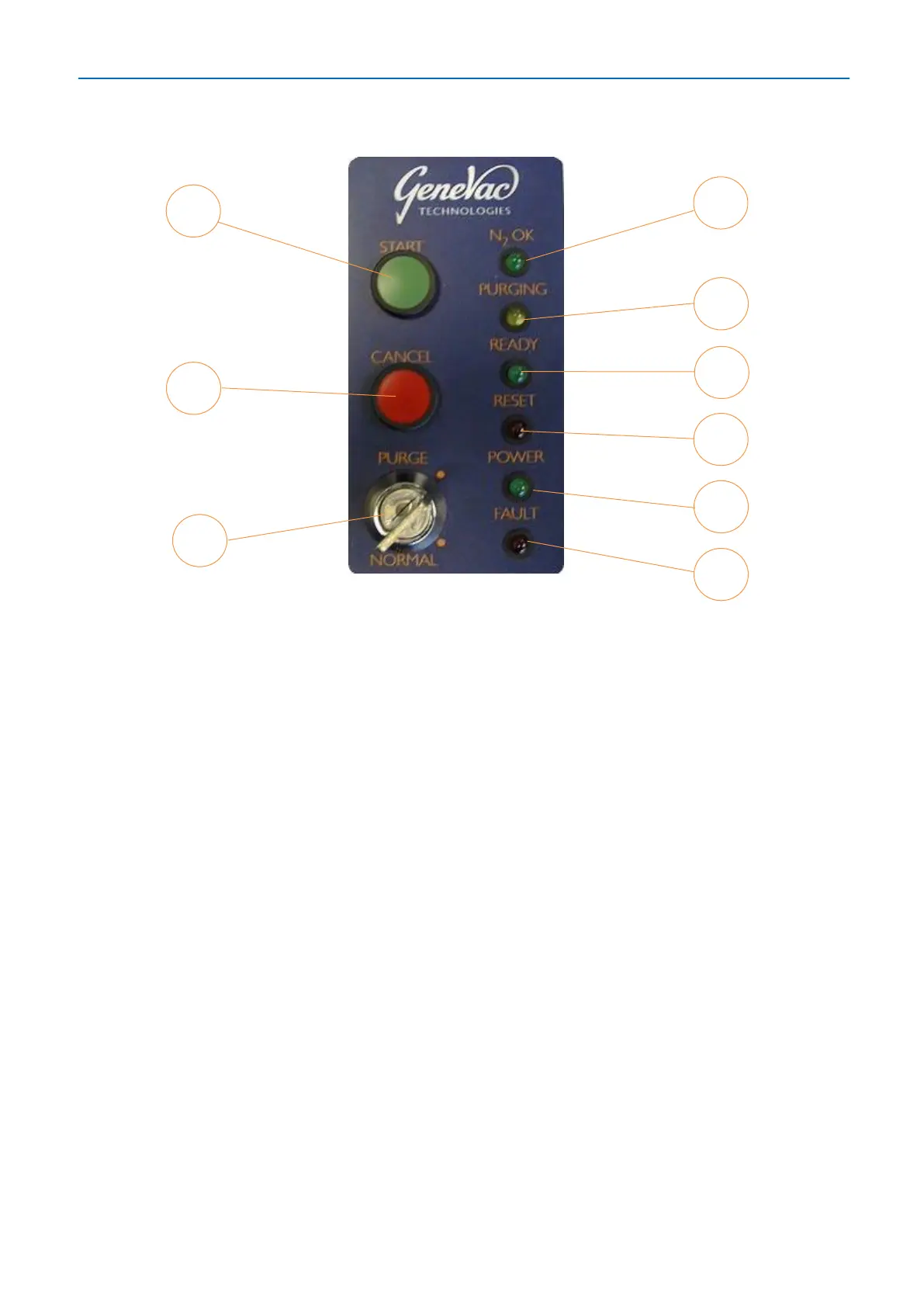
1. START button: Press to start the purge cycle.
2. CANCEL button: Press to reset the inert gas purge system (once the cancel button
has been pressed, the only way to resume is to start a new purge cycle).
3. Key switch: Turn to switch between PURGE mode and NORMAL mode.
4. N
2
OK LED: Lights up to indicate system has detected safe operating pressure of
inert gas supply.
5. PURGING LED: Flashes yellow during the purge cycle to indicate the inert gas purge
system is operating.
6. READY LED: Lights up green to show the purge cycle has completed and the
evaporator is ready to start.
7. RESET LED: Lights up red to indicate the purge system has reset.
8. POWER LED: Lights up green when the system is powered up.
9. FAULT LED: Lights up red if the system detects an internal fault within the inert gas
purge control box. Refer to Troubleshooting.



 To Next Page