2-8
Paper Handling
Overview of Paper Operations
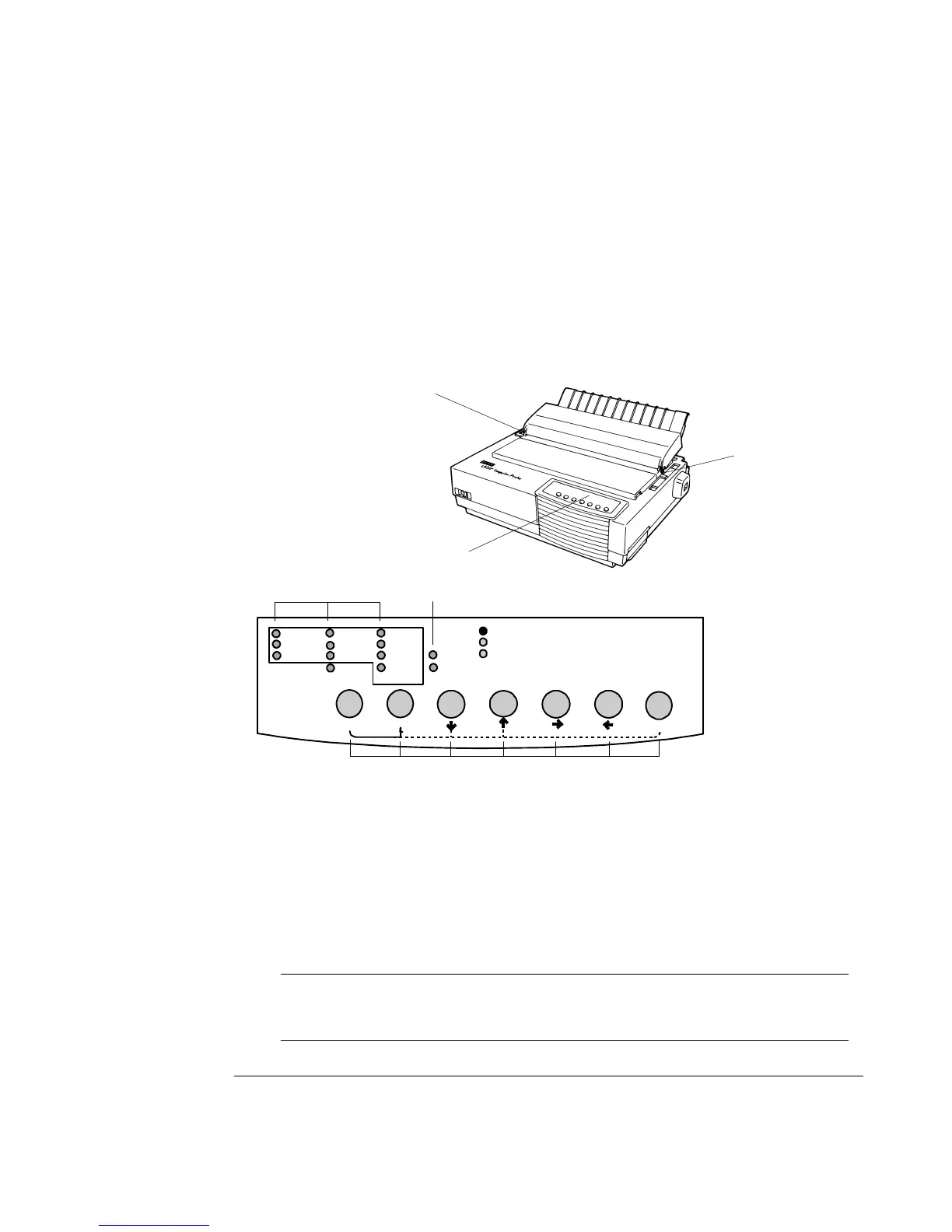
The following levers and buttons are used in paper handling:
• Paper select lever
11
11
1 at the top left corner of the printer
• Paper thickness lever
22
22
2 at the top right corner of the printer
• All buttons
6 6
6 6
6 on the control panel
33
33
3 (Primary and alternative functions are labelled
respectively above and under each button.)
The following figure shows the location of each lever, indicators, and buttons:
Paper select lever
11
11
1 Font indicators
44
44
4
Paper thickness lever
22
22
2 Macro indicators
55
55
5
Control panel
3 3
3 3
3 Buttons
66
66
6
Printer Levers and Buttons
The following table summarizes the use of levers and buttons in paper handling. More
detailed information is provided later in this chapter.
Caution: To load or feed paper, the printer must be:
• In the Ready state but not receiving or printing data
• In the Pause state
Courier 10 Bold PS
Draft
Prestige 12
Time PS
HSDraft
Comp. 17
Nimb. PS
HiDraft
Soft Ctrl.
Font
Macro
M1
M2
Fault
Protocol Park LF FF/Load
PPX24
Set-Up/Quit Top
Exit/Save
Ready
Pause
EP2
M2
M1
11
11
1
33
33
3
22
22
2
44
44
4
55
55
5
66
66
6



 To Next Page