BDVR Manual 82 Version 1.2
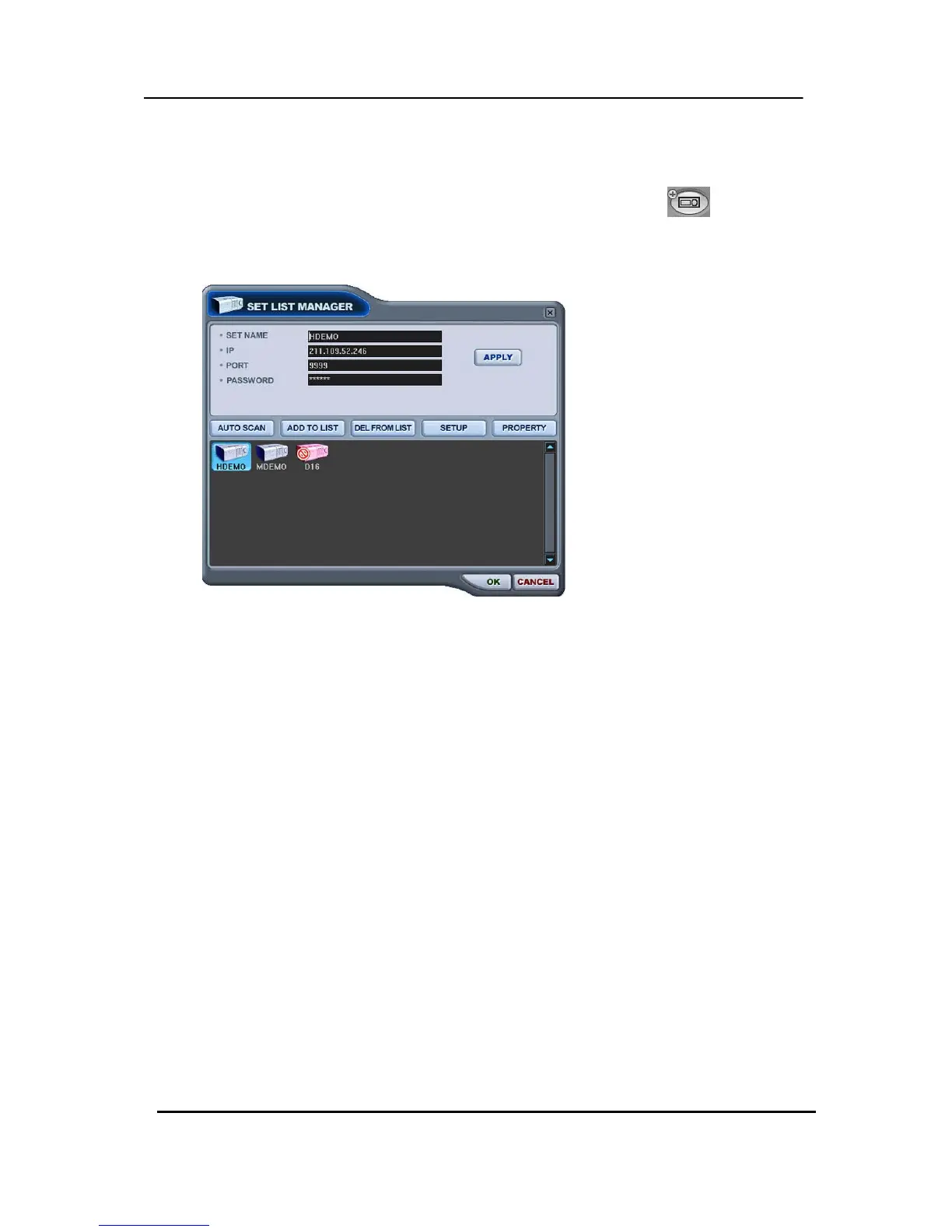
3.1. Set List Manager
- Set List Manger is mainly used to add or delete DVR’s on the CMS. Click button to start
the Set List Manager.
(1) Auto Scan
It automatically tracks down DVR’s connected to the local network but skips over those
already on the list. The DVR Host Name is entered automatically to the title and the
default Password is 000000 (USER).
(2) Add to List
Please follow these steps to add a DVR on CMS.
1) Set Name: Type in DVR title to be displayed on the Monitoring window, Health
window and DVR Window.
2) IP: Enter the IP address<ex:192.168.0.52> or DNS name. <ex: demo.dvrhost.com>
3) Port: 7000<Default>
4) Password: Select from the following options:
- User Password: Depends on user privileges
- Admin Password: All functions.
5) Add to List: Click “Add to List” to complete the addition of the DVR onto CMS list.
6) Save changes and exit the menu: Select “OK”.
7) Exit the menu without making change: Click “Cancel”
z APPLY: Is used for changing the configuration of selected DVR.
(3) DEL FROM LIST: Delete selected DVR from CMS List.



 To Next Page