BDVR Manual 12 Version 1.2
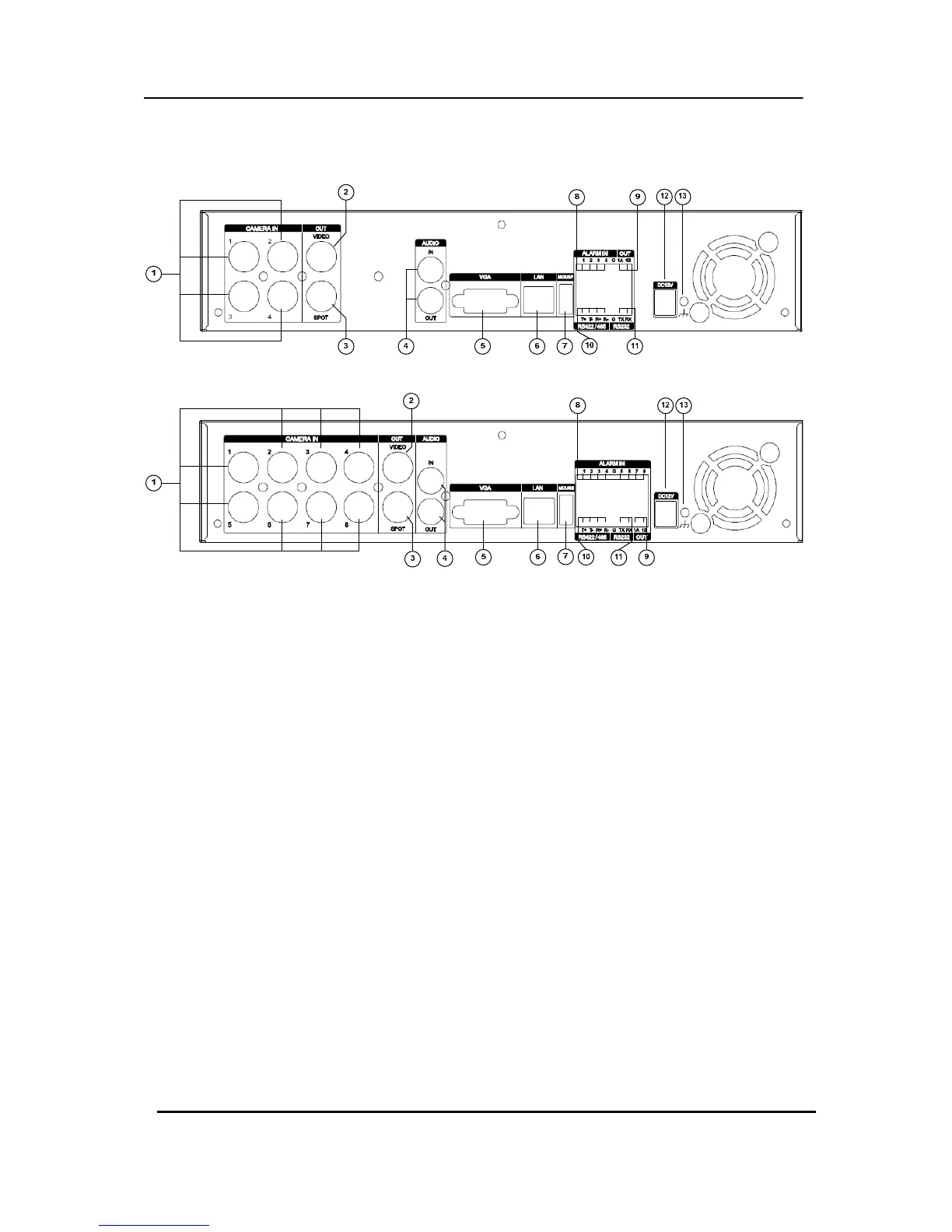
2. Rear Panel Connectors
1) CAM1~4 or 1~8: BNC input (Camera 1~4 or 1~8) connectors
2) MONITOR (Composite Output) : BNC standard composite video output connector.
3) SPOT : Spot Out connector
4) AUDIO Input / SPEAKER (Output) connectors : RCA
5) VGA Out connector
6) LAN (RJ-45 Ethernet Port) : For connecting to remote PC via Ethernet network.
7) MOUSE connection : Connect PS2 USB mouse to this port. To use USB only mouse,
connect it to USB port at rear panel.
8) SENSOR (ALARM IN 1~4 or 1~8) : For connecting alarm inputs.
9) RELAY (ALARM OUT 1) : For connecting alarm out relays.
10) RS-422 : For connecting to PTZ camera.
11) RS-232C : Development purposes only.
12) POWER : DC power Jack
13) FIELD GND : Ground



 To Next Page