57 DIGITAL VIDEO RECORDER
VIII.BACKUP
1. Internal CD R/W
For convenience, this has a built-in CD-RW where the backup can be made easily.
Moreover, any backup CD can be read from the CD-RW for reviewing the backup data.
1. Insert a blank Media into Built-in CD.
<Note>
Please note that CD-RW/DVD RW disks must be formatted before backup.
Disk Format is discussed in System ->DISK Menu.
2. Press [BACKUP] button on IR Remote and the backup menu will appear. Then enter
the password when the password prompt appears.
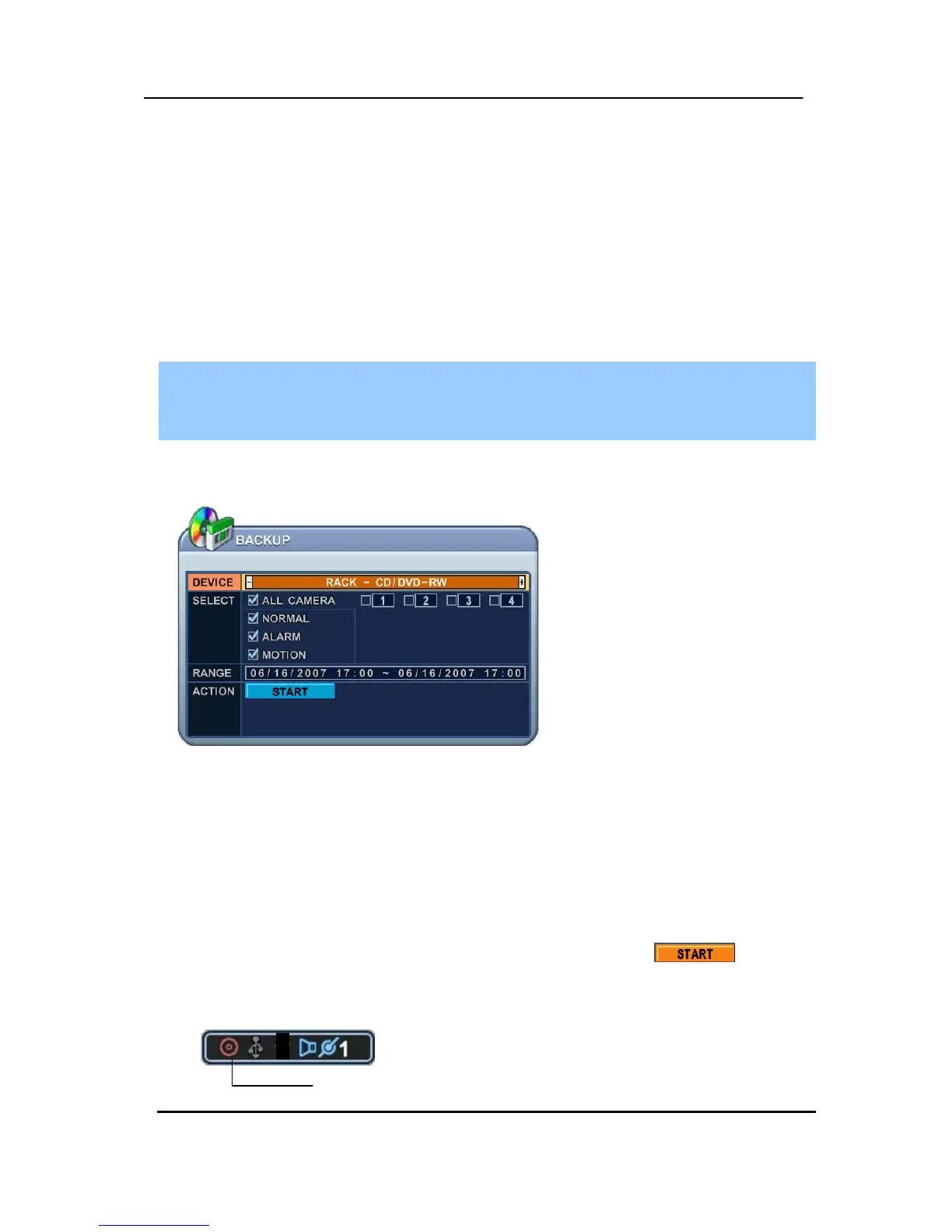
3. Use [-, +] button to change select device: Rack-CD Rom.
4. Please select the data for BACKUP.
(1) NORMAL: Normal Recording Data
(2) ALARM: Alarm Recording Data
(3) MOTION: Motion Recording Data
select the recorded data type to be included on the backup CD. The illustration to
the left has selected ALL CAMERA, NORMAL, ALARM and MOTION data.
5. Enter the numbers as required in 24-hour format, then move to .
6.
Press [ENTER] button to start BACKUP.
* CD indicator will be changed to BLUE Color that the backup is in session.
RACK-CD ROM



 To Next Page