67 DIGITAL VIDEO RECORDER
* CMS Setup
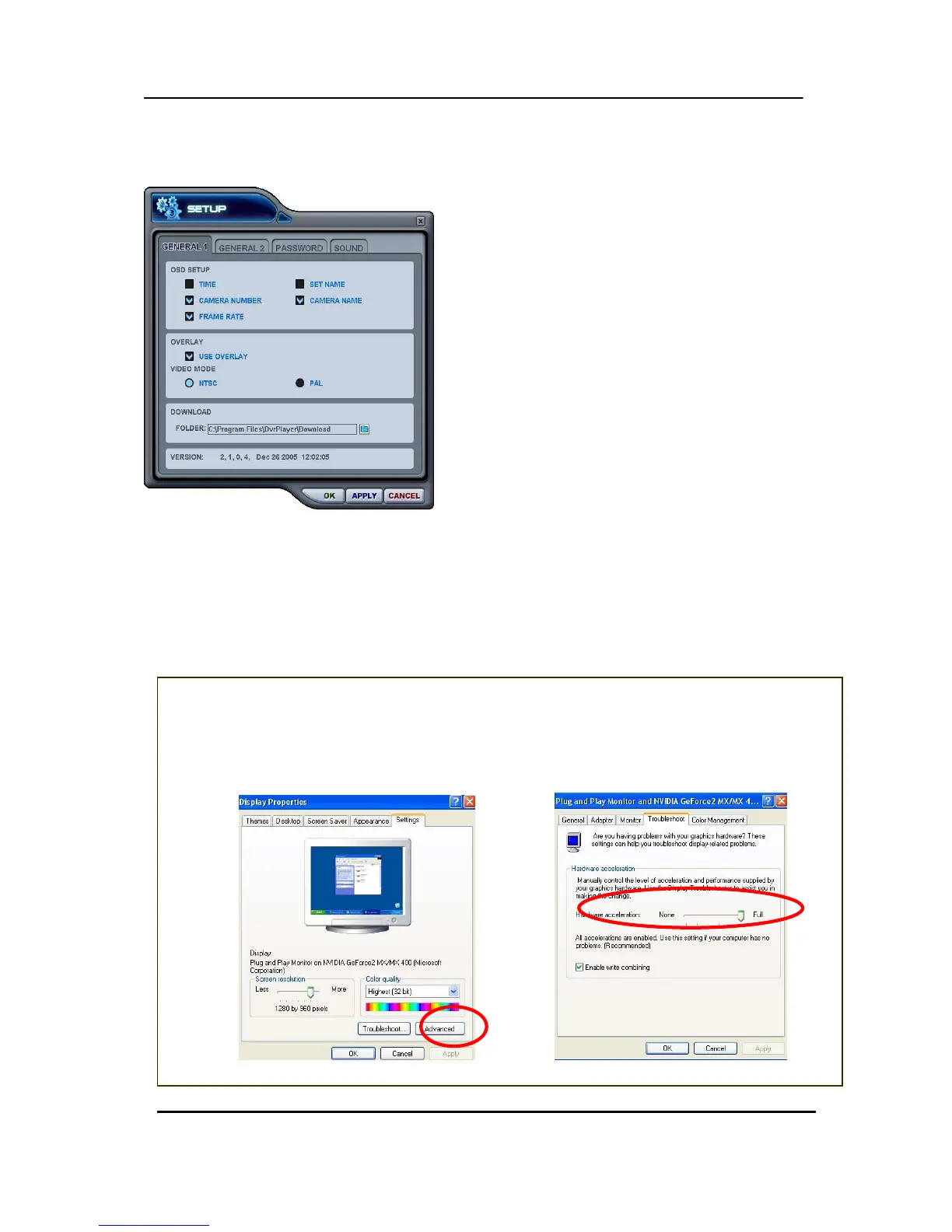
① General 1
< C.F> Control Hardware Acceleration
Click the Adⓐ vanced button on Display Properties on your PC.
ⓑ Select “Troubleshoot” and slow down Hardware Acceleration.
ⓐ
→ ⓑ
a) OSD SETUP
Select On-Screen-Display information such as the
Time, DVR name, Camera Number, Camera Name,
Frame Rates for each camera.
b) OVERLAY (Default)
It is recommended to use OVERLAY for
transmission speed up. Please cancel the Overlay
function if there is broken screen caused by Invalid
Video Driver installed. If you still have the abnormal
screen problem, please slow down the Hardware
Acceleration.
c) Video Mode
Select NTSC or PAL
d) DOWNLOAD
Designate a directory for file Download


 To Next Page