X350 3D-Printer Quick Start Guide
Seite: 7/29
Stand: 2016/03/24 13:55
© German RepRap GmbH 7/29
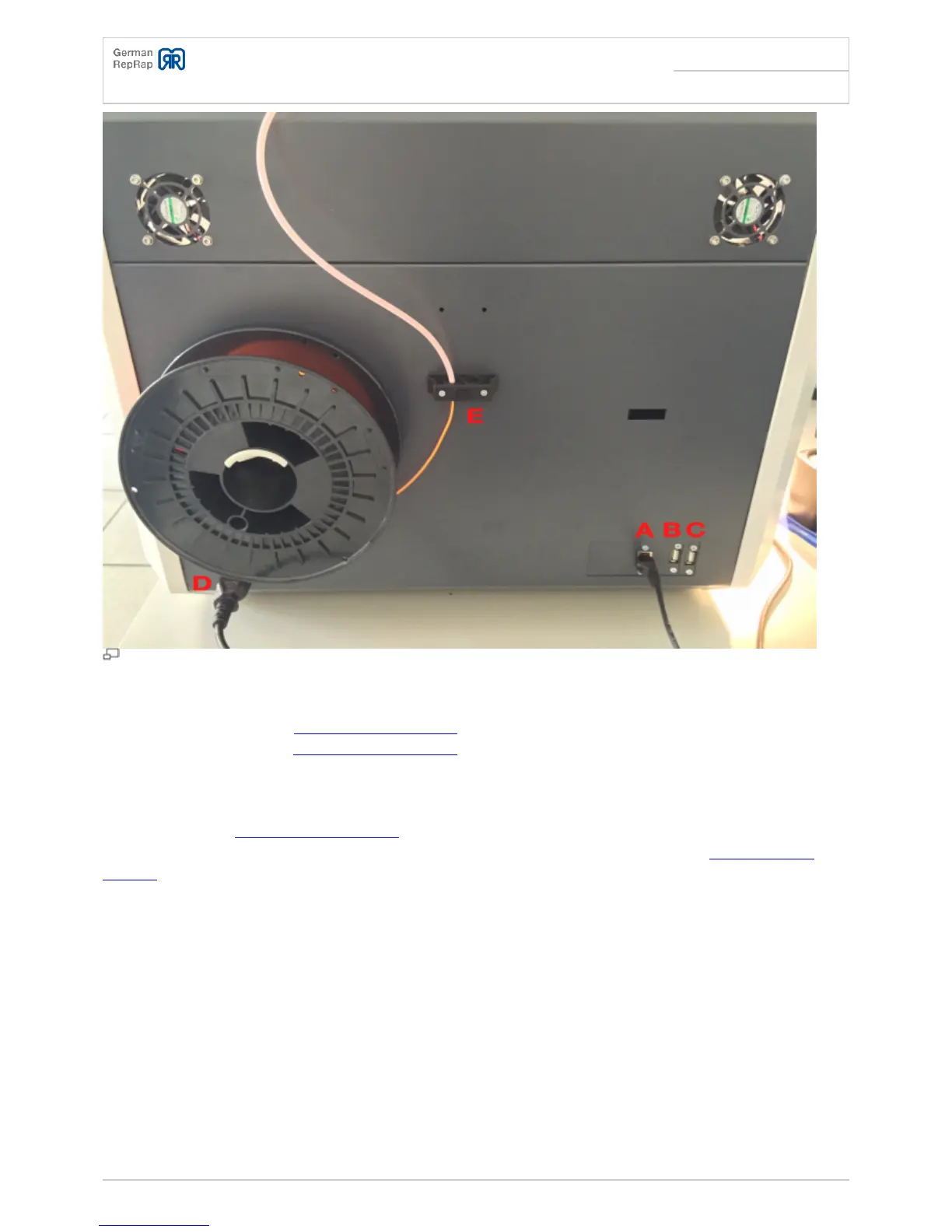
Ports on the rear
A - Network port
●
B - USB port for internal 3DPrintBox V2 manual
●
C - USB port for internal 3DPrintBox V2 manual
●
D - 230V connector
●
E - Filament feed
●
The USB ports for 3DPrintBox V2 manual may be used to attach USB webcams or similar devices with
later software versions. These will then be available in the operating system of the 3DPrintBox V2
manual.
Levelling the printing bed
In order to level the printing bed, the following steps are necessary.
Heat up the printing bed to room temperature
●
Set the z-axis to its home-position using the control panel: Press the button →”Position” → “Home Z”
●
Wait at least 10-15 minutes to let the printer acclimatise
●
If necessary, turn off the holding torque of the motors using the control panel: Press the button →
●
“Quick Settings” → “Turn off motors”



 To Next Page