X350 3D-Printer Quick Start Guide
Seite: 11/29
Stand: 2016/03/24 13:55
© German RepRap GmbH 11/29
In order to lead the filament into the extruder, take the following steps:
Heat up the extruder manually using the control panel: Press the button → “Extruder” → “Temp.1”
●
Wait until the Extruder has reached the target temperature
●
In the menu, select: “Position” → “Extr. Position”
●
After activating the menu point, turn the control wheel clockwise in order to pull in or lead the
●
filament, and counter-clockwise to eject the filament
When you are done, please turn off the extruder heating
●
Through the network
Heat up the Hot-End through the web interface. Once the target temperature is reached, you can lead
the inserted filament via the web interface manually, until it exits the nozzle. Afterwards, turn off the
extruder heating.
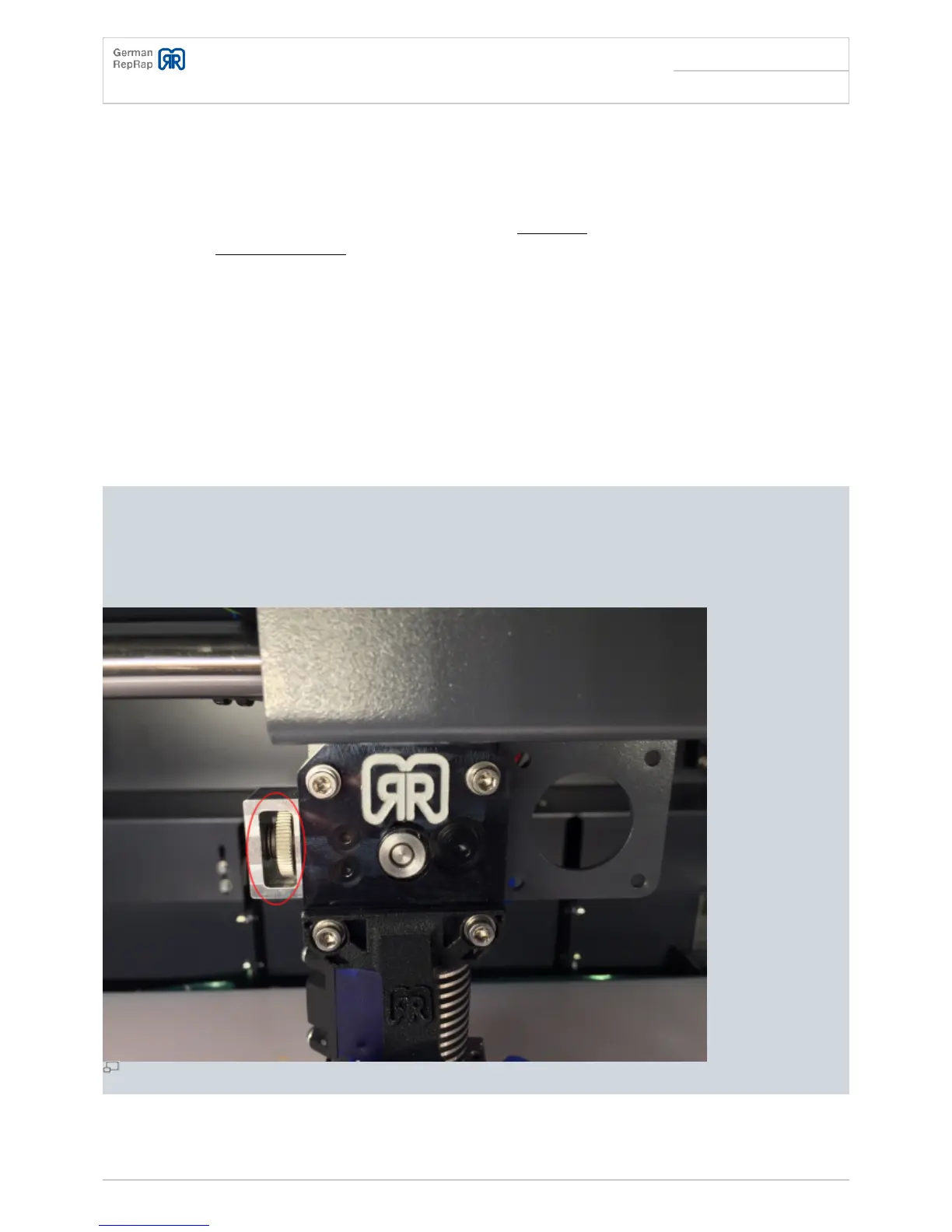
If the extruder doesn't properly lead the filament, you can adjust the contact pressure on the filament
using the adjusting wheel at the extruder. Depending on the material it may be necessary to adjust
the contact pressure to the material in order to achieve a flawless leading of the filament. To do that,
turn the adjusting wheel at the extruder.
Adjusting wheel



 To Next Page