28
Using the WWAN Feature (Optional)
A WWAN (Wireless Wide Area Network) uses mobile telecommunication
cellular network technologies to transfer data. The WWAN module of your
computer supports 4G LTE or 5G NR.
NOTE: Your model only supports data transmission; voice transmission is not
supported.
Installing a Nano-SIM Card
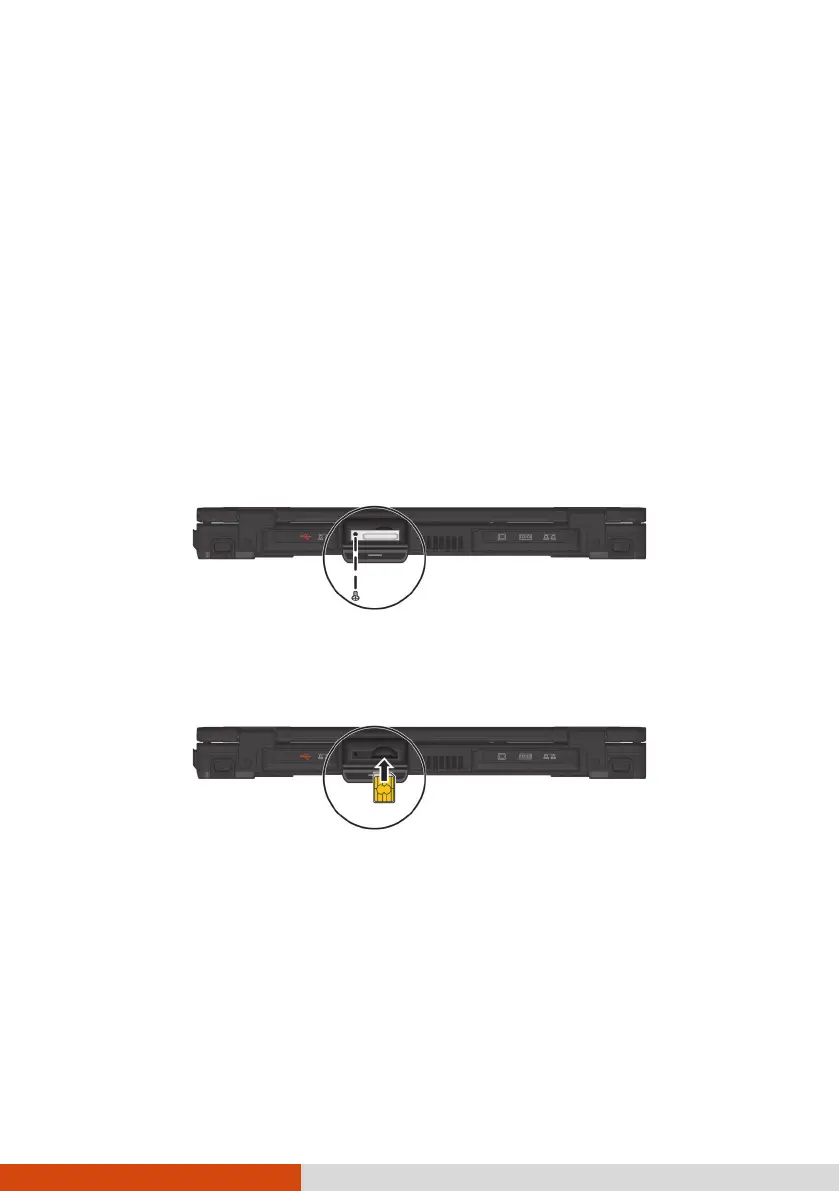
1. Turn off the computer and disconnect the AC adapter.
2. Open the cover of the SIM card slot.
3. Remove one screw to detach the small metal plate that covers the SIM
card slot.
4. Insert the nano-SIM card into the slot. Make sure the golden contact
area on the card is facing upward and the beveled corner on the nano-
SIM card facing inward.
5. Close the cover.
Turning On/Off the WWAN Radio
To turn on the WWAN radio:
Select the network icon in the lower right of the taskbar. Then, select the
Cellular button.



 To Next Page