Repair and adjustment
24
Service instructions
5015108-00 Edition 0403
Scroll to 01 FAN SPEED with J. Press S.
Change AUT to MAN with K. Set fan speed to 75 %.
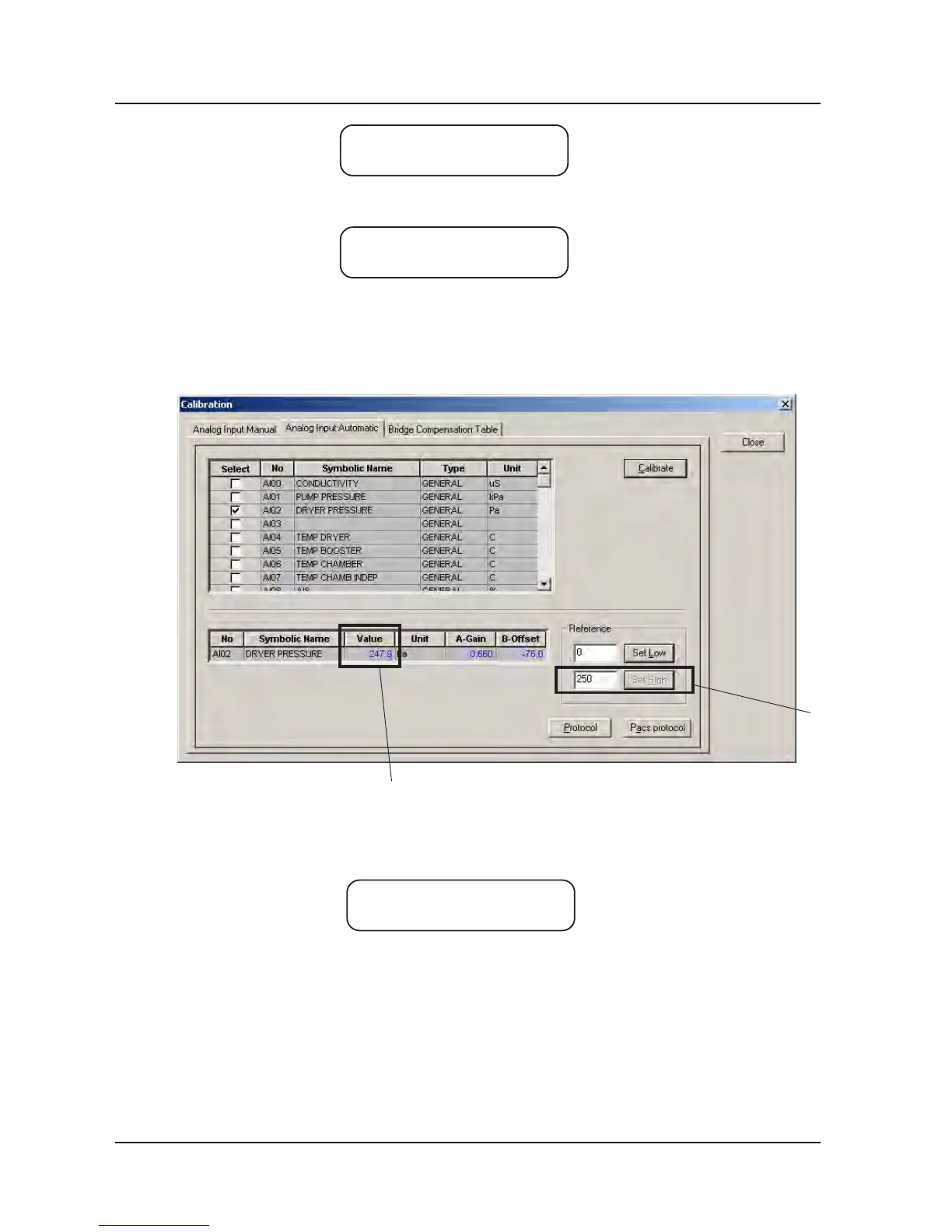
8. Check that the reading of the external differential pressure gauge stabilises. Enter the reading
of gauge (A) in CS 1000 and click Set High.
The reading should be between 200 and 300 Pa.
If it is too high, the filter may be clogged; if it is too low, there may be a hole in the filter.
9. Check that the value (B) rises to the reading of the external differential pressure gauge.
10. Log off CS 1000.
11. Reinstate the fan.
Set fan speed to 0 %. Change MAN to AUT with K. Press S.
12. Log out.
13. Reinstate the differential pressure gauge.
>01 FAN SPEED
AUT 100%
>01 FAN SPEED
MAN 75%
A
B
>01 FAN SPEED
MAN 0%
V1574



 To Next Page