21PowerUp Installation and Operation Manual
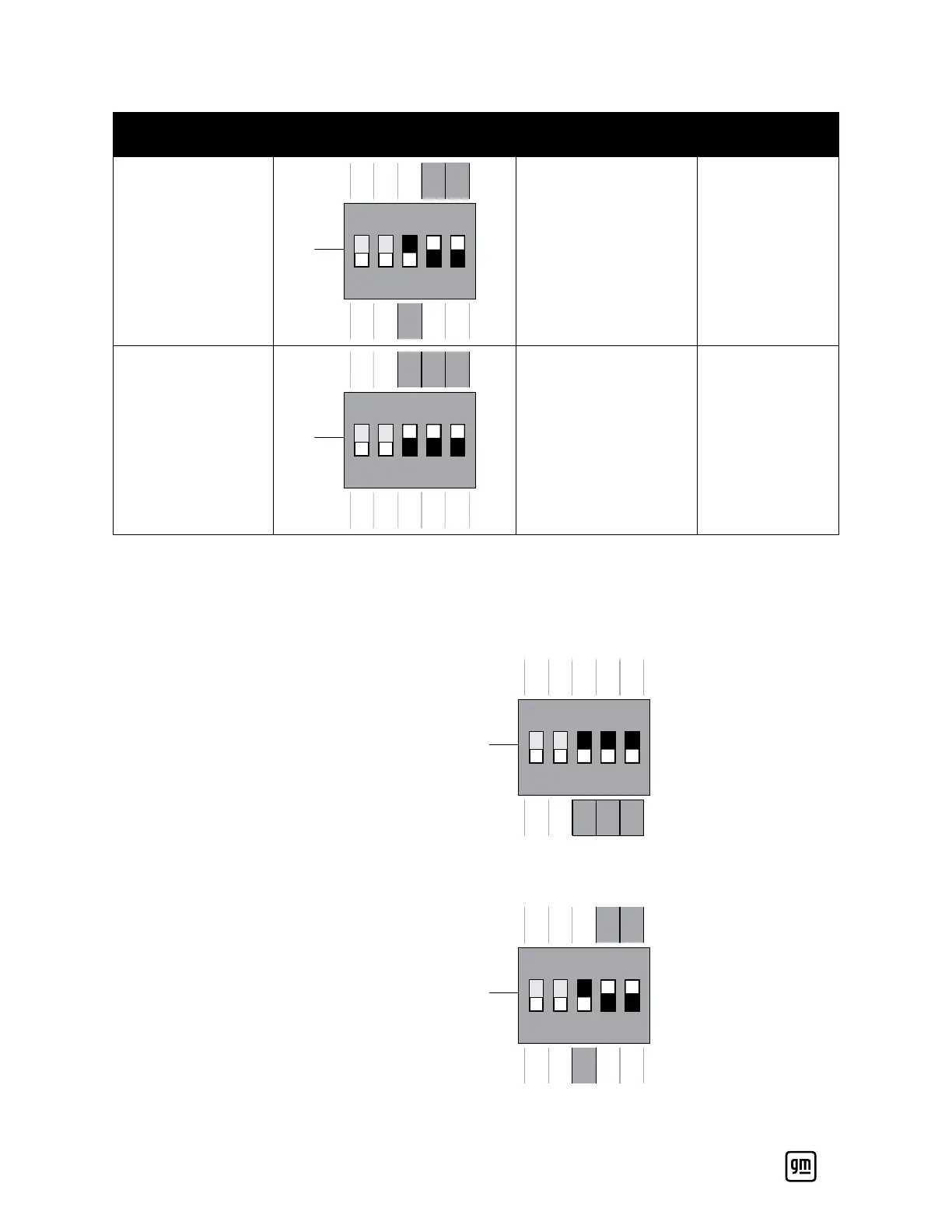
DIP Switch Setting Configuration PowerUp AC Amperage
OCPD Breaker
Size
00011
DIPON
ONOFF
1 OFF
2 OFF
3 OFF
4 OFF
5 OFF
1 ON
2 ON
3 ON
4 ON
5 ON
12
40 50
00111
DIPON
ONOFF
1 OFF
2 OFF
3 OFF
4 OFF
5 OFF
1 ON
2 ON
3 ON
4 ON
5 ON
12
48 60
Refer to the following steps to setup the DIP switches during the initial instal-
lation.
1. Open the middle cover and locate the DIP switch. The default setting
should be 00000.
DIPON
ONOFF
1 OFF
2 OFF
3 OFF
4 OFF
5 OFF
1 ON
2 ON
3 ON
4 ON
5 ON
12
2. Change the DIP switch to the desired output current based on pin configu-
ration table (the example below is for a 40A output current).
DIPON
ONOFF
1 OFF
2 OFF
3 OFF
4 OFF
5 OFF
1 ON
2 ON
3 ON
4 ON
5 ON
12


 To Next Page