General Motors Tech2 User Guide
16
Getting Started
This section covers all Tech2 vehicle applications. Therefore, some of the information
provided may not be required for individual applications.
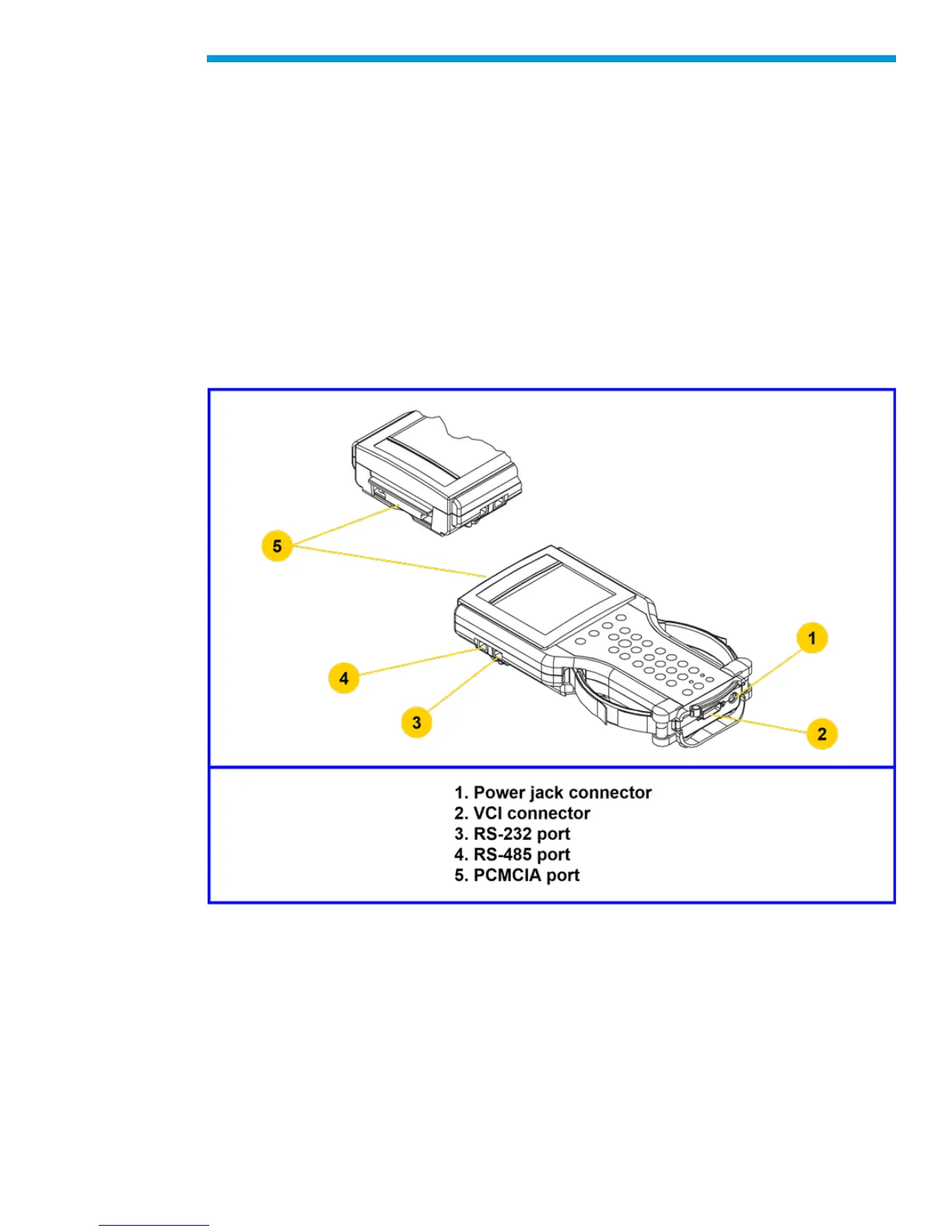
The Tech2 contains two serial communication ports: the RS-232 and the RS-485. Use the
RS-232 port for downloading data from another computer to the Tech2. The RS-485 port is
currently not used.
The Tech2 also contains two PCMCIA ports, a power jack connector, and a Vehicle
Communications Interface (VCI) connector. One of the PCMCIA slots contains a memory
card with diagnostic information. The power jack accepts power from the AC/DC power
supply, battery, or cigarette lighter power cable. The VCI connector accepts the DLC cable
or DLC loopback adapter.
Notice: When using the Tech2 for vehicle communications, the power jack must be
connected to the Tech2 DLC loopback adapter
Identification of the Tech2’s external ports
Initial Hardware Installation
The Tech2 hardware initial installation requires the following seven tasks:
1. Remove the RS-232 loopback adapter (P/N 3000112) from the storage case (P/N
3000116). Plug it into the RS-232 port


 To Next Page