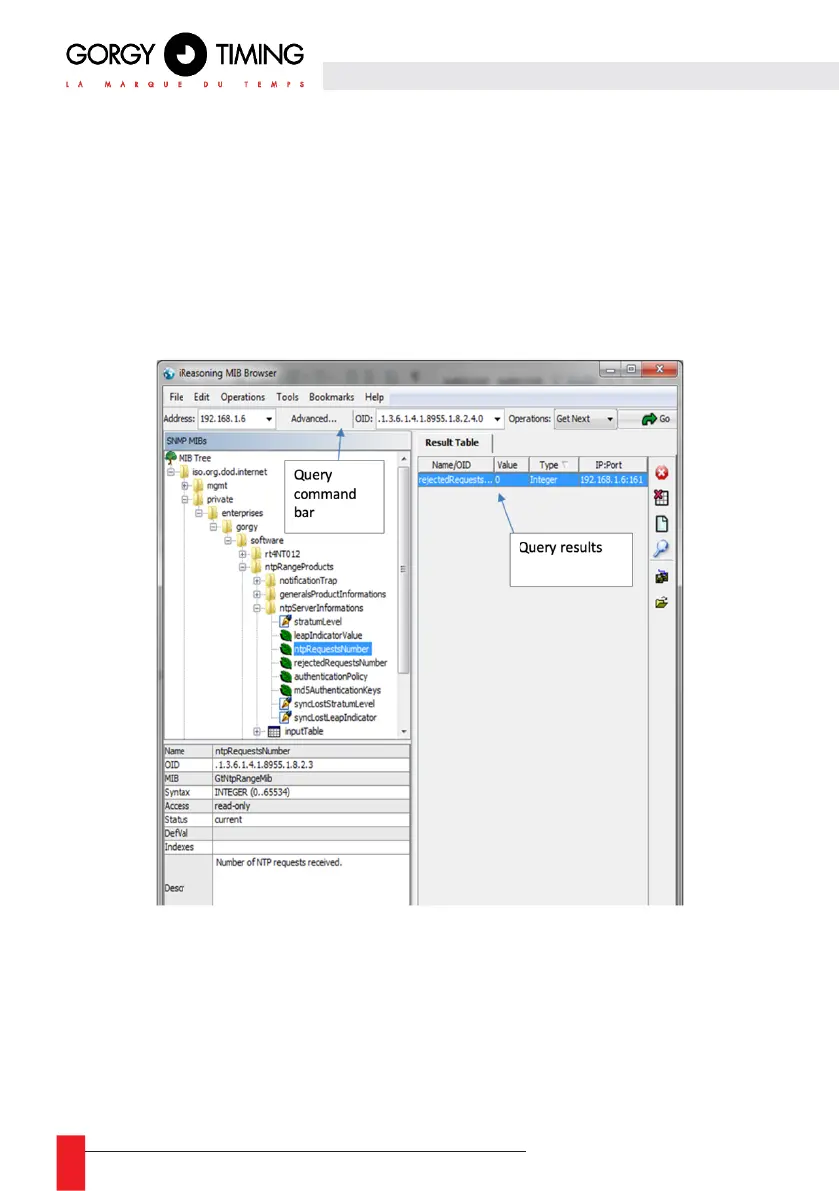
The data accessible in SNMP are distributed in variables integrated in a universal tree
structure. Parts of this tree structure are commonly described in MIB-2 compatible files (RFC
1213) also called MIB files). These files can be opened with a MIB browser (iReasoning MIB
Browser, SNMPb, …) or with a text editor (Notepad, WordPad, …). For example, with
iReasoning MIB Browser the content of a MIB can be added to the displayed tree structure
by clicking on File → Load MIBs (see screenshot below).
iReasoning MIB Browser also provides a trap receiver that can be launched by clicking on
Tools → Trap Receiver.
In the tree structure, each node (folder or table) and each sheet (variable)| has a unique
number and name in the folder containing them. Thus each element in the tree structure
(folder, table or variable) can be identified by a sequence of names and/or numbers called
OID (Object Identifier) e.g. the folder containing all the variables specific to Gorgy Timing
products can be identified by "iso.org.dod.internet.private.enterprises.gorgy",
".1.3.6.1.4.1.8955" or a mixture of both.



 To Next Page