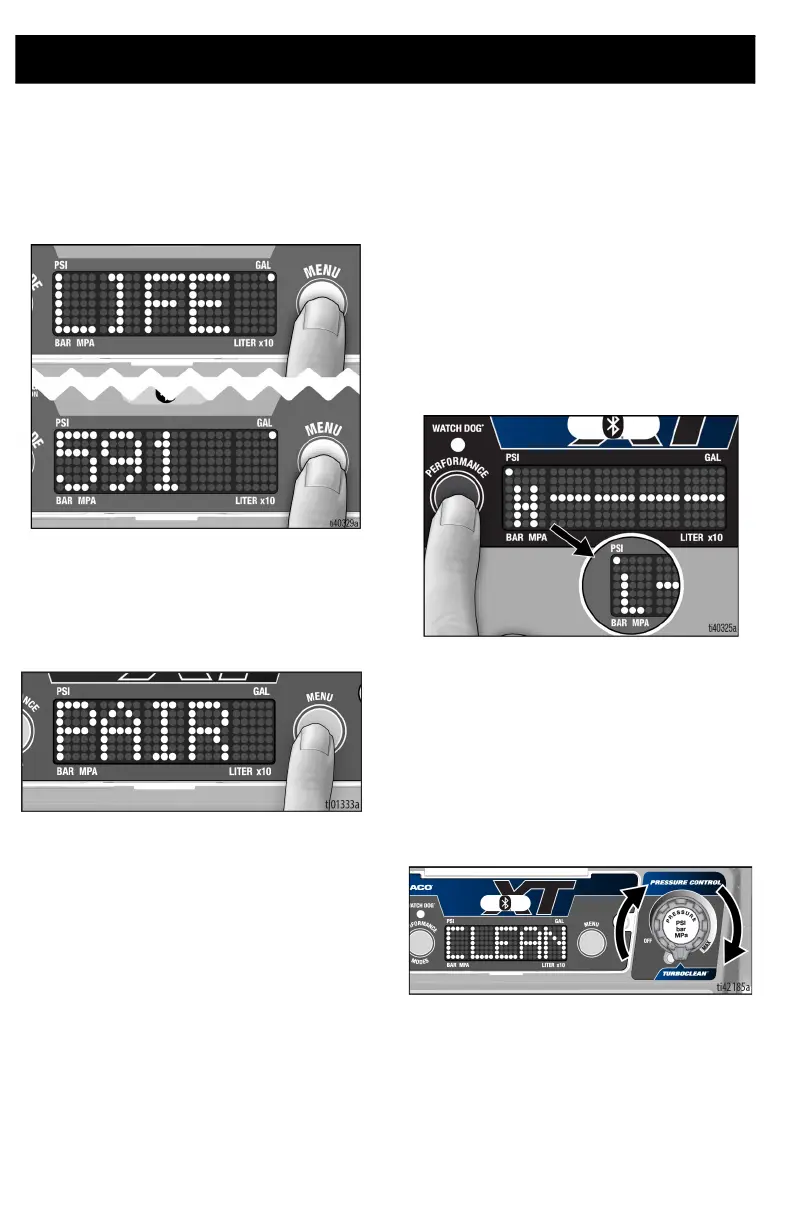
Digital Display
30 3B0070C
7. Press and hold menu button to reset to
zero, or short press button to move to
Lifetime Gallons (or Liters x10).
NOTE: LIFE displays briefly, then the
number of gallons sprayed above 600
psi (41 bar, 4.1MPa).
NOTE: Steps 8 and 9 below apply to
ProContractor models only.
8. Short press menu button to move to Pair
Spray Gun. Screen will scroll “Pair Spray
Gun”.
9. Short press menu button to return to
pressure display screen.
Selecting Performance
Modes
Unit is equipped with two performance
modes. Performance modes are selected by
pressing the “Performance Mode” button on
the left side of the display. The mode will
scroll across the display either “High
Pressure” or “Low Pressure”. They are
denoted by a one letter symbol on the left
side of the display.
For an explanation of performance modes,
see Performance Modes, page 24.
TurboClean
Unit is equipped with TurboClean cleaning
mode. To enable, turn pressure control knob
to TurboClean setting. When entering
TurboClean, there will be a notable detent
when turning the pressure control knob to
the TurboClean setting and CLEAN will flash
on the display.
NOTE: TurboClean is only used for cleaning
fluids. When in TurboClean, the sprayer will
not spray paint or other materials.







 To Next Page