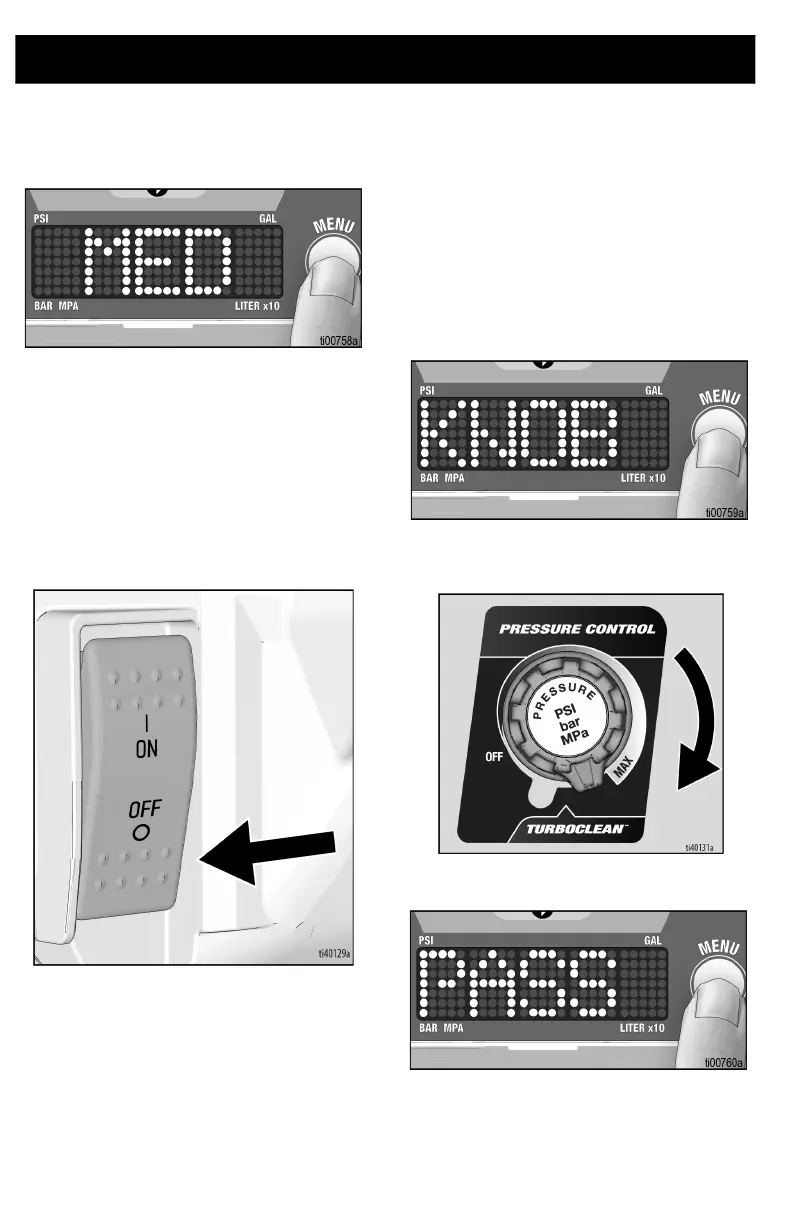
Digital Display
32 3B0070C
7. Press and hold menu button to change
Watchdog sensitivity setting (High,
Medium, Low). Default is set to Medium.
8. Short press menu button to move
software Rev.
9. Short press menu button to move to
Sprayer ID.
10. Short press menu button to move to
Knob Calibration, page 32 and
Transducer Calibration, page 33.
11. Turn ON/OFF switch to OFF position to
exit Stored Data.
Knob Calibration
NOTE: Knob calibration should be
performed whenever a new pressure control
(potentiometer) is installed or the control
board is replaced.
1. To perform knob calibration, enter
secondary menu by holding menu
button while powering sprayer.
2. Use menu button to navigate to knob
calibration screen.
3. Set potentiometer to max spray
position, just before TurboClean.
4. Hold menu button until display shows
pass.
5. Turn potentiometer knob back to OFF
position before restarting and reusing
the sprayer.







 To Next Page