Digital Tracking System
16 3A4399A
Digital Tracking System
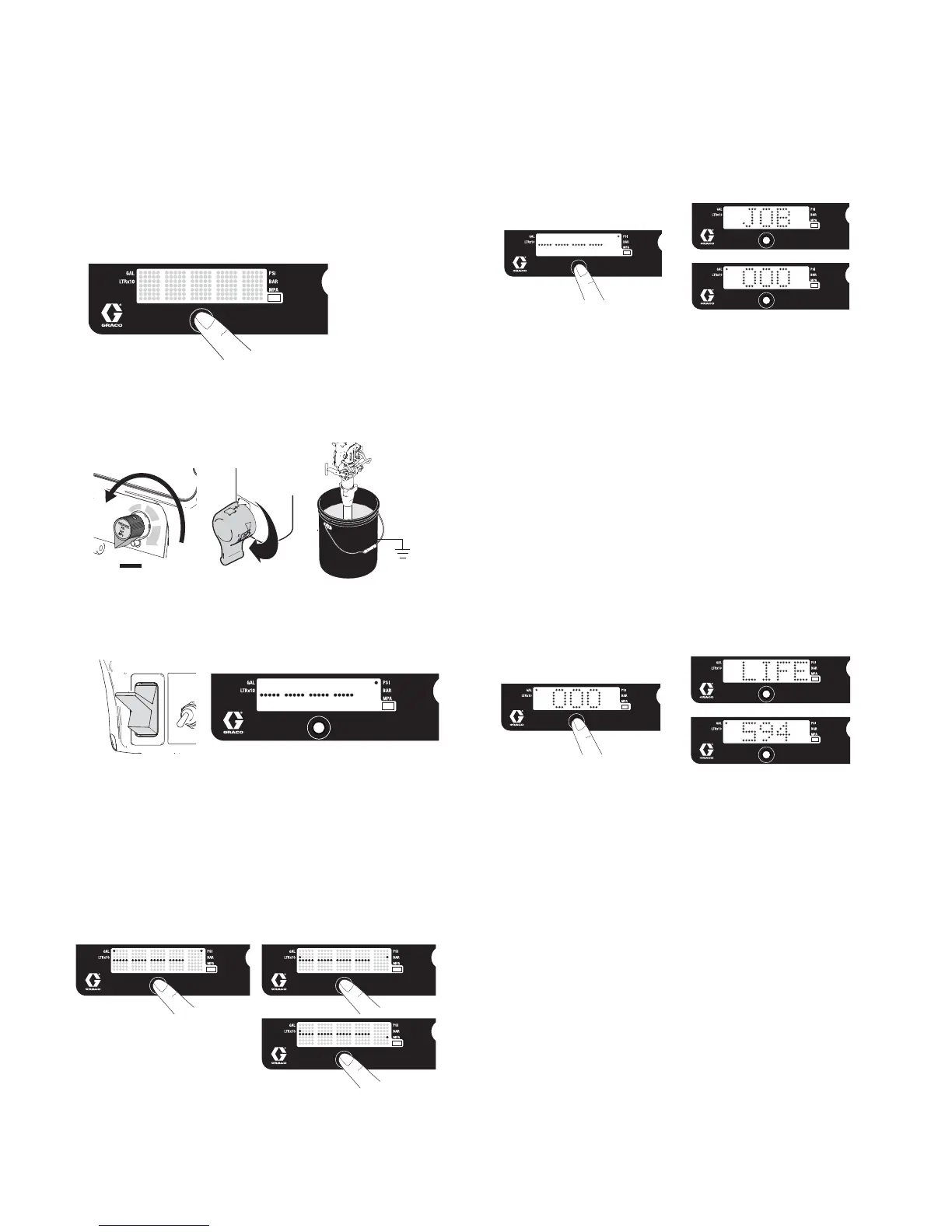
Operation Main Menu
Short press to move to next display. Press and hold (5
seconds) to change units or reset data.
1. Turn pressure to lowest setting. Trigger gun to
relieve pressure. Turn prime valve down to DRAIN
position.
2. Turn power ON. Pressure display appears. Dashes
will not appear unless pressure is less than 200 psi
(14 bar, 1,4 MPa).
Change Display Units
Press and hold DTS button for 5 seconds to change
pressure units (psi, bar, MPa) to desired units. Selec-
tion of bar or MPa changes gallons to liters x 10. To
change display units DTS must be in pressure display
mode and pressure must be at zero.
Job Gallons
1. Short press DTS button to move to Job Gallons (or
liters x 10).
NOTE: JOB scrolls past, then the number of gallons
sprayed above 400 psi (28 bar, 2.8 MPa) for Mark
VII and Mark X displays; 1000 psi (70 bar, 7 MPa)
for all other models.
2. Press and hold to reset to zero.
Lifetime Gallons
1. Short press DTS button to move to Lifetime Gallons
(or liters x 10).
NOTE: LIFE scrolls briefly, then the number of gal-
lons sprayed above 400 psi (28 bar, 2.8 MPa) for
Mark VII and Mark X displays; 1000 psi (70 bar, 7
MPa) for all other models.







 To Next Page