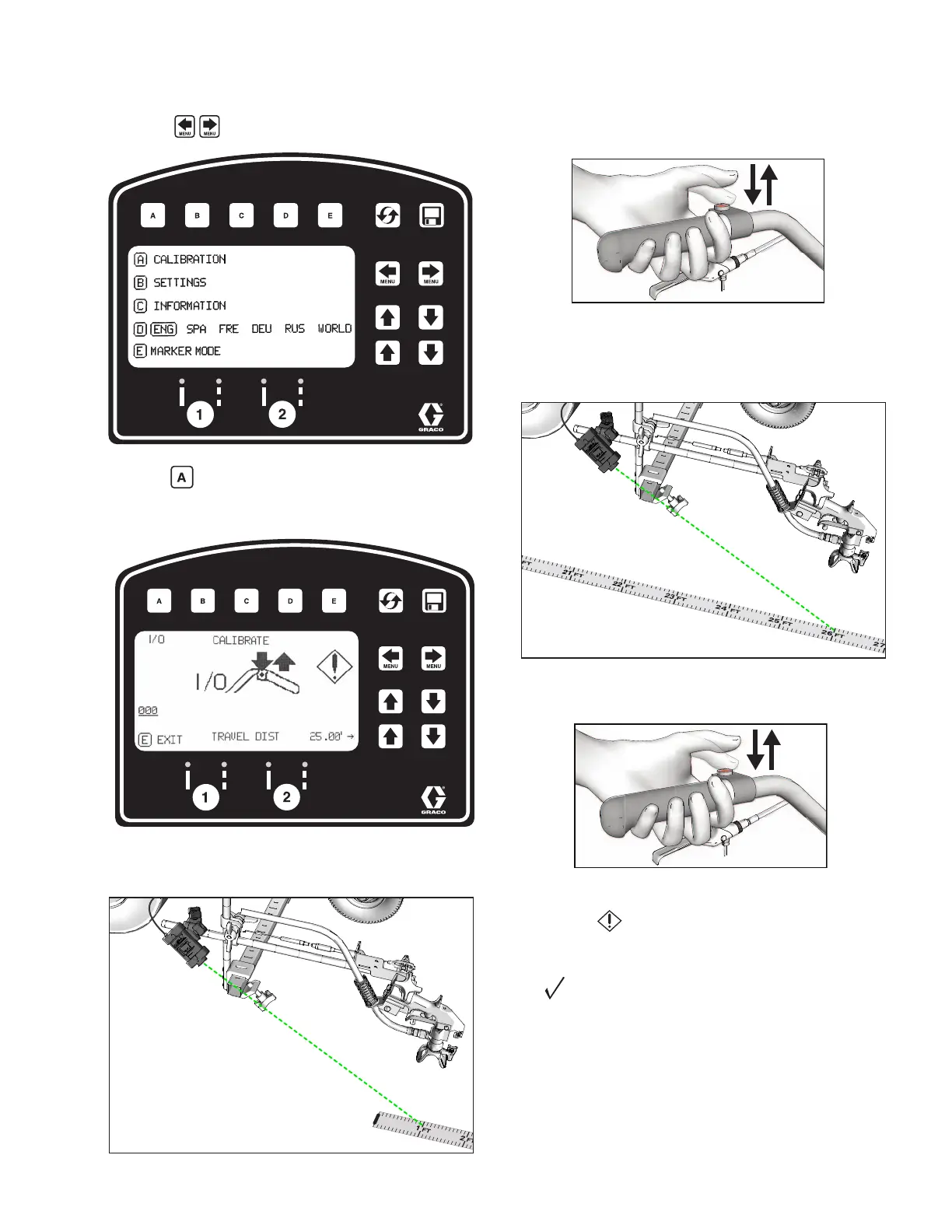
LineLazer V LiveLook Display
3A3426EOperation 37
3. Press to select Setup/Information.
4. Press for Calibration. Set TRAVEL DIST to 25 ft
(7.6m) or longer. Longer distances ensure better
accuracy, depending on conditions.
5. Turn on laser and align laser dot with 1 foot
(30.5cm) on steel tape.
6. Press and release auto gun trigger control to start
calibration.
7. Move striper forward. Keep laser dot on steel tape.
8. Stop when laser aligns with 26-ft (8m) or distance
entered on steel tape (25-ft./7.6m distance).
9. Press and release auto gun trigger control to
complete calibration.
• Calibration is not complete when the exclamation
symbol is displayed.
• Calibration is finished when the check mark symbol
is displayed.
10. Calibration is now complete.
Go to Measure Mode (HP Auto Series), page 39, and
verify accuracy by measuring the tape.
ti27912a
ti27912a







 To Next Page