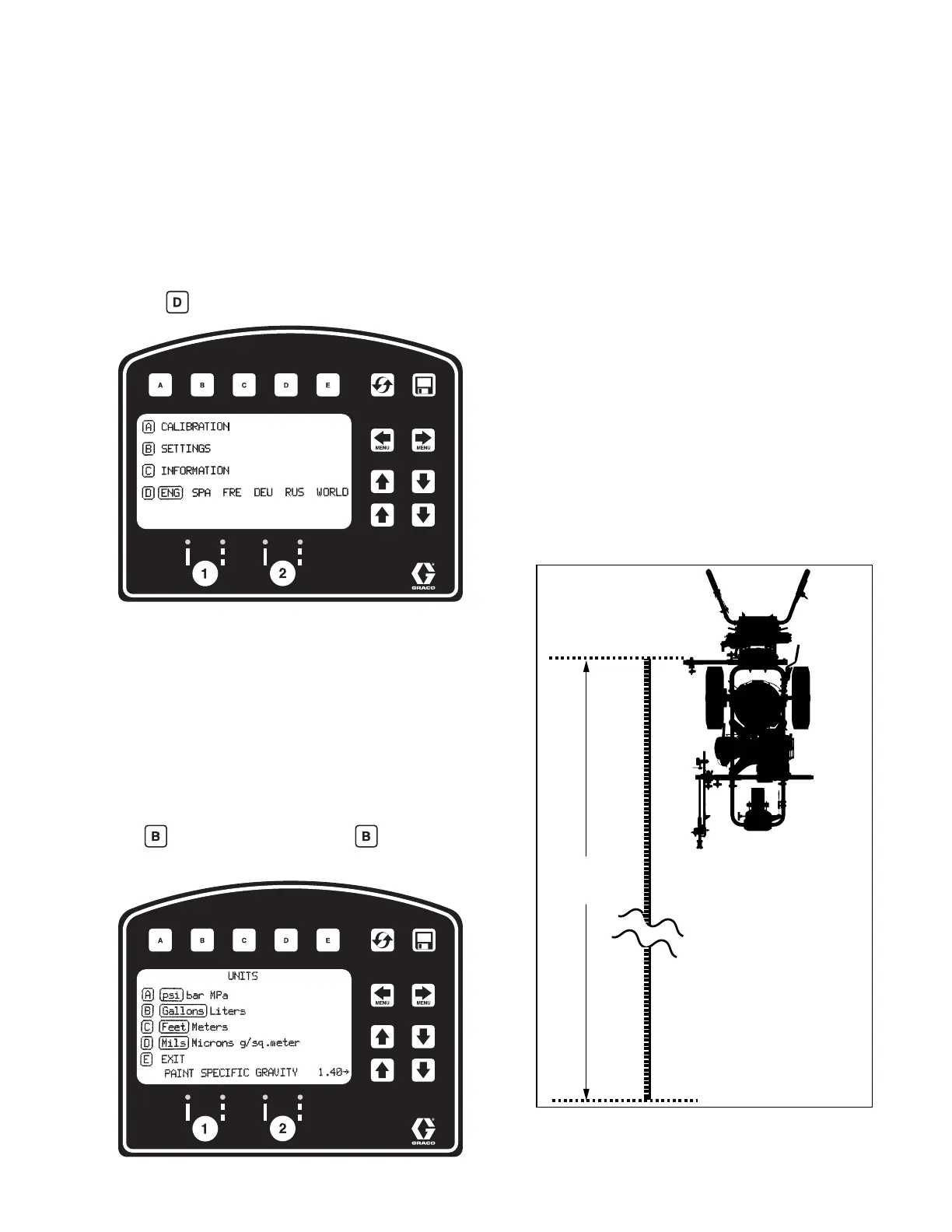
LineLazer V LiveLook Display
3A3426EOperation 27
Initial Setup (Standard Series)
The initial setup prepares the striper for operation based
on a number of user entered parameters. Language
selections and the units of measure selections can be
set before you start or changed later.
Language
From Setup/Information select appropriate language by
pressing until the language is outlined.
ENG = English
SPA = Spanish
FRE = French
DEU = German
RUS = Russian
WORLD = Symbols see World Symbol Key, page
60.
NOTE: Language can be changed later.
Units
Press to enter settings and then again to enter
units. Select appropriate units of measure.
US Units
Pressure = psi
Volume = gallons
Distance = feet
Line Thickness = mil
SI Units
Pressure = bar (MPa available)
Volume = liters
Distance = meters
Line thickness = micron (g/m
2
available)
Paint Specific Gravity = Use UP and DOWN arrows
to set specific gravity. Required to determine paint
thickness.
NOTE: All units can be changed individually at any
time.
Calibration
1. Check rear tire pressure 55 ± 5 psi (379 ± 34 kpa)
and fill if necessary.
2. Extend steel tape to distance greater than 26 ft.
(8m).







 To Next Page