LineLazer V LiveLook Display
42 3A3426EOperation
Angle Calculator
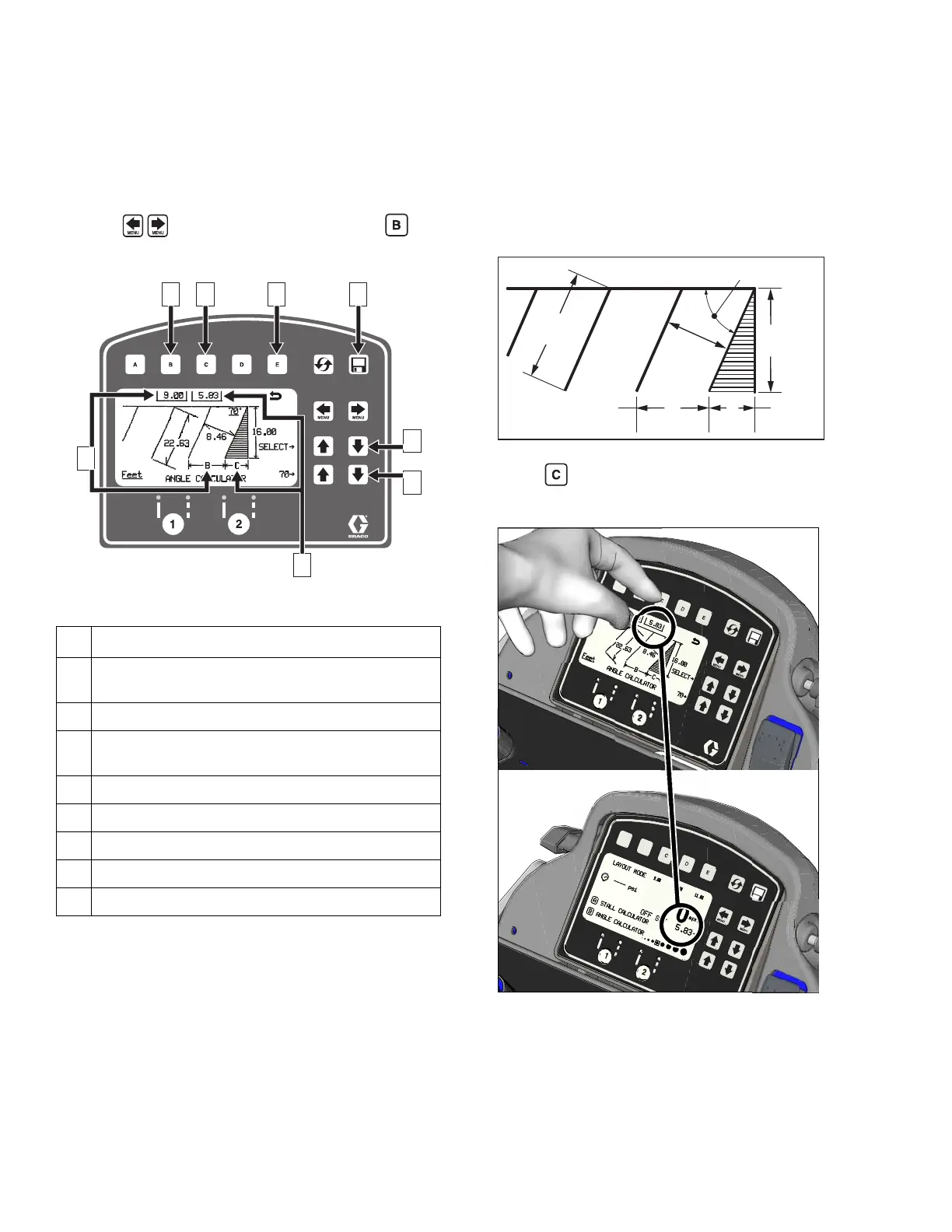
Angle Calculator is used to determine the offset value
and dot spacing value for a layout.
1. Use to select Layout Mode. Press to
open Angle Calculator Menu.
2. Dot spacing (B) and offset (C) are calculated based
on the parameters entered:
Stall angle
Stall depth
Stall size (width)
Line Length
3. Press to transfer calculated off set distance to
Layout Mode. Save this value in favorites if desired.
Ref. Description
1 Transfers calculated dot spacing, B, to Layout
Mode.
2 Transfers calculated off set, C, to Layout Mode.
3 Exits and returns to Layout Mode without
transferring any values.
4 Data Logging.
5 Select input variables.
6 Adjust the variable selected.
7 Calculated dot spacing, B.
8 Calculated off set, C.
STALL
SIZE
LINE
LENGTH
B
C
STALL
DEPTH
OFF SET
ANGLE
DOT SPACING
ti28024a










 To Next Page