4 – 8
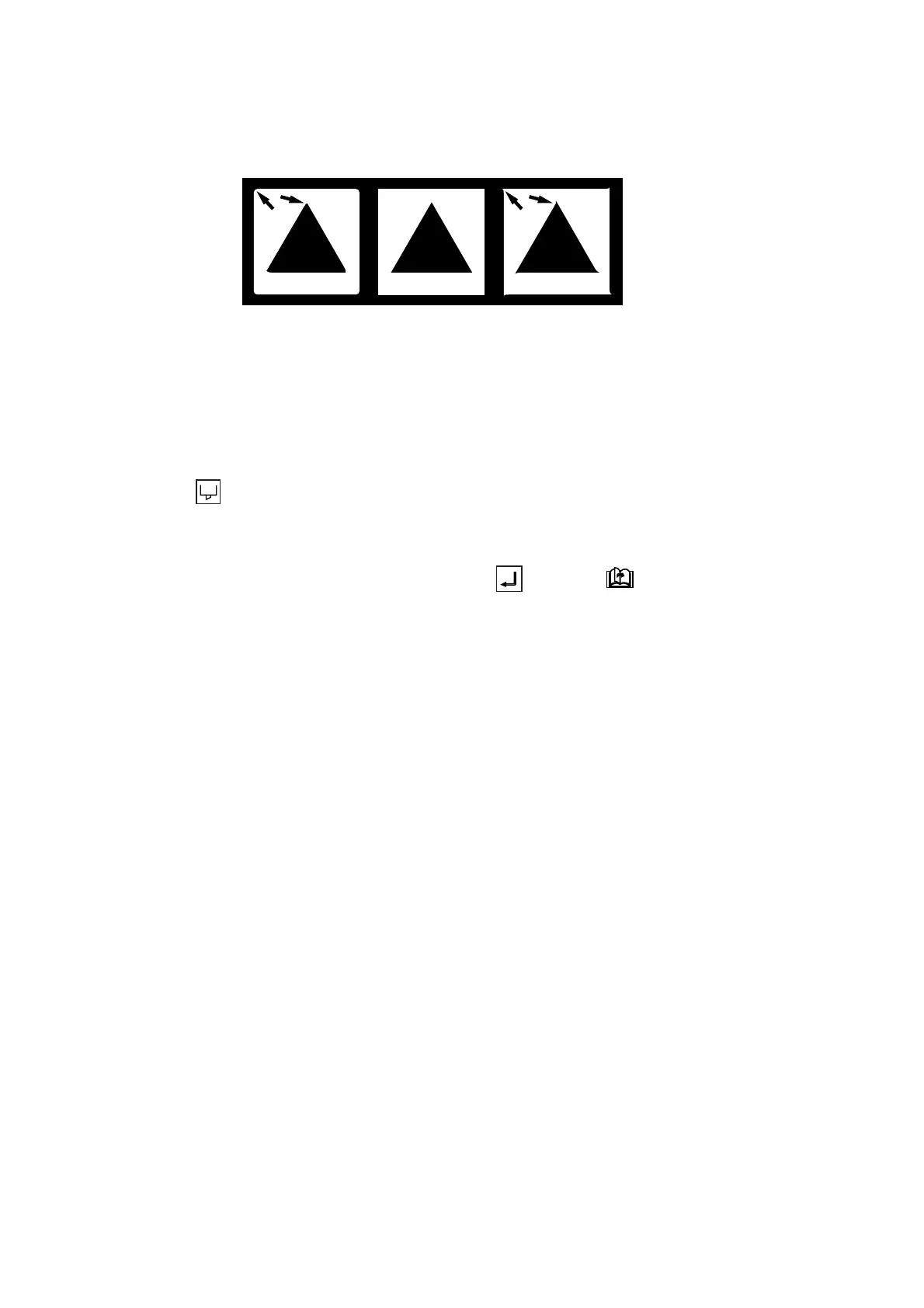
(6) Check the cut pattern(s). Peel off the four outside corners of the test pattern(s) that you cut by selecting
TEST 1 or 2, and then look at the corners of the inner triangle. If the corners are rounded, the OFFSET
setting is too low. Conversely, if the corners are too pointed, the OFFSET setting is too high.
(7) Next, peel off the corners of the triangle(s). Ideally, only slight traces of the cutter blade should remain
on the medium’s base sheet. If the base sheet has been cut through, either the FORCE setting is too
high or the cutter blade’s tip is extended too far. If the base sheet shows only a few traces of the cutter
blade, either the FORCE setting is too low or the cutter blade’s tip is not sufficiently extended.
(8) Press the CONDITIONS key to display the menu for specifying the cutting conditions, then adjust
the FORCE and OFFSET settings.
(9) Repeat Steps (3) through (8) until you achieve satisfactory test results.
(10) When satisfactory test results are achieved, press the ENTER or NEXT PAGE key to return
the plotter to READY status.
Insufficent offset
Raise the OFFSET value
(+1 to +5)
Ideal offset Excessive offset
Lower the OFFSET value
(
-
1 to -5)










 To Next Page