47
CB - Searches the Citizens Band radio frequencies
Marine - Searches the VHF-FM marine radio band
FRS/GMRS/MURS/DOT/STAR (F/G/MURS) - Searches the FRS, GMRS,
MURS, DOT and STAR radio frequencies
Railroad - searches the Association of American Railroads (AAR) VHF
railroad frequencies used in the US and Canada
When finished, press the
Save
softkey to store your SRVC search as a
new object.
Once your SRVC object is saved, you can use it while scanning, or launch
the SRVC search by itself by pressing the
SRCH
softkey after navigating to
the SRVC object in Manual Mode.
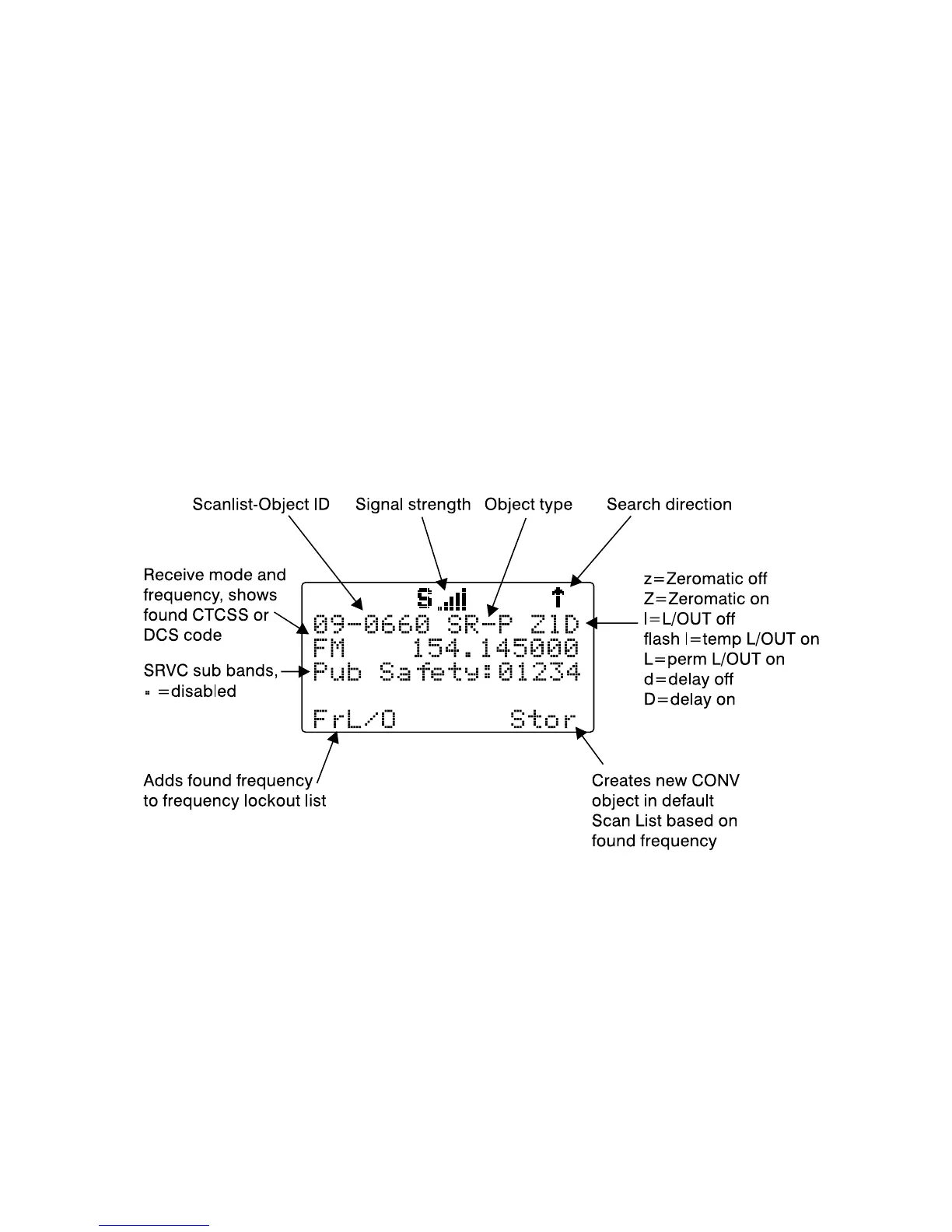
When the SRVC search stops on an active frequency, the display will
appear as follows:
To resume searching, press the
5
key.
Now, take a few moments to practice setting up each of the different search
object types by experimenting and creating some SRVC, LMIT and SWPR
objects.
HINT: Remember that there is context sensitive help available for each
menu item in the object menus. Just press FUNC, then SEL to view the
help, and SEL again to exit the help screen.



 To Next Page