66
Using dedicated TUNE mode
Your scanner's dedicated TUNE mode provides you with the ability to
quickly enter any frequency and monitor that frequency for transmissions,
or search up or down from that frequency for activity.
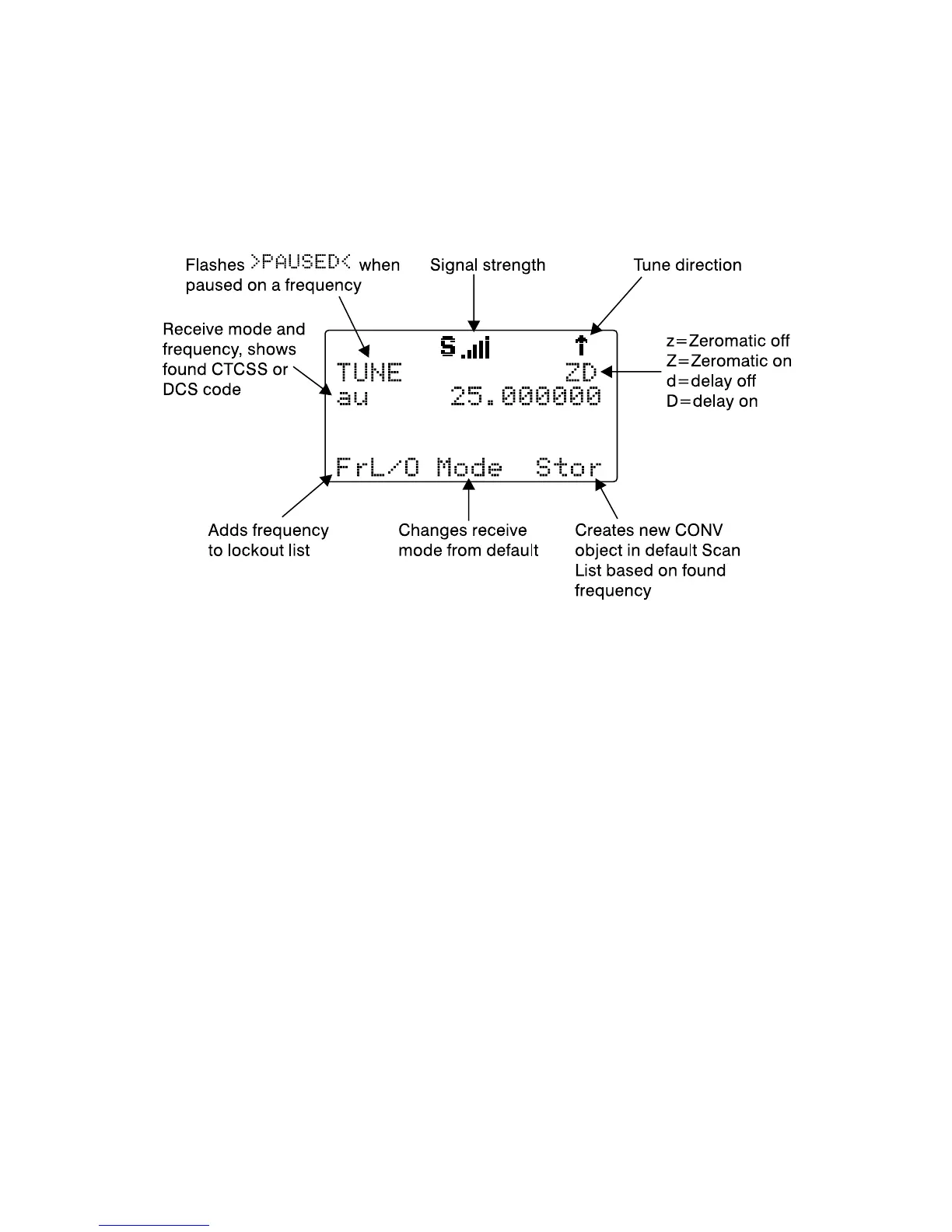
To enter TUNE mode, press the TUNE key on the keypad. The scanner
displays the TUNE screen.
By default, TUNE mode is paused when first activated. Press PAUSE to
begin searching from the current frequency.
Press the
5
or
6
keys on the 5-way pushbutton pad to change the search
direction.
Press the
FrL/O
softkey to add a found frequency to the lockout list.
Press the
MODE
softkey to change the receive mode (AM, FM, NFM) from
the default for the current frequency range (au).
Press
STOR
to create a new CONV object using the found frequency.
Use the keypad to enter a new frequency, and press ENT to make that the
TUNE frequency.
Using FUNC TUNE from any other mode will load the last active frequency
from the other mode into TUNE. For example, pressing FUNC TUNE while
parked on a trunked radio TGRP will load the control channel frequency
into the TUNE mode if the control channel frequency is the last frequency
that the scanner checked while scanning.



 To Next Page