GREENWORKSTOOLS.COM GREENWORKSCOMMERCIAL.COM
26
2021-03-18
5. Repairing the charging
station
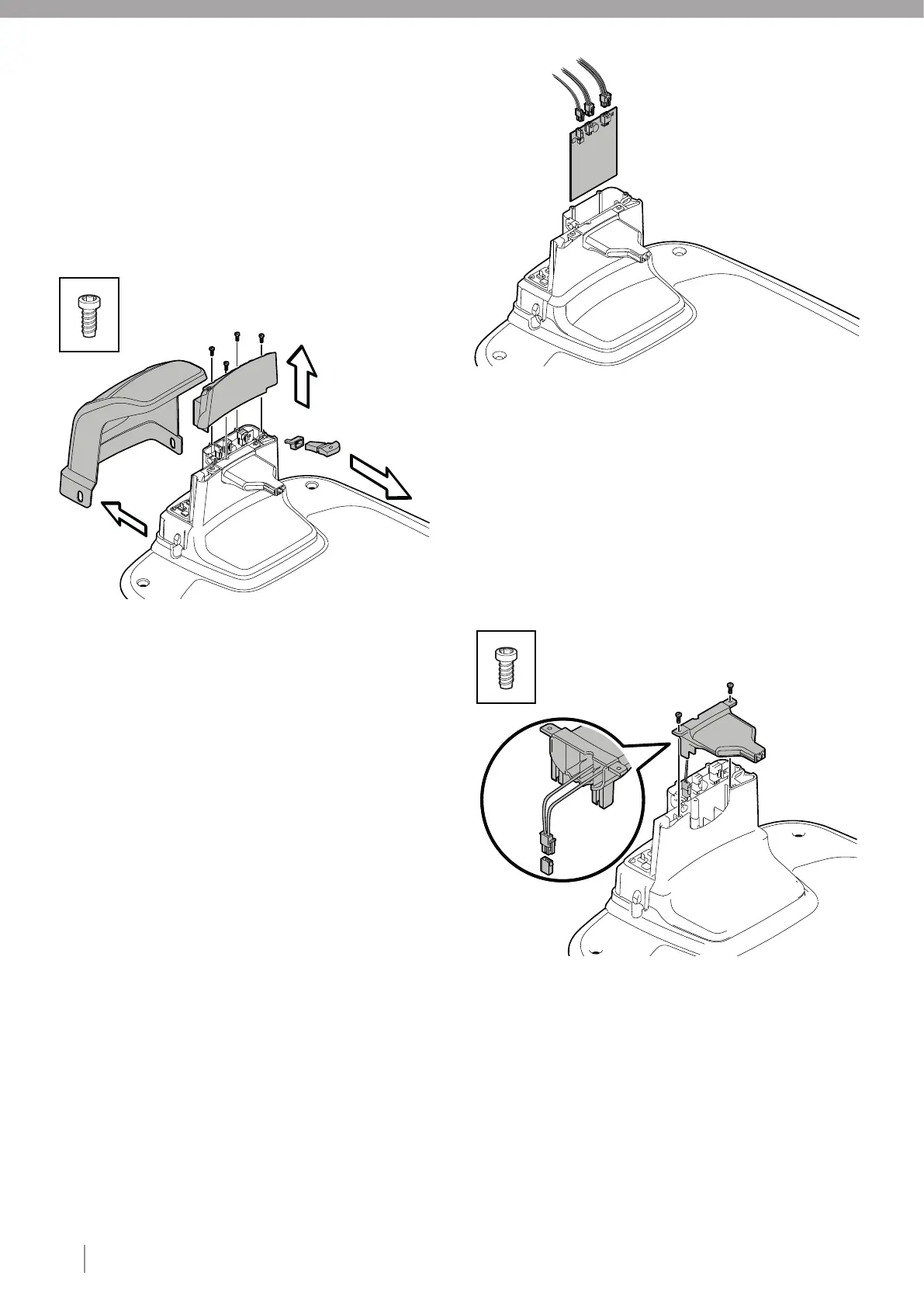
5.1. DISASSEMBLING THE CHARGING STATION
1 Disconnect the power supply.
2 Remove the charging station hood from the charging station by
0 pressing in the tabs on each side of the charging tower base and
0 lifting away the hood.
3 Disconnect all cables from the charging station.
4 Unscrew four type 2 fasteners that secure the charging tower top
0 to the charging tower.
5 Remove the charging tower top and the light guide and light guide
0 holder.
5.2. REPLACING THE CHARGING STATION BOARD
1 Disassemble the charging station (see section 5.1).
2 Disconnect all cables from the charging station board by pressing
0 the catches on the connectors.
Note: Pull on the connectors, not the cables.
3 Lift out the old charging station board from the charging tower.
Note: Only handle the charging station board by the edges to
prevent ESD damage.
X4
X2
4 Fit the new charging station board into the slots in the charging tower.
5 Connect all connectors to the charging station board.
6 Assemble the charging station (see section 5.5).
7 Set the device type of charging station board in.
5.3. REPLACING THE CHARGING NOZZLE
1 Disassemble the charging station (see section 5.1).
2 Unscrew two type 2 fasteners that secure the charging nozzle to
0 the charging tower.
3 Disconnect the charging nozzle cable from the charging station board.
Note: Pull on the connectors, not the cables.
4 Remove the old charging nozzle and fit the new charging nozzle
0 onto the charging tower.
5 Insert two type 2 fasteners and tighten to the correct torque (see
4 section 3).
6 Guide the charging nozzle cable through the rubber grommet and
4 connect the charging nozzle cable to the charging station board.
7 Assemble the charging station (see section 5.5).










 To Next Page