GREENWORKSTOOLS.COM GREENWORKSCOMMERCIAL.COM
10
2021-03-18
2.2. SYMPTOMS
Table 3 lists the most commonly occurring symptoms grouped by the
following situations where they occur most often (mowing, docking,
and charging).
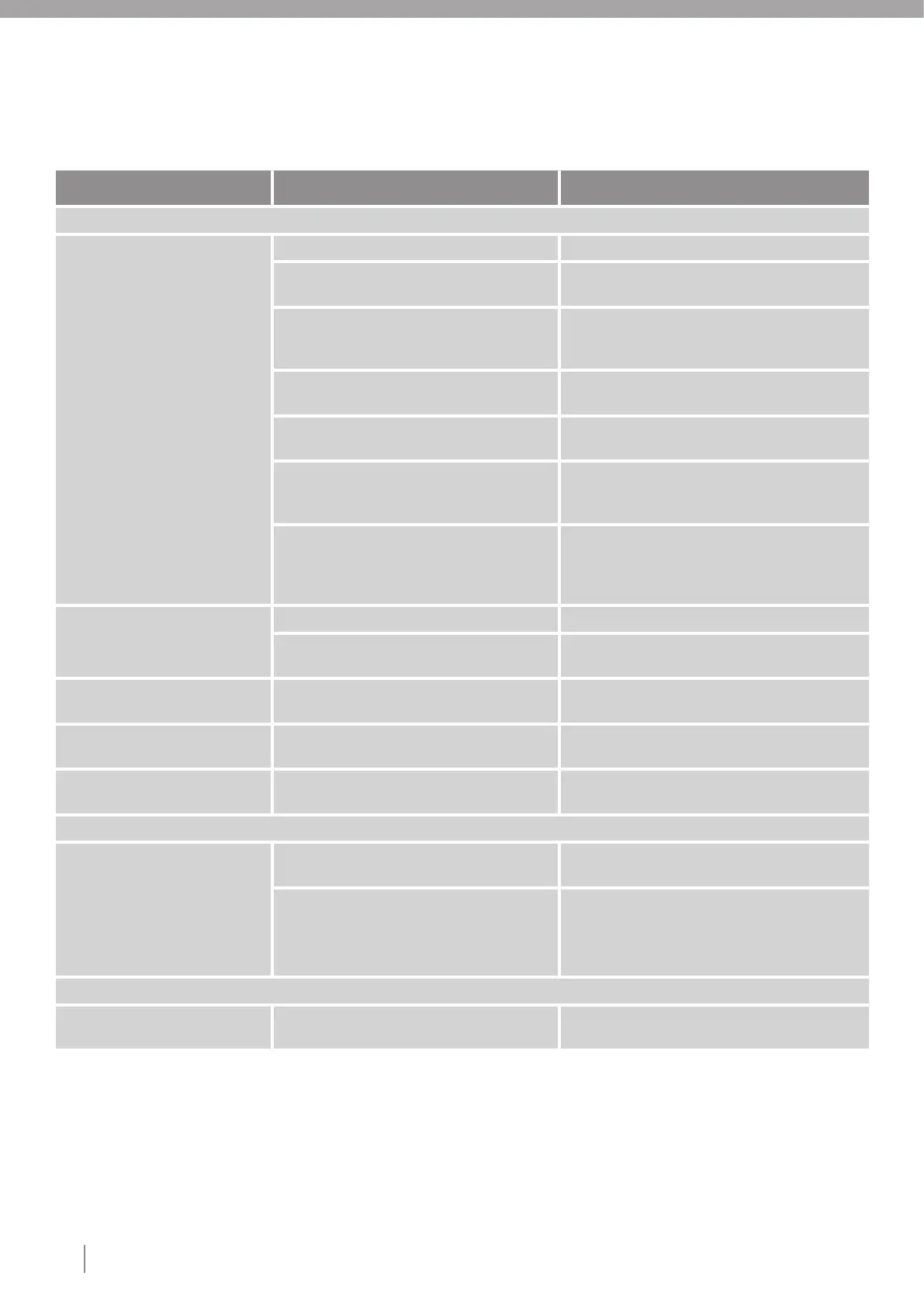
Table 3: Symptoms and corrective actions
Symptom Cause Action
Mowing
Uneven mowing results The mower works too few hours per day. Increase the working hours in the app.
Working area too large. Try to limit the working area or extend the working
time in the app.
Blunt blades. Replace all the blades and screws so that the
rotating parts are balanced (see the Operator
Manual).
Long grass in relation to the set cutting height. Increase the cutting height and then gradually
lower it (see the Operator Manual).
Incorrect lawn coverage settings. Check the lawn coverage settings and optimize them
for the installation (see the Operator Manual).
Does not follow the guide wire to the areas
specified.
Check the guide signal (see section 2.4), as well
as the settings for following the guide wire (see
section 2.4).
Accumulation of grass by the blade disc or
around the motor shaft.
Check that the blade disc rotates freely and easily.
If not, the blade disc may need to be removed
and grass and foreign objects removed (see the
Operator Manual).
The mower operates at the
wrong time.
The mower clock needs to be set. Set the clock in the app.
The start and stop times for mowing are incorrect. Adjust the start and stop time setting for mowing
in the app.
The mower vibrates. Damaged blade on blade disc. Inspect the blades and screws and replace them if
necessary (see section 4.5).
The mower mows for shorter
periods than usual between charges.
Grass or a foreign object is blocking the blade
disc or wheels.
Remove and clean the blade disc (see section 4.6).
Both the mowing and charging
times are shorter than usual.
Impaired battery capacity. Replace the battery (see section 4.18).
Docking
The mower detects charging
station plate, but cannot dock.
The mower can not dock. Clean the charging station (see the Operator
Manual).
Check the mechanical components like wheels
so that it is not stuck due to grass.
Follow the yearly service.
Make sure the cable lugs and connection for the
contact strips are intact and properly connected.
Ensure the correct cable is connected to the right
charging strip (see section 5.2).
Charging
Both the mowing and charging
times are shorter than usual
Impaired battery capacity. Replace the battery (see section 4.19).




 To Next Page