GREENWORKSTOOLS.COM GREENWORKSCOMMERCIAL.COM
12
2021-03-18
2.3. INTERPRETING LED INDICATORS
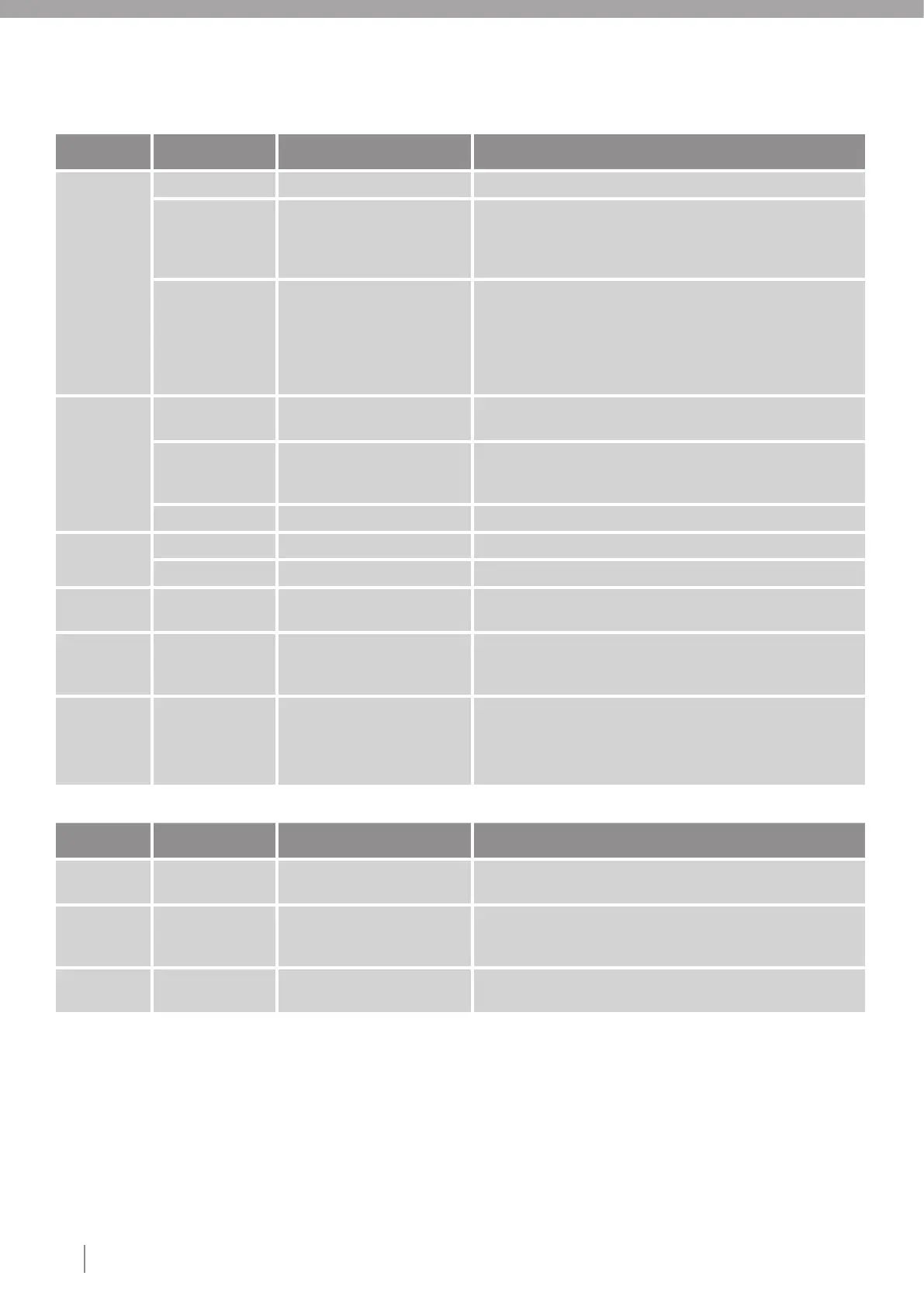
Table 4. Indicator LEDs on mower
Color Status Meaning Action
Operating
(Green)
On Start button pressed. No action required.
Off Safety key is in Disabled
position, mower stopped with
STOP button or robot is in error
state or alarm state.
No action required.
Flashing Mower in recovery mode Allow the mower 3 hours to download the correct software and
reprogram before using the mower. An internal software error
has forced the mower to enter recovery mode. Ensure that
the mower has GSM coverage and that the safety key is left in
Enabled position when robot are placed in the charging station. If
robot can't finish recovery in 24 hours contact Globe support.
Connectivity
(Blue)
Flashing Mower is establishing the
connection.
Ensure if the mower have GSM coverage. If robot can't connect to
server, replace the communication module.
On Connection established.
Mower is parable in the first
5min.
No action required.
Off Robot turned off with key. No action required.
Security
(Yellow)
Flashing PIN code authorization required. Verify the PIN code using the app.
Off No pin required. No action required.
Error
(Red)
Flashing Mower stopped with error. Mower require users attention (For further error information, check
error code).
All four LEDs On Mower booting. No action required.
This is normal behaviour for the first seconds when the mower is
turned on.
Red
Remaining
three LEDS
On
Flashing
Mower recovery failed. Turn the safety key to Disabled position and back to Enabled.
Allow the mower 3 hours to download the correct software and
reprogram before using the mower. Ensure that the mower has
GSM connection and that the safety key is left in Enabled position.
Table 5. Indicator LEDs on charging station
Color Status Meaning Action
Green On Boundary wire and Charging
station OK
No action required.
Blue Flashing Boundary loop wire broken
or not connected (may occur
while mower is charging).
Undock mower and see if LED turns steady Green. If not, check
boundary and connectors for damage.
Red Flashing Electronic fault in charging
station or power supply unit.
Replace power supply, or CS board
Note: Use only original replacement parts.











 To Next Page