GREENWORKSTOOLS.COM GREENWORKSCOMMERCIAL.COM
9
2021-03-18
Code Message Cause Action
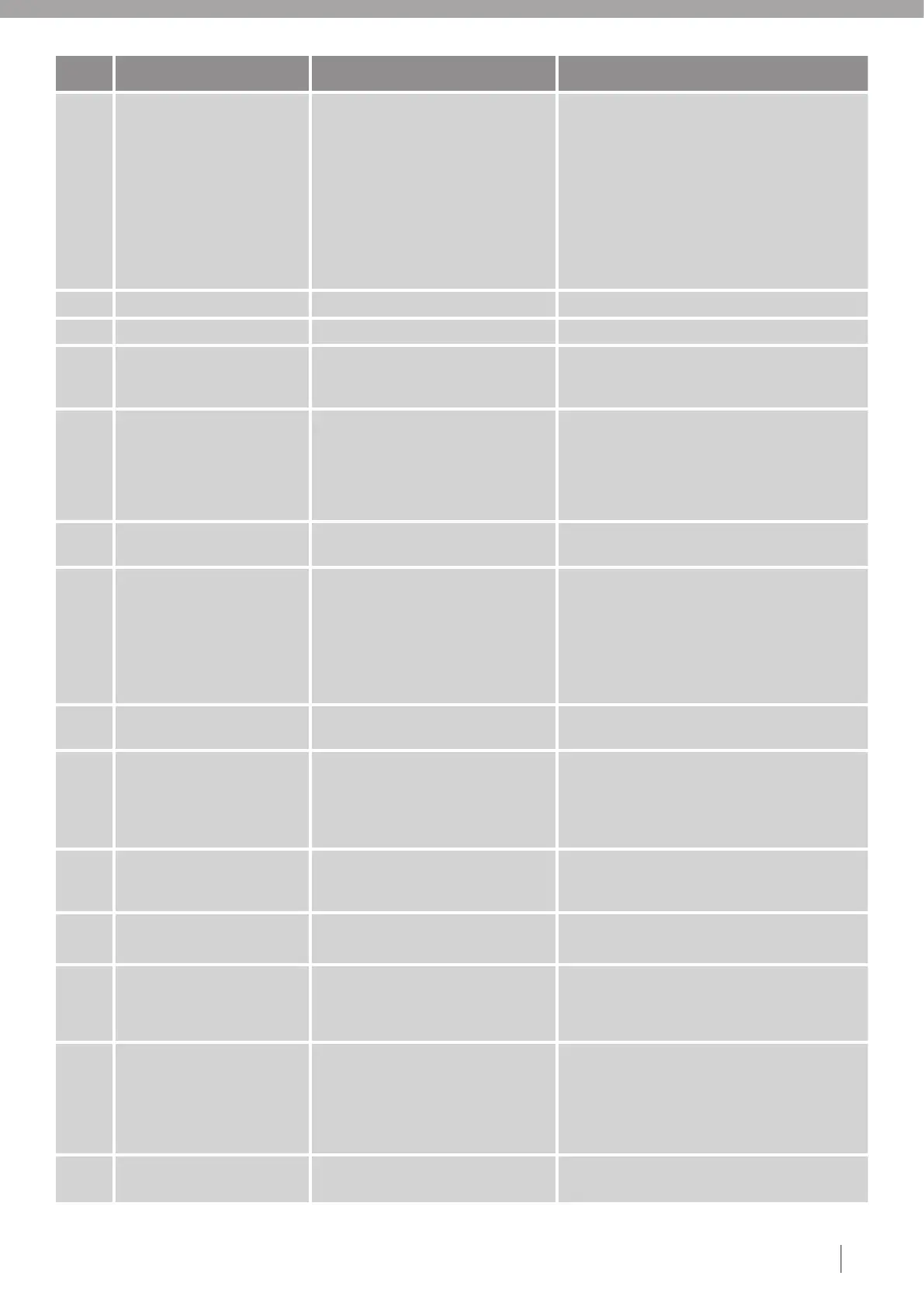
55 Stuck in Charging station. Mower has tried to leave CS, but can
still detect charging power.
1. Make sure the charging station is installed in an
even level.
2. Make sure rear wheels and charging station base
are clean and has traction.
3. Make sure that charging plates on robot and
charging station has no damage and are free from
dirt and oxide.
4. Make sure that wheel motors work correctly.
5. If problem still remains change main board.
56 Not used.
57 Not used.
58 Geofence alarm. Alarm started because of mower
outside geofence area.
Acknowledge alarm with PIN. Note: Mower have
to be returned to geofence area for the function to
be resetted.
59 No loop signal. Boundary signal lost while running. 1. If LED on charging station is flashing blue, control
the boundary wire for any damage or loose connector.
2. If LED on charging station is steady green, set a
new loop code.
3. Fully reset the mower and CS.
60 Lost connection to Charging
station.
Mower is pulled out from CS. Loop
signal still detected.
Press STOP then START on the robot.
61 No power in Charging station. Mower in CS. Lost CS Power. No loop
signal.
1. Check that it is power in the wall socket.
2. Make sure the powersupply is pluged in and
there is no damaged on power cable.
3. If problem still remains replace the power supply.
4. If problem still remains change the charging
station board.
62 Loop signal installation conflict. Interference with loop signal from other
installation. Change loop code.
63 Mower software updated. Indicates that a new Main Application
SW is installed.
Log data 1: Byte 0 = Minor version, Byte
1 = Major version.
Log data 2 = Build no.
64 STOP followed by START
required on mower.
Maybe mower started on disabling
device with Start button pressed. Press
on Stop + Start on mower needed.
Press STOP--> START on robot.
65 Front loop sensor defect. No loop signal on this sensor, but other
loop sensors ok.
1. Replace the loop sensor.
2. If problem still remains change main board.
66 Cutting motor brake defect. Cutting motor cannot be stop fast
enough.
Repair by service personnel needed.
1. Reset the fault indication from A3S.
2. If problem still remains change main board.
3. If problem still remains replace cutting motor.
67 Too low charging current. Charging current very low.
May be bad connection to CS or faulty
PSU.
1. Make sure that charging plates on robot and
charging station has no damage and are free from
dirt and oxide.
2.If problem still remains replace power supply.
3.If problem still remains replace main board.
68 Charging system defect in
mower.
Charging system on mower Main board
defect.
1. Complete a power cycle on mower.
2. Change mainboard.




 To Next Page