-30-
Model T33903/T33904 (Mfd. Since 07/23)
Adjusting
Depth Stop
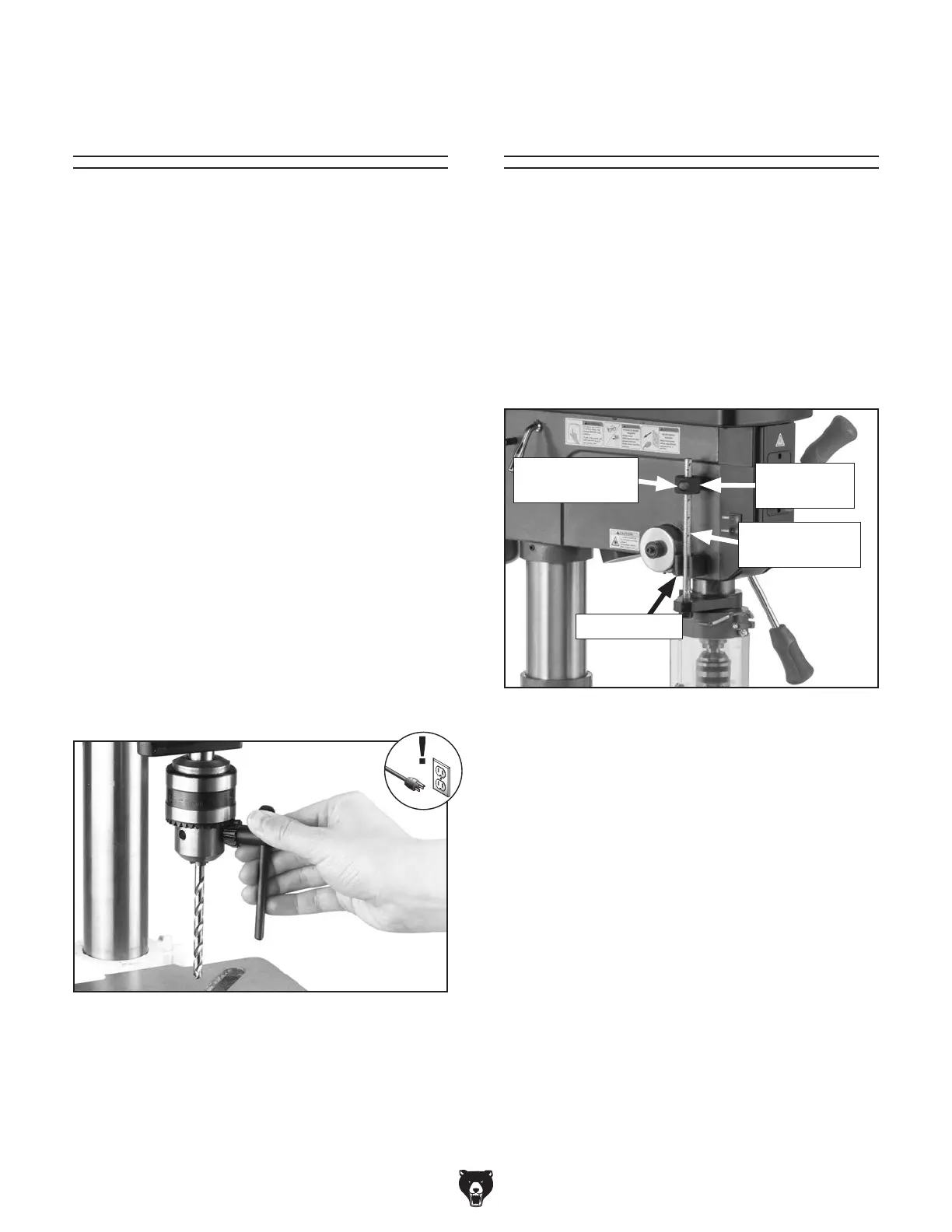
Figure 36. Depth stop components.
To adjust depth stop:
1.
Lower drill bit to required height.
2. Thread depth stop nut down against stop
bracket.
Tip: Press quick-release button on depth
stop nut to quickly adjust nut up or down on
rod.
Note: Scale on depth stop can be calibrated
if it gets moved or has changed since the fac-
tory setting. Refer to Calibrating Depth Stop
on Page 43 for instructions on how this is
done.
The Model T33903/T33904 has a depth stop that
allows you to drill repeat non-through holes to the
same depth every time. The scale on the front of
the depth stop shows the depth in inches.
The depth stop consists of a threaded rod
attached to the quill with a depth stop nut that
can be lowered or raised against a stop bracket
to control drilling depth. Figure 36 shows the
various components of the depth stop.
Stop Bracket
Threaded Rod
w/Scale
Installing/Removing
Drill Bit
Any drill bit you install in the chuck must be
tight enough that it will not come loose during
operation.
Installing Drill Bit
1. DISCONNECT MACHINE FROM POWER!
2. Open drill chuck wide enough to accept
shank of drill bit.
3.
Insert drill bit as far as possible into chuck
WITHOUT allowing chuck jaws to touch
fluted portion of bit, then hand-tighten chuck.
Note: Make sure small bits are not trapped
between edges of two jaws; if they are, re-
install drill bit or it will not be secure enough
to use for drilling.
4.
Tighten chuck firmly with chuck key (see
Figure 35), then remove chuck key from
chuck.
Removing Drill Bit
1. DISCONNECT MACHINE FROM POWER!
2. Use chuck key to open drill chuck, and catch
drill bit with rag to protect your hands.
Figure 35. Example of tightening chuck with
chuck key.
Item Needed Qty
Chuck Key ......................................................... 1
Rag ................................................................... 1
Quick-Release
Button
Depth Stop
Nut


 To Next Page