18
Picture settings
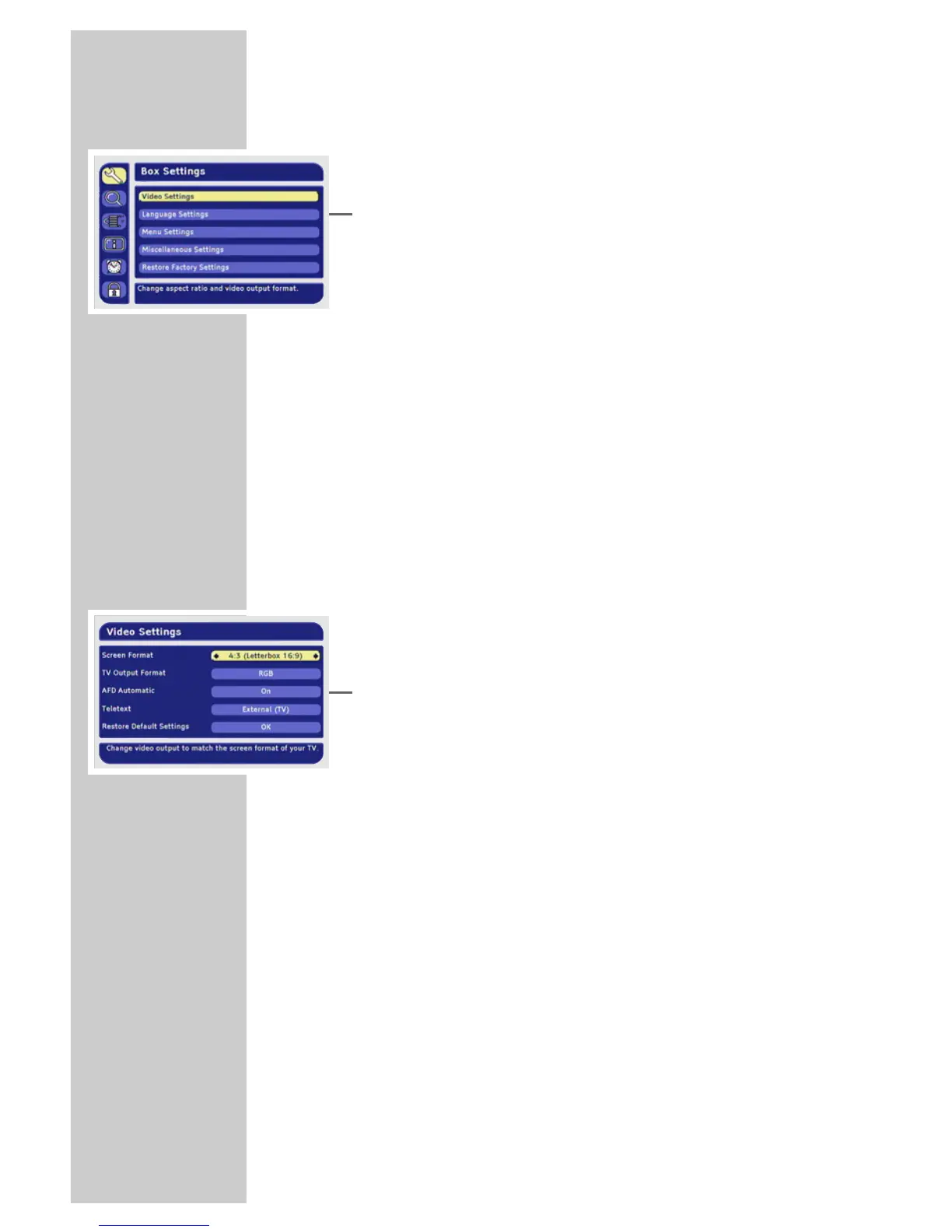
1 Press »i« to open the main menu.
– The main menu is displayed.
2 Select »Box Settings« by pressing »P+« or »P-« and press
»OK« to confirm.
– The »Box Settings« menu appears.
3 Select »Video Settings« with »P-« or »P+« and press »OK« to
confirm.
Note:
Additional operations are explained in the following sections.
Selecting the television picture format
If you have a 16:9 format television or flat screen, select the
»16:9/Widescreen TV« setting.
If you have a 4:3 format television or flat screen, the following set-
tings are available:
»4:3 (Pan&Scan/CCO)« for wide-screen playback without black
bars on the top and bottom edges of the screen. The picture is
cropped on the left and right.
»4:3 (Letterbox 14:9)« and »4:3 (Letterbox 16:9)« for widescreen
playback, with black bars at the top and bottom of the television
screen.
1 Select »Screen Format« with »P-« or »P+«.
2 Press »
Ǹ
« or »
Ƿ
« to select the screen format.
Specifying the video signal at the Euro AV (TV)
output
You can choose »Video (CVBS)« (normal picture quality), »RGB«
(high picture quality) or »S-Video (Y/C)«. The default setting is
»RGB«.
1 Select »TV Output Format« with »P-« or »P+«.
2 Select the video signal with »
Ǹ
« or »
Ƿ
«.
Selecting AFD
The transmitted screen format can differ from the displayed screen
format.
AFD recognises and corrects the display when switched on.
1 Select »AFD Automatic« with »P-« or »P+«.
2 Press »
Ǹ
« or »
Ƿ
« to switch AFD on or off.
SETTINGS ______________________________________________









 To Next Page