ENGLISH
27
Safety
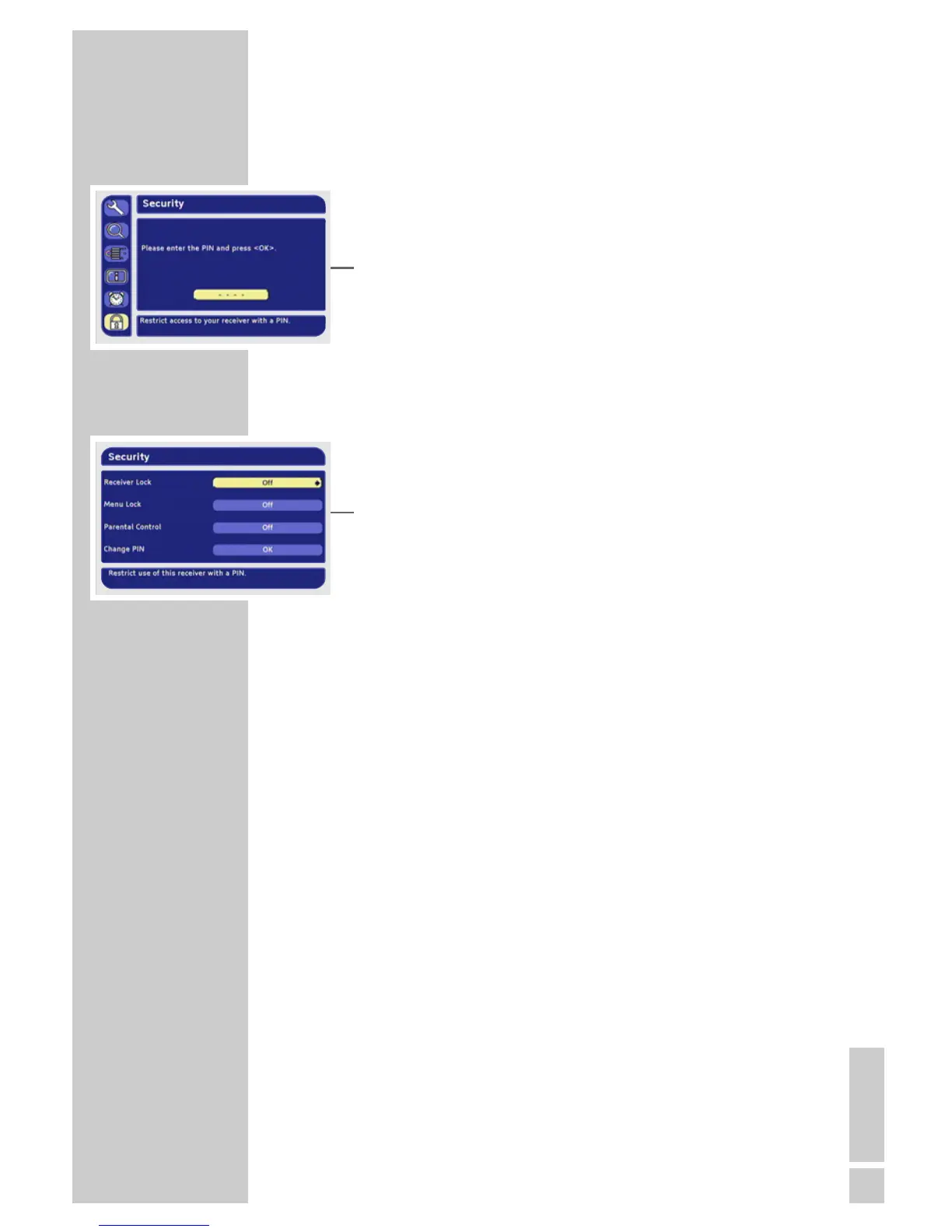
1 Press »i« to open the main menu.
– The main menu is displayed.
2 Select »Security« with »P+« or »P-« and press »OK« to con-
firm.
3 Enter the PIN code with the buttons from »0« to »9« and
confirm with »OK«.
Note:
The default PIN code is 0000.
Additional operations are explained in the following sections.
Device lock
The complete receiver is locked.
1 Select »Receiver Lock« with »P-« or »P+«.
2 Press »
Ǹ
« or »
Ƿ
« to switch the device lock on or off.
Menu lock
The menu is locked and can only be called up when the PIN code is
entered.
1 Select »Menu Lock« with »P-« or »P+«.
2 Press »
Ǹ
« or »
Ƿ
« to switch the menu lock on or off.
Parental lock
You can set a minimum age for certain programmes here.
1 Select »Parental Lock« with »P-« or »P+«.
2 Select the minimum age with »
Ǹ
« or »
Ƿ
«.
Changing the PIN code
You can set your personal PIN code here.
1 Select »Change PIN« with »P-« or »P+« and press »OK« to
confirm.
2 Enter the current PIN code with the buttons from »0« to »9«
and confirm with »OK«.
3 Enter the new PIN code with the buttons from »0« to »9« and
confirm with »OK«.
4 Enter the new PIN code again to confirm with the buttons from
»0« to »9« and confirm with »OK«.
Ending the settings
1 Press »i« to finish the setting.
ADDITIONAL FUNCTIONS
_____________________________



 To Next Page