ENGLISH
19
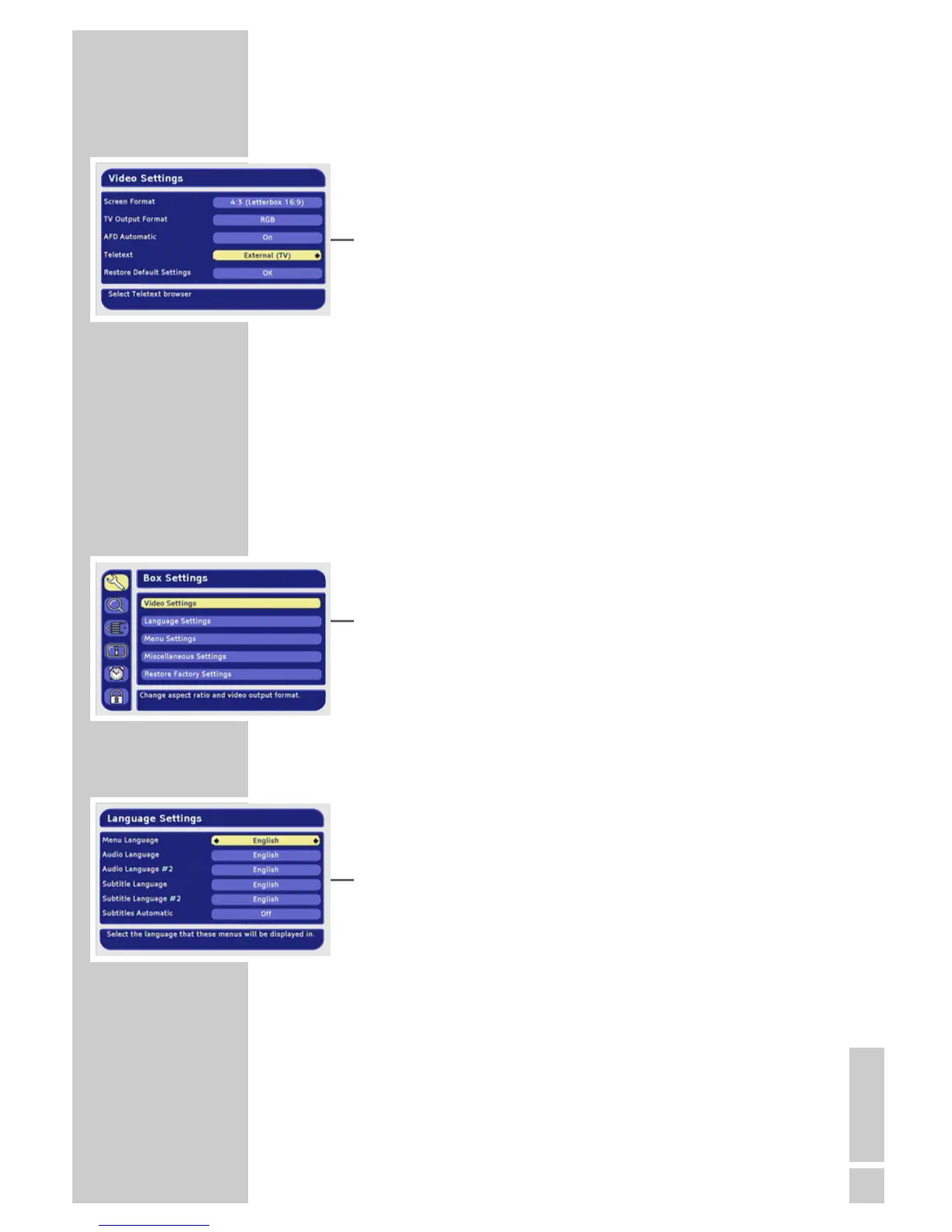
Teletext
With this function you can select whether teletext should be dis-
played on the receiver of the television.
1 Select »Teletext« with »P-« or »P+«.
2 Press »
Ǹ
« or »
Ƿ
« to adjust the setting.
Selecting the standard setting
You can reset the screen settings back to the default settings (factory
settings) with this function.
1 Select »Restore Default Settings« with »P-« or »P+« and press
»OK« to confirm.
Ending the settings
1 Press »i« to finish the setting.
Language settings
1 Press »i« to open the main menu.
– The main menu is displayed.
2 Select »Box Settings« by pressing »P+« or »P-« and press
»OK« to confirm.
– The »Box Settings« menu appears.
3 Select »Language Settings« with »P-« or »P+« and press
»OK« to confirm.
Note:
Additional operations are explained in the following sections.
Setting the menu language
1 Select »Menu Language« with »P-« or »P+«.
2 Press »
Ǹ
« or »
Ƿ
« to select the language.
Selecting the preferred audio language
You can set a preferred language for all programmes.
1 Select »Audio Language« with »P-« or »P+«.
2 Press »
Ǹ
« or »
Ƿ
« to select the language.
SETTINGS
_________________________________________________





 To Next Page