24
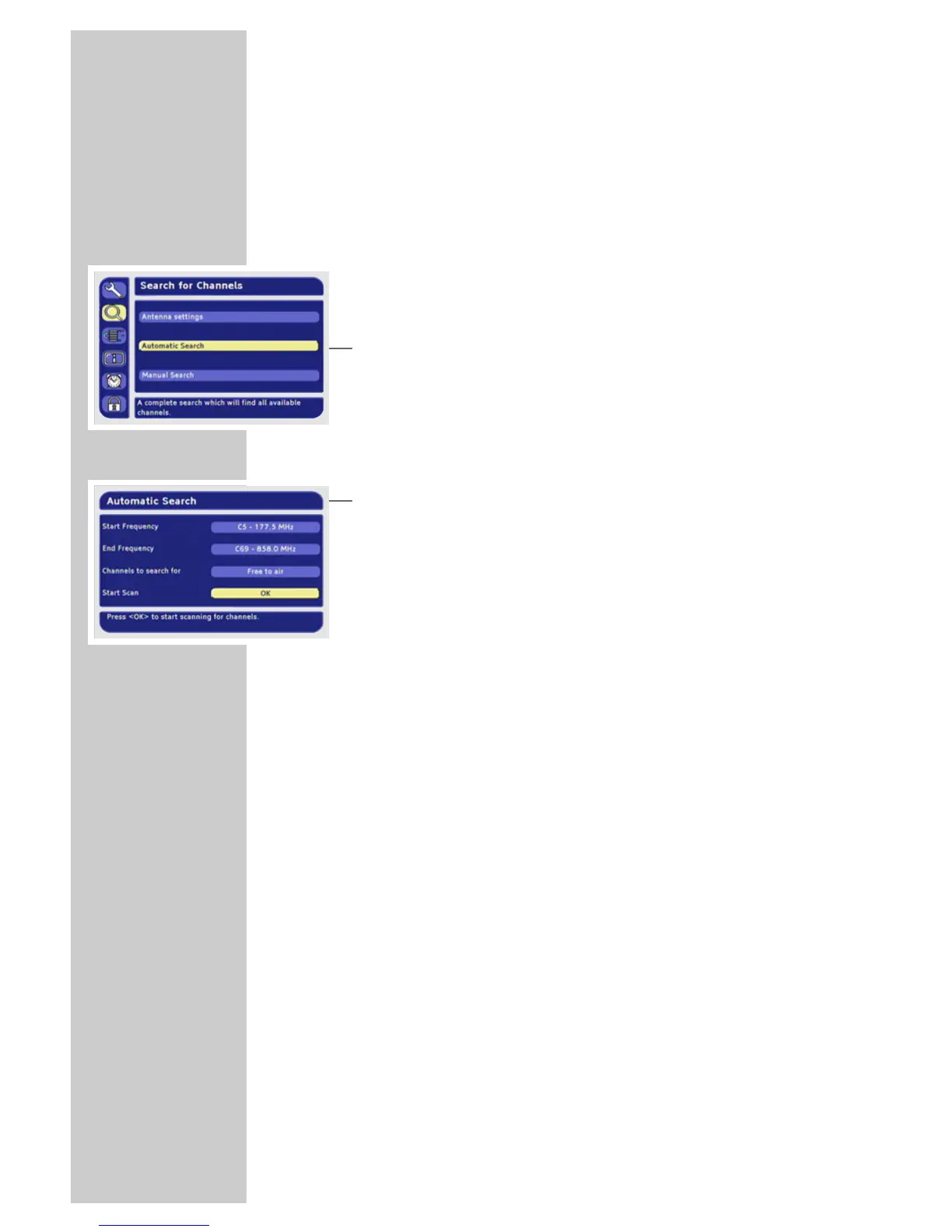
Automatic station search
The automatic search looks for receivable stations among the
available bouquets of digital stations.
1 In the main menu, select »Search for Channels« with »P-« or
»P+« and press »OK« to confirm.
Note:
You only need to change the antenna settings if the antenna
type (passive, active) has changed.
2 Select »Automatic Search« with »P-« or »P+« and press »OK«
to confirm.
Note:
You can retain the values for the start and end frequency.
Select the »All« option in »Channels to search for« if you would
also like to receive encoded stations.
3 Select »Start Scan« with »P+« or »P-« and press »OK« to start
the search.
– A message will appear once the search has ended.
4 Press »
Ǹ
« or »
Ƿ
« to select one of the following options:
»Yes, add new channels«
– The stations that have been found are added to the station list.
»Yes, replace old channellist«
– The old station list is overwritten with the new stations.
»No, discard new channels«
– The new stations are not stored.
5 Press »OK« to confirm.
6 Press »i« to finish the setting.
ADDITIONAL FUNCTIONS _________________



 To Next Page