ENGLISH
23
SETTINGS
_________________________________________________
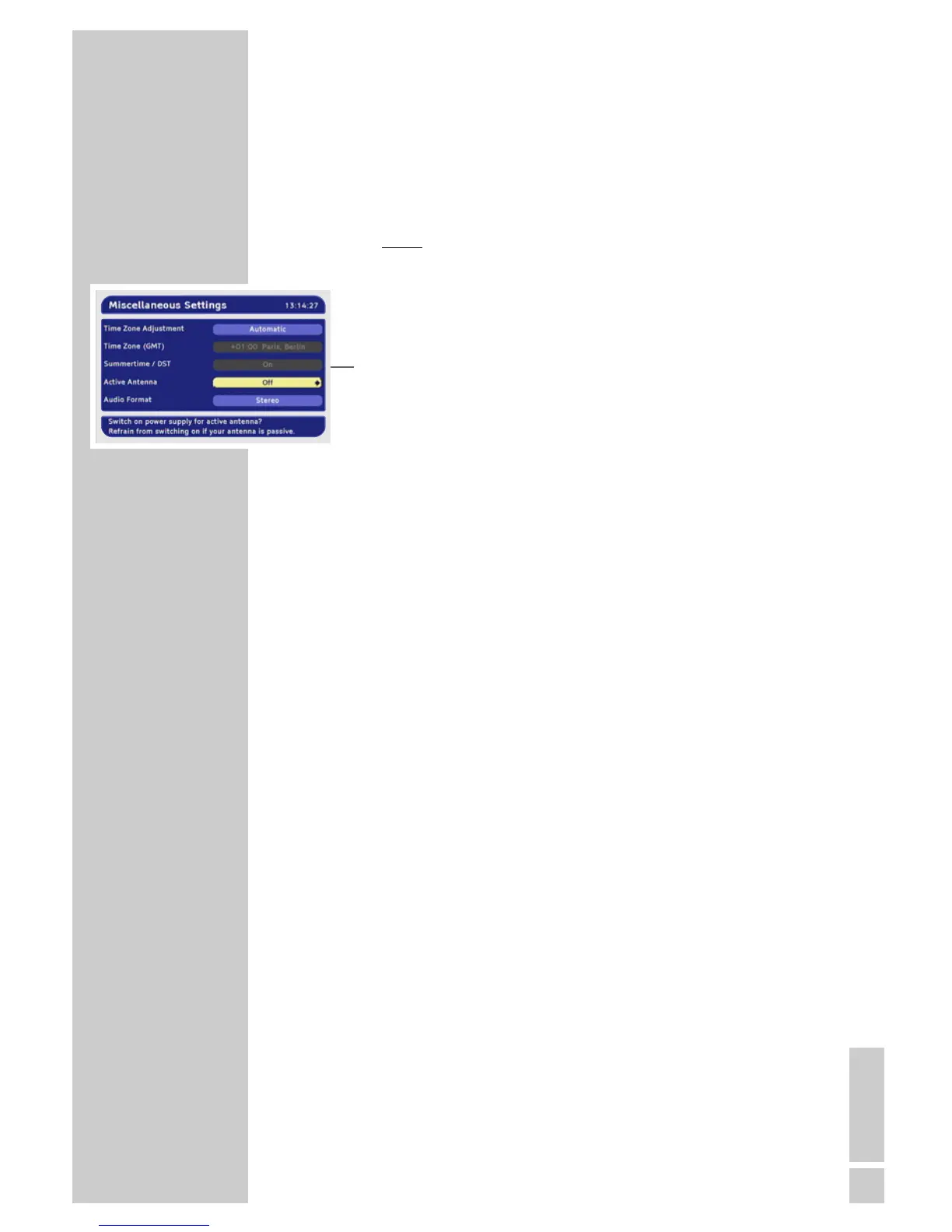
Switching the voltage for an active indoor
antenna on and off
An active indoor antenna with a signal amplifier can be
powered via the »
ÉÉ
« connection with a +5 V DC supply (max. 30
mA). However, only switch on the antenna voltage if the antenna is
an active indoor antenna with a signal amplifier with no power sup-
ply of its own from a mains adapter or similar source. Otherwise
you may cause a short circuit and irreparably damage your anten-
na.
1 Select »Active Antenna« with »P-« or »P+«.
2 Press »
Ǹ
« or »
Ƿ
« to switch the power supply on or off.
Stereo/two channel, mono
If the device receives two-channel sound programmes, e.g. a film
with the original sound on sound channel B (display: »Mono left
channel«) and the dubbed version on sound channel A (display:
»Mono right channel«), you can select the sound channel you want
to hear.
If the device receives stereo programmes, it switches automatically
to stereo sound (display: »Stereo«).
You can switch the sound to »Mono (Left + Right)« if the stereo
reception quality is poor.
1 Select »Audio Format« with »P-« or »P+«.
2 Select the television sound with »
Ǹ
« or »
Ƿ
«.
Ending the settings
1 Press »i« to finish the setting.









 To Next Page