GTO 3000XLS/3200XLS Instruction Manual © 01.10.12 15
GRNCOMCOM
CYCLE
CLOSE
SAFETY
SHADOW
LOOP
CLOSE
EDGE
OPEN
EDGE
EXIT
OPEN
BLK
RECEIVER
RED
RECEIVER
ORGBLUEWHTGRN BRN RED
MASTER OPERATOR
BLK
MASTER OPERATOR
CONTROL INPUTS
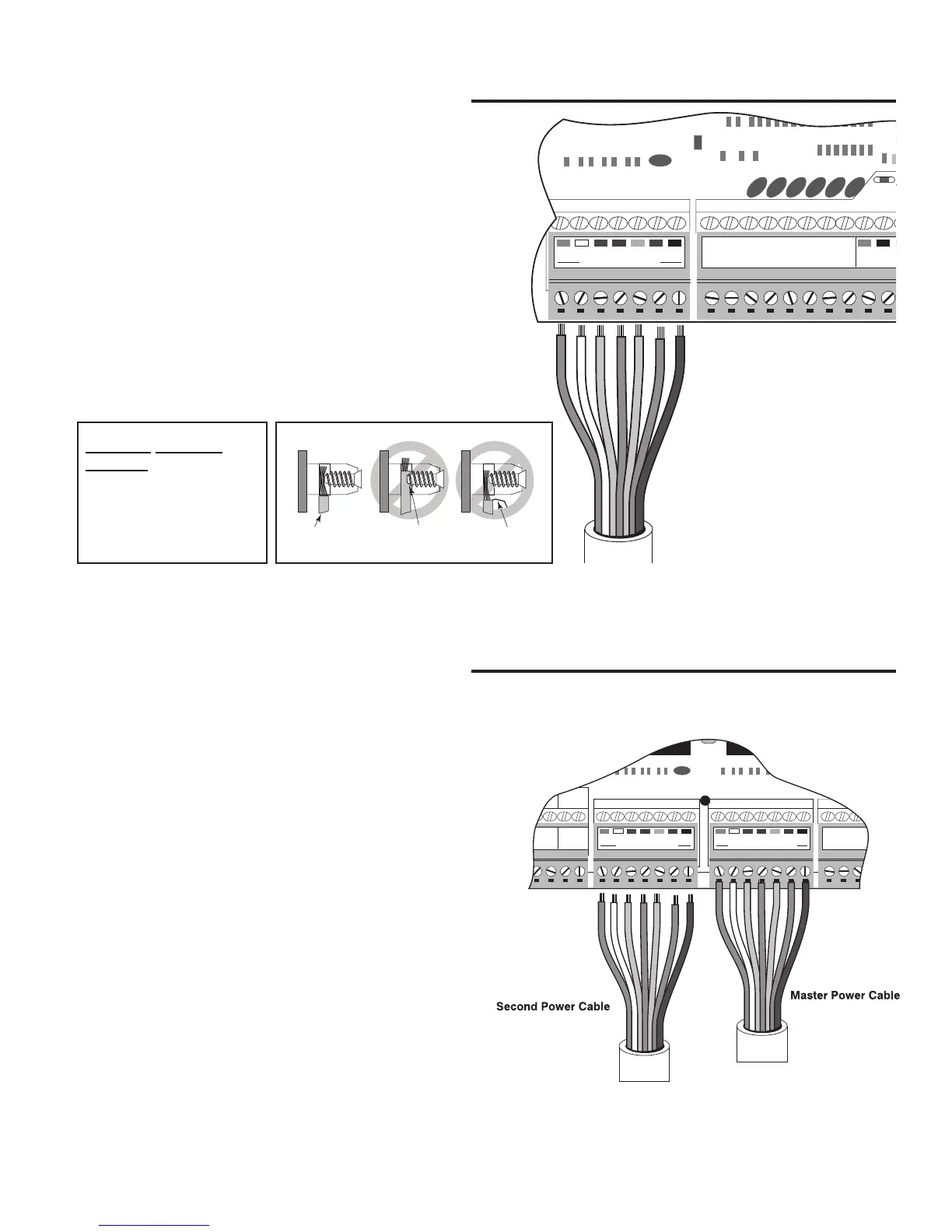
Step 3
Insert the stripped power cable wires into the
appropriate terminals on the MASTER OPERATOR
terminal block. The green wire should be inserted into
the GRN terminal, the white wire into WHT, the blue
wire into BLUE, brown wire into BRN, orange wire into
ORG, red wire into RED, and the black wire into the BLK
terminal.
Tighten the set screws against the end of the wires.
Correct
Wrong Wrong
Wire
Screwed into
wire insulation
Exposed strands
of wire
Connecting MASTER Operator
Step 4
Insert the stripped wires of the power cable into the
appropriate terminals on the SECOND OPERATOR
terminal block. The green wire should be inserted
into the GRN terminal, the white wire into WHT, the
blue wire into BLUE, brown wire into BRN, orange
wire into ORG, red wire into RED, and the black wire
into the BLK terminal.
Tighten the set screws against the end of the wires.
Connecting SECOND Operator
NEVER SPLICE
WIRES
Splicing permits
corrosion and seriously
degrades the wire's ability
to carry an adequate
current.
COM COM
CYCLE
CLOSE
SAFETY
SHADOW
LOOP
EXIT
OPEN
ORGBLUEWHTGRN BRN RED
MASTER OPERATOR
BLK
SOLAR
or
18 VAC
ORGBLUEWHTGRN BRN RED
2ND OPERATOR
BLK
LOCK
PWR
AUX
RLY
GTO
TRANSF
LOCK
PWR
AUX
RLY
MASTER OPERATOR2ND OPERATOR
CONTROL INPUTS


 To Next Page