18 GTO 3000XLS/3200XLS Instruction Manual © 01.10.12
Step 1
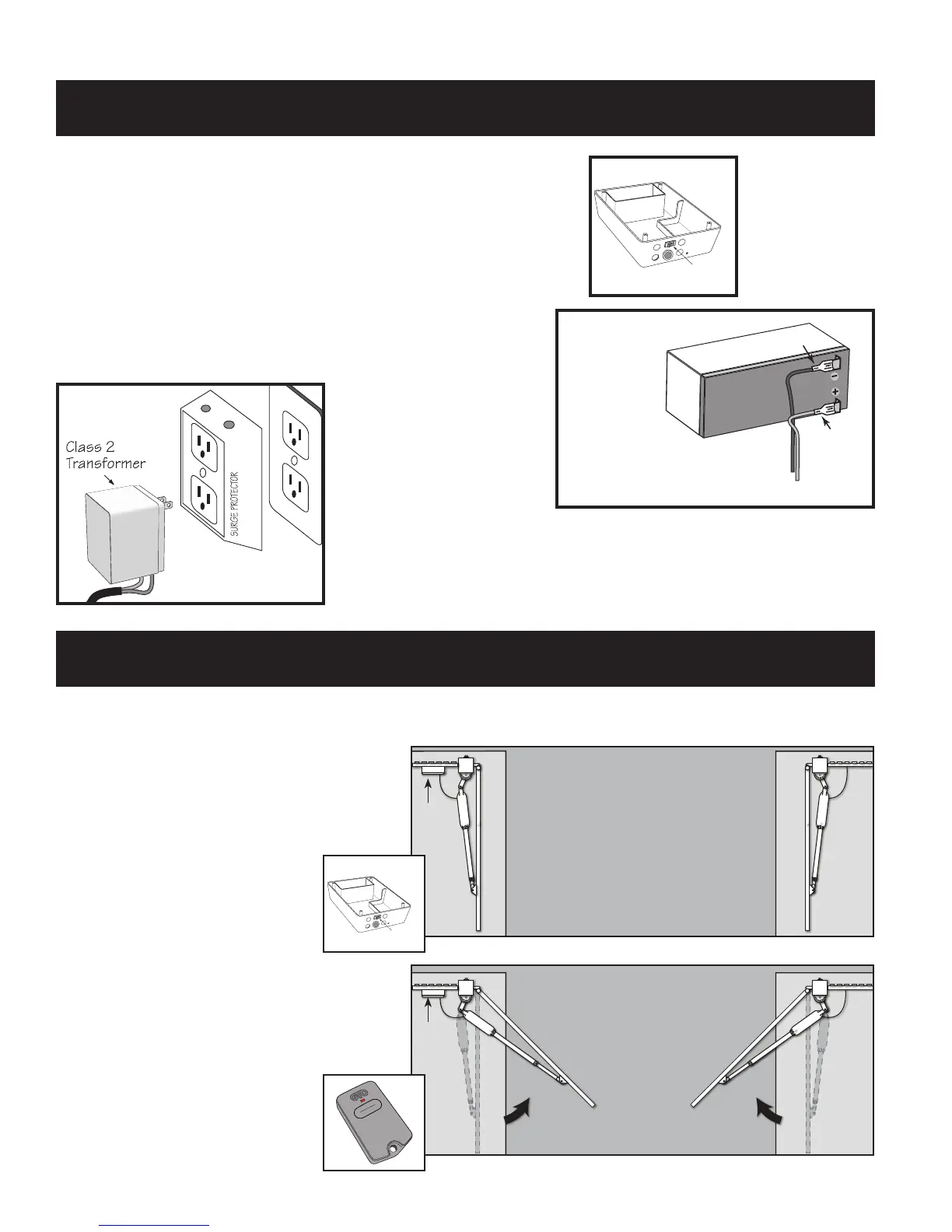
Make sure the control box power switch is OFF. Remove the
control box cover and slide the battery into position (terminals
to the right).
Step 2
IMPORTANT: Connect the BLACK battery wire to the NEGATIVE
(–) battery terminal. Connect the RED battery wire to the
POSITIVE(+)terminal.Reverse connection of battery wires
will damage the control board.
Step 3
Plug the transformer
into the electrical
outlet. (Use of a surge
protector with the transformer is strongly recommended.)
IMPORTANT: This is a class II indoor transformer; if using
transformer outdoors be sure to enclose it in a weatherproof case.
Connect Battery
ON/OFF Switch
RED wire to POSITIVE (+) terminal
BLACK wire to NEGATIVE (–) terminal
RED
BLACK
Step 1
Power switch is on, gates are in the
OPEN position, operator arms fully
retracted.
Gates in
OPEN
Postion
Control
Box
ON/OFF Switch
Master
Gate
Operator
Second
Gate
Operator
Step 2
Press the transmitter to activate operator
arms. The gates will begin to CLOSE.
Gates
Closing
Control
Box
Master
Gate
Operator
Second
Gate
Operator
Control Board Settings
Set Closed Position Limit (for Pull-To-Open Applications)


 To Next Page