20 GTO 3000XLS/3200XLS Instruction Manual © 01.10.12
Adjust the Stall Force Setting
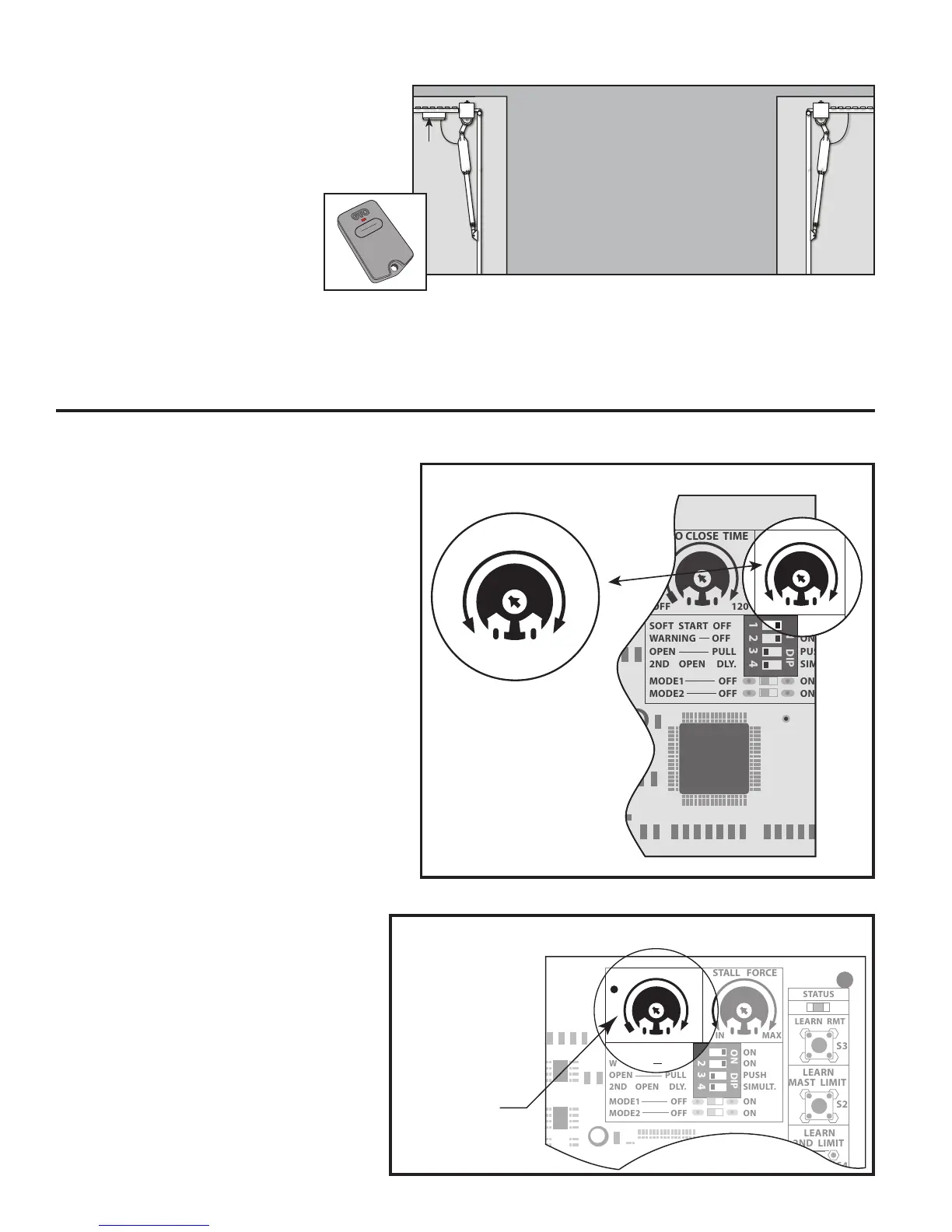
The Stall Force potentiometer on the
control board controls the obstruction
sensitivity (or the amount of force the
operator will apply to an obstruction for
two (2) seconds before it automatically
stops and reverses direction).
IMPORTANT: For safety reasons the
stall force setting will need to be adjusted
for your particular application.
The Stall Force potentiometer on the
control board operates like a volume
controlonaradio.Useasmallatblade
screwdriver to adjust the potentiometer.
Adjust the stall force from the MIN position
until the gate operates smoothly without
obstructing from its own weight or wind
conditions.
NOTE: you may need to increase the stall
force in cold temperatures due to increased
resistance from gate hinges.
Set Auto Close Time
The Auto-Close Time potentiometer
controls the Auto-Close feature, and
determines how long the gate will
remain open (at the fully open position)
before it begins to close. The settings
for this feature are OFF, or from 3 to 120
seconds.
Adjust the Auto-Close potentiometer by
usingasmallatbladescrewdriver.
1 2 3 4
ON DIP
OFF
SOFT START OFF
WARNING OFF
OPEN PULL
2ND OPEN DLY.
MODE1 OFF
MODE2 OFF
ON
ON
PUSH
SIMULT.
ON
ON
120 MIN MAX
AUTO CLOSE TIME STALL FORCE
1 2 3 4
ON
OFF
ON
ON
PUSH
SIMULT.
ON
ON
120 MIN MAX
AUTO CLOSE TIME STALL FORCE
MIN MAX
STALL FORCE
1 2 3 4
ON DIP
STATUS
LEARN RMT
LEARN
MAST LIMIT
LEARN
2ND LIMIT
S3
S4
S2
OFF
SOFT START OFF
WARNING OFF
OPEN PULL
2ND OPEN DLY.
MODE1 OFF
MODE2 OFF
ON
ON
PUSH
SIMULT.
ON
ON
120 MIN MAX
AUTO CLOSE TIME STALL FORCE
Auto Close Time
Potentiometer
Step 7
Press the transmitter once again to
OPEN gates.
Both gates closed position are now
programmed.
If you make a mistake and set
the limit at the wrong position:
press your transmitter to return
the gate to the fully opened
position, then press and hold
the LEARN MAST LIMIT and/or the
LEARN 2ND LIMIT button for 5 seconds.
This will clear the memory for the
closed limit position. Repeat Steps 1-6.
Gates in
OPEN
Postion
Control
Box
Master
Gate
Operator
Second
Gate
Operator


 To Next Page