GTO 3000XLS/3200XLS Instruction Manual © 01.10.12 19
Step 3
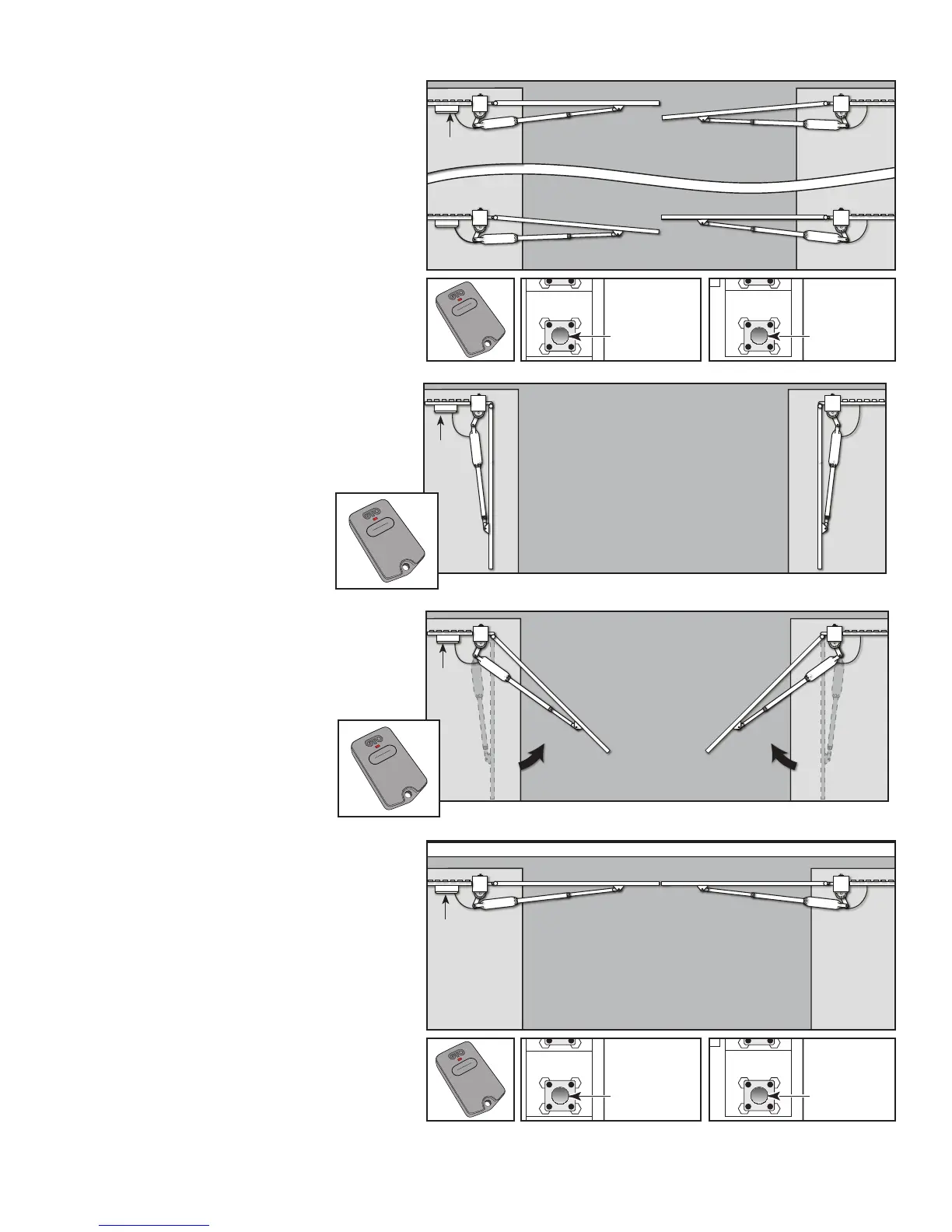
When either gate reaches CLOSED
position, press transmitter to stop the
gates.
A. If the master gate reaches closed
postion rst - press and hold LEARN
MAST LIMIT for 5 seconds, or until
buzzer beeps to set closed postion.
B. If the second gate reaches closed
postion rst - press and hold LEARN
2ND LIMIT for 5 seconds, or until buzzer
beeps to set closed postion.
A. Master Gate Closed
Control
Box
B. Second Gate Closed
Learn Master
Limit Button
1 2 3 4
ON DIP
STATUS
LEARN RMT
LEARN
MAST LIMIT
S2
SOFT START OFF
WARNING OFF
OPEN PULL
SLV OPEN DLY.
MODE1 OFF
MODE2 OFF
ON
ON
PUSH
SIMULT.
ON
ON
120 MIN MAX
AUTO CLOSE TIME STALL FORCE
1 2 3 4
ON DIP
STATUS
LEARN RMT
LEARN
MAST LIMIT
LEARN
2ND LIMIT
S4
S2
SOFT START OFF
WARNING OFF
OPEN PULL
SLV OPEN DLY.
MODE1 OFF
MODE2 OFF
ON
ON
PUSH
SIMULT.
ON
ON
120 MIN MAX
AUTO CLOSE TIME STALL FORCE
Learn 2ND
Limit Button
A B
Step 4
Press the transmitter to open
the gates. Gates will OPEN fully.
The gate in step 3A or 3B is now
programmed.
Gates in
OPEN
Postion
Control
Box
Master
Gate
Operator
Second
Gate
Operator
Step 5
Press the transmitter to activate
operator arms. The gates will
begin to CLOSE.
Gates
Closing
Control
Box
Master
Gate
Operator
Second
Gate
Operator
Step 6
The gate that was programmed in step 4
will stop on its own. Press the transmitter
again to stop the other gate when it
reaches the desired CLOSED limit.
A1. Master gate reaches closed postion. -
press and hold LEARN MAST LIMIT for
5 seconds, or until buzzer beeps to set
closed postion.
(Master gate is now programmed)
B1. 2nd gate reaches closed postion -
press and hold LEARN 2ND LIMIT for 5
seconds, or until buzzer beeps to set
closed postion.
(Second gate is now programmed)
Control
Box
Learn Master
Limit Button
1 2 3 4
ON DIP
STATUS
LEARN RMT
LEARN
MAST LIMIT
S2
SOFT START OFF
WARNING OFF
OPEN PULL
SLV OPEN DLY.
MODE1 OFF
MODE2 OFF
ON
ON
PUSH
SIMULT.
ON
ON
120 MIN MAX
AUTO CLOSE TIME STALL FORCE
1 2 3 4
ON DIP
STATUS
LEARN RMT
LEARN
MAST LIMIT
LEARN
2ND LIMIT
S4
S2
SOFT START OFF
WARNING OFF
OPEN PULL
SLV OPEN DLY.
MODE1 OFF
MODE2 OFF
ON
ON
PUSH
SIMULT.
ON
ON
120 MIN MAX
AUTO CLOSE TIME STALL FORCE
Learn 2ND
Limit Button
A1 B1
Gates in Closed
Position


 To Next Page