13
Step 10:
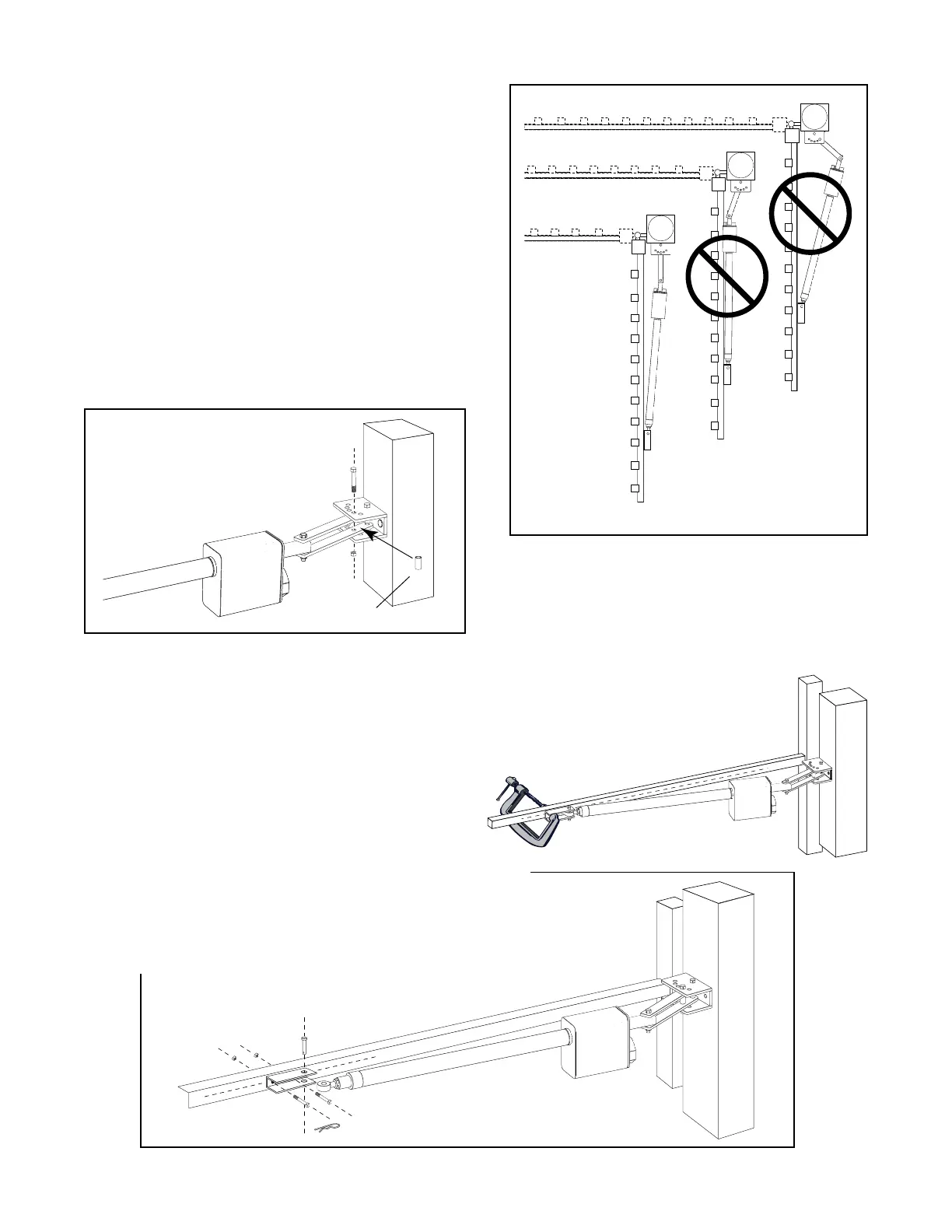
Open the gate to the desired position (at least 10º and no greater
than 110º). Position the operator arm so that the gate bracket
just rests against the gate. Check the clearance between the
operator and the gate. The operator should only make contact
with the gate at the gate bracket. However, there should not be
too much clearance between the operator and the gate, or the
operator will fully extend before it reaches the closed position.
See illustration at right for examples of clearance.
Step 11:
Now align spacer and post pivot brackets hole with the
post bracket hole that provides the best clearance. Insert
the
1
/
2
" x 3
3
/
4
" bolt through holes in post bracket, post
pivot brackets and spacer. When tightening the
1
/
2
" nut,
leave it loose enough so that you can make adjustments
later.
Installing the Gate Bracket
Spacer
Step 12:
With the gate bracket clamped in the open position (no more than
110
o
from the closed position). Detach the operator arm from the
gate bracket. The mounting holes should be centered over the
scribe line. Drill the
3
/
8
" holes in the gate cross member and attach
the gate bracket using the
3
/
8
" bolts, washers and nuts. Reattach the
operator arm to the gate bracket. You have now established the
OPEN POSITION of the gate.
NOTE: Rotating the front mount at the end of the push-pull tube will change its length so
that the mount and gate bracket can be properly aligned with each other on the gate at the
best location (i.e. between or on pickets, on braces, mounting plate, etc.).



 To Next Page